
Vandaag of morgen in huis

Kwaliteit gegarandeerd

Welkomstaanbiedingen ontgrendelen: GRATIS bezorging | Tot 80% korting | Gratis 30 dagen JoyPlus-proefperiode
Download de app
A gaming headset needs to do more than play sound. You want to be able to play comfortably, hear your teammates clearly and know that the connection works with your PC or console. Yet many product pages are packed with terms such as “surround”, “noise cancelling” and “professional microphone”. These terms only mean something when you understand the technology behind them.
A 7.1 surround sound headset can provide genuine multi-channel audio, but it often uses virtual surround sound through software. This can affect sound positioning, but the result also depends on the game, the software and your platform. So check whether 7.1 is available on PC, Mac, PlayStation or Xbox. With some models, this feature only works on PC.
Gaming headsets with noise cancelling sometimes use a microphone with noise reduction. This helps make your voice clearer, but it does not automatically mean that ambient sound is actively filtered out of your ears. Pay attention to the difference between:
The supplied product specifications mention microphone noise reduction for several models, while active noise cancelling is not listed.
A USB headset does not automatically work with every console. A gaming headset for PC may need software for RGB lighting or surround sound, for example. A model with a 3.5mm connection is generally more flexible for controllers, Nintendo Switch and mobile use, but it may require a splitter on older PCs.
Check the following before buying:
A wired gaming headset does not have a battery and generally will not interrupt your session for charging. A USB model can also combine digital audio, controls and lighting. The downside is having a cable on your desk or by your controller.
A wireless gaming headset gives you greater freedom of movement. When choosing one, do not just look at the stated range. Pay particular attention to the battery life, charging port and included receiver. The Corsair HS55 Wireless, for example, uses both a 2.4GHz receiver and Bluetooth 5.2, with a stated battery life of up to 24 hours. The Trust GXT 491 Fayzo combines 2.4GHz and Bluetooth, with up to 22 hours of play time.
A gaming headset with a microphone is practical for voice chat, but the design varies from model to model. A flip-to-mute microphone mutes when you lift the arm. A detachable microphone is useful if you also want to use the headset for music or while travelling.
Look out for:
An over-ear gaming headset completely encloses your ears. This can help reduce distractions and prevents the ear cup from pressing directly against your ear. Consider the weight: the models in this selection range from approximately 259 to 373 grams. An adjustable headband, swivelling ear cups and memory foam cushions can be useful during long sessions, but the fit is a personal choice.
RGB lighting does not change the sound. An RGB gaming headset is mainly appealing if you want to synchronise the lighting with your desk setup. Check whether software is required and whether the lighting is powered via USB.
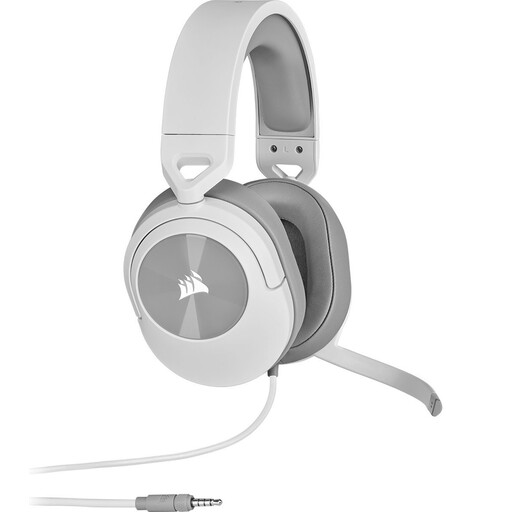
Why it suits this profile: According to the product specifications, the 3.5mm connection works with PC, Mac, PS5, PS4, Xbox, Nintendo Switch and mobile devices. This makes it a suitable choice if you are looking for one headset for several devices.
The connection and compatibility are clearly described. You are not paying for wireless features or RGB if you mainly want to game and chat with ease.
50mm drivers, a flip-to-mute microphone, a weight of 273 grams and an included Y-splitter.
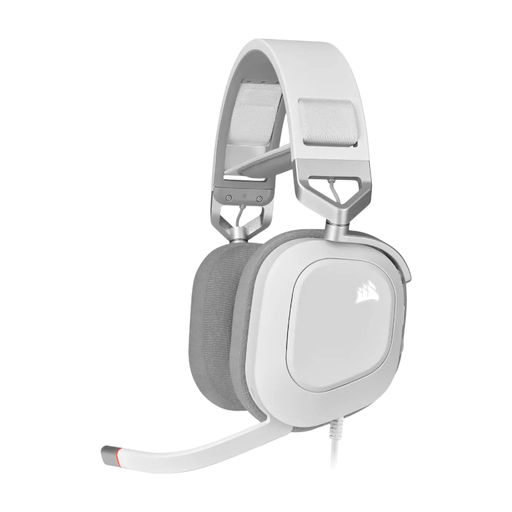
Why it suits this profile: This wired USB model is aimed at PC gamers who want to combine digital audio, RGB controls and a broad stated frequency range. According to the product information, Dolby Audio 7.1 True Surround Sound works on PC.
The restriction of surround sound to PC is stated in the specifications. This means you know in advance that the feature will not necessarily be available on every console.
50mm neodymium drivers, USB audio up to 24-bit/96kHz, an aluminium frame, memory foam cushions and RGB lighting.
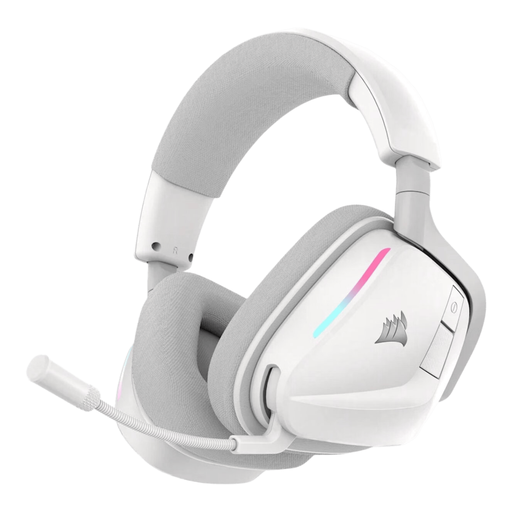
Why it suits this profile: The combination of 2.4GHz and Bluetooth is practical for gaming on PC or console and listening on a mobile device. According to Corsair, the maximum battery life is up to 70 hours in 2.4GHz mode.
The wireless technology, receiver, Bluetooth version and charging details are clearly stated. This allows you to check whether the connection suits your devices.
50mm drivers, USB-C fast charging, RGB lighting, Dolby Atmos Spatial Audio and a microphone with stated noise reduction.

Why it suits this profile: According to the product specifications, this model supports PC, PS5 and PS4, and combines wireless use with a 3.5mm cable. This is useful if you switch between devices.
The dual-wireless features and compatible platforms are specified, as is the battery life of up to 22 hours. This allows you to decide in advance whether charging fits your usage.
2.4GHz and Bluetooth, virtual 7.1 according to the product description, swivelling ear cups and a detachable microphone.
We have put together a complete, up-to-date list of products that fully meet these strict selection criteria and the applicable European safety regulations.
That depends on the connection and the features. A headset with a 3.5mm connection can usually be connected via the controller. USB and wireless models may require a suitable port or receiver. Also check whether surround sound and RGB are available on both platforms.
The headset uses power for its built-in battery and needs to be charged regularly. Running costs are generally limited to electricity, but the battery has a limited lifespan. If you do not want to maintain a battery, you can choose a wired model.
Its lifespan depends on cable strain, hinges, ear cushions, battery use and storage. Keep the headset dry, do not pull on the cable and charge a wireless model using the supplied or suitable USB cable. Use a moderate volume and only replace loose components when supported by the manufacturer.
