
Gamer with weak Wi-Fi upstairs
Wants a usable connection on the upper floor and is weighing up running a cable against carefully positioning a mesh node. The Consumentenbond advises placing Wi-Fi extenders where the signal is needed.


If you can run an Ethernet cable upstairs, first look into a suitable wired Wi-Fi access point, and connect your PC or console by cable too if possible. If running a cable isn’t an option, mesh may be worth considering, but where you place the extra node and how it connects will affect what works in your home. Don’t automatically replace a working router supplied by your provider: first check whether an add-on can connect to your existing network.
Wants a usable connection on the upper floor and is weighing up running a cable against carefully positioning a mesh node. The Consumentenbond advises placing Wi-Fi extenders where the signal is needed.
Is looking for a Wi-Fi access point that could be mounted on a wall or ceiling, and checks the cable route and power supply in advance. TP-Link describes wall and ceiling mounting for the Deco X50-PoE.
Wants to improve Wi-Fi upstairs without replacing their existing router unnecessarily, and pays attention to the connection and network management. FRITZ! describes the Mesh Set 1600 as a kit that can connect to an existing router or modem.
Choose this option if: you can run an Ethernet cable upstairs and want to keep your shelf clear.
Trade-off: you’ll need a cable route; with a PoE model, the power source must also meet its requirements.
Choose this option if: running a cable isn’t practical and there’s somewhere to place the extra node where it can connect to the main network.
Trade-off: the node needs space and power; its stated range doesn’t guarantee a good connection through your floor.
Choose this option if: one router in a suitable location can provide enough coverage, or you need ports near your gaming equipment.
Trade-off: a router downstairs won’t automatically solve a weak connection through the floor; measure the available space too.
Choose this option if: you want to keep your existing modem or router and would prefer compact Wi-Fi nodes.
Trade-off: check how the first node connects; an LAN port on a node doesn’t automatically mean the nodes are connected by cable.
| What to consider | What should you check? | Who is this important to? |
|---|---|---|
| Coverage upstairs | Look at where your existing device is located, possible cable routes and where an extra node could go. Don’t treat coverage or area figures as measurements of your home. | If the Wi-Fi doesn’t reach my gaming area, I want to know whether a node there will get a usable connection. Around 29% of consumers put coverage top of their list. |
| Connection for a PC or console | Check whether a cable can reach your gaming area, how many LAN ports are available and whether the connection between mesh nodes is wired too. | If you’re mainly looking for a stable connection for your PC or console, you’ll want to know which parts of the connection can be wired. Around 29% of consumers prioritise this. |
| Placement when space is limited | Measure the space, including aerials, plugs and cables. For PoE, check the mounting and power requirements of the exact model. | With a small shelf, I want to know whether the Wi-Fi access point can go somewhere else and what that would involve. Around 24% of consumers put available placement space first. |
| Connection and management | Check how it connects to your existing router or modem, any provider settings and the update policy. | If I want to keep my existing equipment, I look for a straightforward connection and clear network management. Around 18% of consumers prioritise compatibility with their existing setup. |
A stated capacity or range doesn’t tell you how the connection will perform through your floor or in the location you’ve chosen.
First, work out whether you can run a cable, then assess the connection where you’ll actually be gaming.
You can connect a console to a mesh node by cable while that node itself communicates wirelessly with the main network.
Check the console connection and the connection between the Wi-Fi node and the main router separately.
A cable between floors may still be needed for a fully wired connection.
For the Deco X50-PoE, TP-Link lists IEEE 802.3at and 802.3bt, but not 802.3af. If a router has external aerials, allow for the space they take up too.
Check the exact model, PoE standard, cable route, mounting and total clearance.
You may also need a compatible PoE source, cabling or mounting equipment.
The Deco X50 is a mesh range with wireless and optional Ethernet backhaul; the Deco X50-PoE is an alternative designed for wall or ceiling mounting.
The RT-AX58U is an example of a standalone Wi-Fi 6 router with LAN ports, QoS and an AiMesh option.
The Mesh Set 1600 is a compact way to extend your network while keeping your existing router or modem.
These products are intended for a standalone router or mesh setup around an upstairs gaming area. For each model, check that its connections, placement and compatibility with your existing network suit your needs.
 No image available
A standalone router to consider if you want to expand your existing network setup and connect devices by cable.
Wi-Fi 6; AiMesh; dual-band (2.4 GHz / 5 GHz); three gigabit Ethernet ports.
 No image available
A mesh system to consider if you want to set up Wi-Fi in several areas; check where the units can go and how they connect to each other.
Wi-Fi 6 (802.11ax); dual-band (2.4 GHz / 5 GHz); three units; three gigabit ports per unit.
 No image available
A mesh router to consider if you’re looking for a router described as mesh-compatible; check in advance how it will fit into your existing network.
Dual-band; Wi-Fi 7; mesh router.
 No image available
A standalone router to consider if you’re looking for AiMesh expansion and several wired connections; check its placement and how it connects to your network.
Wi-Fi 6; dual-band (2.4 GHz / 5 GHz); AiMesh; four gigabit LAN ports.
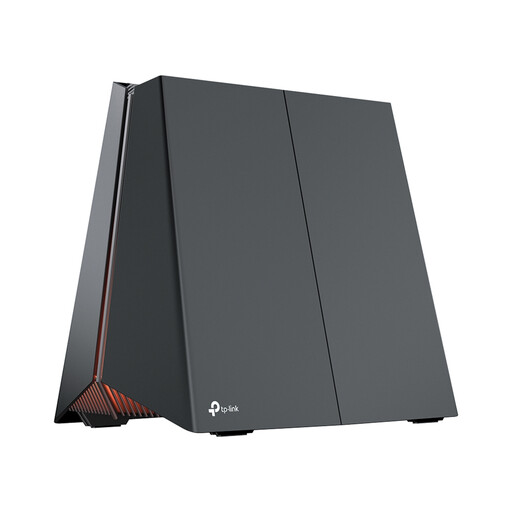 No image available
A gaming router to consider if you’re looking for the listed gaming features and wired connections; these features alone don’t guarantee a better connection upstairs.
Wi-Fi 7; dedicated 5-GHz gaming band; three 2.5-Gbps LAN ports; QoS; EasyMesh.
No, not if the add-on you choose can connect to your existing equipment. FRITZ!, for example, describes the Mesh Set 1600 as suitable for connecting to an existing router or modem. Check your provider’s settings if you’d rather connect your own modem directly.
Yes, if that particular node has an available LAN port. FRITZ! lists a gigabit LAN connection on each node in the Mesh Set 1600. Also check how the node connects to the main router: using a cable for the console doesn’t make a wireless connection between mesh nodes wired.
According to TP-Link, the Deco X50-PoE can receive data and power through a single Ethernet cable if the PoE source supports IEEE 802.3at or 802.3bt; IEEE 802.3af is not supported. Also check the mounting, cable route and power budget of any PoE switch you might use.
Install firmware updates and check whether automatic updates are available. ACM ConsuWijzer highlights the importance of updating your own equipment; Veilig Internetten provides practical instructions for installing updates.
According to ACM ConsuWijzer, you have the right to choose your own router, but choosing your own modem or router isn’t possible in every situation. Check your provider’s terms and conditions. A Wi-Fi router sold in the Netherlands must meet the relevant European requirements and bear the correct CE marking for the specific model; the Rijksinspectie Digitale Infrastructuur states that equipment must carry the CE marking.