Start with a screen size that lets everyone read their own race view from their usual seat. Then assess reflections and picture quality from both players’ positions. Compare OLED and mini-LED/LCD based on the exact model and the light in your room. Only then consider whether 120 Hz and VRR will make a difference with your game, console and HDMI input.
Who is this choice for?
Racing side by side
You play together on one screen and want the HUD, corners and opponents to remain clear in each player’s view. Local multiplayer modes and the number of controllers required depend on the game and console. The Gran Turismo 7 manual explains the requirements for that game.
Players in a bright living room
Your TV is near a kitchen or opposite lamps and windows. You want to assess reflections and see how the picture looks from different seats. RTINGS.com identifies reflection handling as an important factor when dealing with distracting light.
Console players looking for smooth visuals
You’re comparing refresh rates, VRR and compatible HDMI inputs, but need to match these features to what your console and game can actually output. For example, Nintendo Netherlands states that 4K display on Switch 2 supports up to 60 fps.
What should you consider when choosing?
OLED
Good for: when several players are sitting at an angle to the screen and you want to assess the picture from both positions.
Trade-off: check reflections where you plan to place the TV. Image retention remains a consideration if the same fixed game visuals are displayed for very long periods. RTINGS.com describes this risk under extreme, prolonged static use.
Mini-LED/LCD
Good for: if kitchen or daylight falls on the screen, compare the brightness and reflection handling of the exact model.
Trade-off: high brightness doesn’t guarantee fewer reflections, and viewing angles vary between panels. RTINGS.com recommends factoring in reflections in a bright room.
| What to consider |
What to look for |
Who is this important for? |
| Clarity in each player’s view |
Measure your viewing distance and available space. If possible, try the game with the intended number of players and check the HUD and text. |
When I play split-screen, I want to be able to read the information in my view from my usual seat. Around 28% of consumers put clear split-screen views first. |
| Kitchen lighting and reflections |
Compare the exact model’s brightness and reflection handling, and check where lamps and windows appear on the screen. RTINGS.com highlights the importance of reflection handling when dealing with distracting light. |
I don’t want to be distracted by lamps or windows reflected on the screen while racing. Around 22% of consumers prioritise visibility in bright conditions. |
| Picture quality from both seats |
View the same picture from the two seats furthest apart; viewing angles can vary between panels. RTINGS.com notes that a wide viewing angle can matter when several people are spread out. |
If we’re sitting side by side or at an angle to each other, I want the picture to remain clear from both seats. Around 22% of consumers put viewing angle first. |
| Gaming features and HDMI |
Check the output supported by your specific game and console, and use the right HDMI input. Sony lists VRR on HDMI 3 and 4 for the Sony K-55XR5; Nintendo Netherlands states a maximum of 60 fps at 4K on Switch 2. |
I want to choose features my game and console can actually use, not just a big number on the TV box. Around 17% of consumers prioritise gaming features and connectivity. |
| Power consumption and long-term use |
Compare the EU energy label and product information sheet for the exact model. If the same fixed game visuals are displayed for long periods, image retention is a consideration with OLED; the RTINGS.com test cited involved extreme static use. |
If I use the TV often or for long periods, I also want to consider power consumption and fixed interface elements. Around 11% of consumers put running costs and long-term use first. |
Common pitfalls
-
Assuming the stated refresh rate is the same as the game’s frame rate
The game, console and input used together determine the available output. Nintendo Netherlands states that Switch 2 supports up to 60 fps at 4K, so a higher TV specification doesn’t automatically mean your split-screen race will run at that frame rate.
Check the output supported by your specific game and console, then see which TV input supports the feature you want.
-
Looking only at brightness in a kitchen with bright lighting
Alongside brightness, reflection handling plays a part in how distracting bright light can be. A lamp or window may be reflected on the screen.
Consider where your light sources are and compare both features on the exact model.
-
Checking the viewing angle only from the middle seat
The picture can look different from an angle, and viewing angles vary between LCD panels and models. RTINGS.com explains that wide viewing angles are useful when people are seated in different positions.
Check the screen from both players’ actual seats.
-
Considering only the TV when planning your set-up
Local multiplayer modes and the number of controllers needed depend on the game and console. The Gran Turismo 7 manual specifies one controller per player.
Check which controllers you already have and what accessories you’ll need for your chosen set-up.
A multiplayer set-up may require extra controllers or mounting equipment; check what’s right for your situation.
Brands to compare
Samsung
Samsung’s S95H range in the Netherlands is an OLED option to compare if you also want to assess its stated Glare Free screen treatment.
- Samsung describes the S95H as Glare Free; see for yourself how reflections from your kitchen look from the intended viewing position.
- Image retention remains a consideration with OLED if the same fixed game visuals are displayed for very long periods. The extreme conditions in the RTINGS.com test don’t predict the risk under normal, varied use.
LG
The LG OLED55C56LB from the C5 range is an OLED model to compare if players will be watching from different angles.
- LG lists OLED and 4K for the OLED55C56LB. RTINGS.com reported a wide viewing angle on a tested 65-inch C5 model.
- The test wasn’t of the 55-inch model sold in the Netherlands; check the picture, light conditions and connections on the exact model.
TCL
The TCL 55C7K sold in the Netherlands is a mini-LED model to compare if you’re also considering the stated refresh rate.
- TCL lists a native refresh rate of 144 Hz for the 55C7K.
- That specification doesn’t tell you the frame rate your split-screen race will achieve, or how the picture will look from each seat.
Sony
The Sony K-55XR5 sold in the Netherlands is a mini-LED option to compare if you need VRR on a specific HDMI input.
- Sony lists 120 Hz and VRR on HDMI 3 and 4 for this model.
- The port requirement applies to this model; its specifications don’t determine the frame rate a specific game will achieve in split-screen.
Philips
According to Philips, the Philips 55OLED810/12 combines OLED, 4K, VRR and Ambilight.
- These features make this model worth considering if you also want to assess how lighting around the screen will work in your room.
- Philips’ descriptions of the picture from an angle and the Ambilight experience are manufacturer claims. Check for reflections from your kitchen lighting and consider which features you’ll actually use.
Joybuy products for this set-up
This Joybuy selection includes OLED and mini-LED models in a range of screen sizes, so you can compare space for split-screen views, light conditions and compatibility with your game and console.
 No image available
LG OLED83C67LA 83-inch OLED evo AI C6 4K Smart TV
The 83-inch 4K screen gives you a specific option for assessing how easy it is to read split-screen views from your seating distance.
- 83 inches, 4K and OLED
- 120 Hz native; VRR up to 165 Hz
- Image retention remains a consideration with OLED if the same fixed game visuals are displayed for very long periods; the RTINGS.com test cited involved extreme, prolonged static use.
View at Joybuy
 No image available
LG OLED65C68LA 65-inch OLED evo AI C6 4K Smart TV
The 65-inch 4K screen is an option to assess against your available space and the clarity of split-screen views.
- 65 inches, 4K and OLED
- 120 Hz; VRR up to 165 Hz
- Image retention remains a consideration with OLED if the same fixed game visuals are displayed for very long periods; the RTINGS.com test cited involved extreme, prolonged static use.
View at Joybuy
No image available
LG OLED55C68LA 55-inch OLED evo AI C6 4K Smart TV
The 55-inch 4K screen is an option to compare with your viewing distance and the space each split-screen view takes up.
- 55 inches, 4K and OLED
- 120 Hz native; VRR up to 165 Hz
- Image retention remains a consideration with OLED if the same fixed game visuals are displayed for very long periods; the RTINGS.com test cited involved extreme, prolonged static use.
View at Joybuy
 No image available
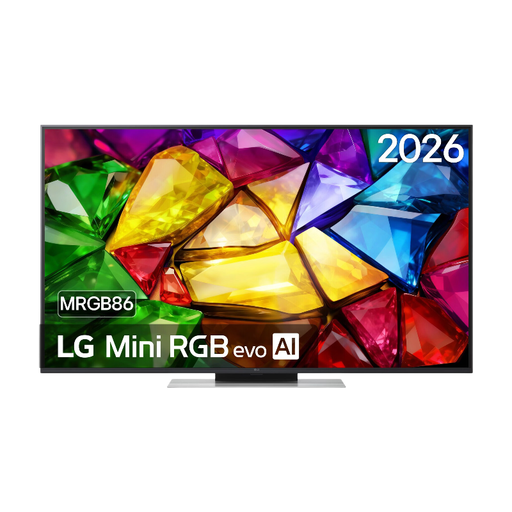
LG 50MRGB8669A 50-inch 4K Mini RGB LED Smart TV
The 50-inch screen is an option to assess against your available space for gaming and the clarity you want from split-screen views.
- 50 inches, 4K and Mini RGB LED
- 120 Hz
View at Joybuy
 No image available
LG 65QNED93B6A 65-inch QNED Evo AI Mini LED 4K Smart TV
The 65-inch 4K screen is an option to compare for split-screen space and visibility from different players’ seats.
- 65 inches, 4K and Mini LED
- 120 Hz; VRR up to 144 Hz
View at Joybuy
Frequently asked questions
Will any gaming TV make a racing game suitable for split-screen?
No. Local multiplayer modes are determined by the game and console. The Gran Turismo 7 manual states that it supports up to four players, or up to two on PlayStation 4, with one controller per player.
Do I need a 4K/120Hz TV for Nintendo Switch 2 races?
Not based on the console specification alone: Nintendo Netherlands states that 4K supports up to 60 fps and that 4K display requires a compatible game and TV. Check the output for the specific racing game and game mode.
How should I position the TV for two players and a nearby kitchen?
Test the picture from both seats and check for lamps or windows reflected on the screen. If wall-mounting the TV, follow the mounting and ventilation instructions in the manual for your chosen model.
How do I compare power consumption and my rights when buying online?
TVs are covered by EU energy labelling; compare the energy label and product information sheet for the exact model. According to the Government of the Netherlands, when you buy online from a business you’ll generally have 14 days to change your mind; this doesn’t necessarily apply to purchases from private sellers.


