
Gamers with a narrow TV shelf
You want to check that both the screen and the stand will fit, without choosing a screen that looks too small from where you sit.


First, measure your viewing distance and the available width and depth, then check that both players can see the screen clearly. A compact LCD or QLED TV could be a good fit when space is the deciding factor. Choose an OLED or more fully featured gaming model only if it fits your space and its features suit your games and equipment. With OLED, bear static game elements in mind, and always check the dimensions including the stand.
You want to check that both the screen and the stand will fit, without choosing a screen that looks too small from where you sit.
You both want to follow clues and read text on screen. So, consider the viewing distance, viewing angle and reflections from both seats.
You’re looking for one compact TV for puzzles and other games, with features that work well across your TV, console and games.
A good fit for: a space where fitting the TV is the priority, and a smaller screen looks large enough from both seats.
Bear in mind: TCL lists FHD resolution for the S5K series. Don’t assume a model has 4K or advanced gaming features without checking the exact model.
A good fit for: anyone with room for a 42-inch TV who values picture contrast.
Bear in mind: the Dutch Consumers’ Association flags static images as a consideration with OLED. Also check that the TV and stand will fit your setup.
A good fit for: anyone with room for a TV of around 43 inches who plays games beyond puzzles that could benefit from extra gaming features.
Bear in mind: Philips lists VRR 144 Hz for the 43PUS9000/12, but check whether your console and games can make use of it.
| What to consider | What to look for | Who should pay particular attention? |
|---|---|---|
| Size and positioning | Measure the viewing distance, shelf width and depth. Compare them with the dimensions of the exact model, including the stand. | If your shelf has limited space, you’ll want to know whether both the screen and stand will fit. This is the top priority for around 36% of consumers. |
| Visibility for both players | Consider the viewing distance, viewing angle and reflections from both seats. | If you need to read clues from different seats, you’ll want to make sure the screen is clearly visible to both of you. This is the most important factor for around 29% of consumers. |
| Gaming features and connections | Check which connections you need and make sure the listed gaming features work with your console and games. | If you also play other games, you’ll want features that your equipment can actually use. Around 21% of consumers prioritise compatibility with their games and devices. |
| Running costs and aftercare | Compare the EU energy label for the exact model and check who the seller is and how warranty claims and returns are handled. | If energy use and after-sales service are important to you, you’ll want to compare these points in advance. Around 14% of consumers prioritise them. |
Your viewing distance can help you choose a screen size, but it won’t tell you whether the stand will fit on your shelf.
Measure the shelf and check the dimensions of the exact model, including the stand, before ordering.
If the stand doesn’t fit, you may need another way to position the TV.
A listed feature such as VRR 144 Hz won’t automatically benefit you with the games and equipment you use.
Start with your games and connected equipment, then check which TV features are compatible.
OLED and LCD-based screens use different technologies. The Dutch Consumers’ Association flags static images as a consideration with OLED.
Compare the screen technology with how you use your TV, especially if game elements stay in the same place for a long time.
In the Netherlands, TCL lists the S5K series in sizes including 32, 40 and 43 inches.
LG lists the OLED42C69LB in the Netherlands as a 42-inch OLED TV.
Samsung describes the QE43QN90FATXXN as a 43-inch Neo QLED Mini LED model.
Philips lists the 43PUS9000/12 as a 43-inch 4K QLED TV with Ambilight.
This selection includes compact TV options for smaller spaces, as well as models with gaming features. Measure the space available for each version and check that it works with your equipment.
 No image available
A 42-inch option if this size fits your space and you also play games that support compatible gaming features.
4K UHD OLED; the product description lists ALLM, VRR and four HDMI 2.1 ports. Check that your equipment and games support these features. The Dutch Consumers’ Association flags static images as a consideration with OLED.
 No image available
A 43-inch option if it fits your space and you want to compare gaming features.
4K UHD, 60 Hz and Game Mode Plus; the product description lists VRR and ALLM via HDMI. Check that these features suit your equipment and games.
 No image available
A 43-inch QLED model to compare if it fits your space and your equipment supports the gaming features you need.
The product description lists a native refresh rate of 144 Hz, Game Mode, Game Bar and AMD FreeSync Premium Pro. Check compatibility with your console and games.
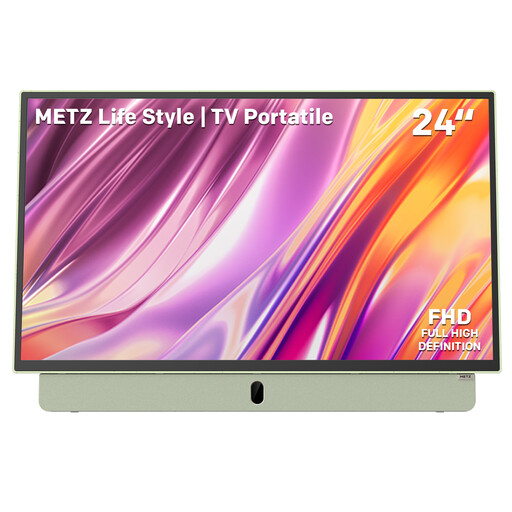 No image available
A smaller, portable screen to consider if space is tight. Check that it looks large enough from both seats.
The product title lists a built-in battery, 12V car charger, anti-glare LED screen, FHD and HDMI.
 No image available
A 32-inch option if you need a smaller screen. Measure the stand too, and check that you can both read clues from where you sit.
HD Ready resolution; the product information lists HDMI connections. Check that they suit your equipment.
Measure the distance from both seats to the screen. The viewing distances recommended by the Dutch Consumers’ Association are a useful starting point; then check readability, viewing angle and reflections in your own setup.
Not just because you play puzzle games. First check which picture features your other games and equipment support. A high listed refresh rate alone doesn’t prove it will benefit the puzzle game you play.
Compare the space available with the dimensions of the exact version, including the stand. For wall mounting, also check the model’s mounting details and installation instructions, as well as those for your chosen bracket. Screen size alone isn’t enough.
Use the EU energy label and product information sheet for each exact model you’re considering. Don’t infer a particular version’s energy use from the brand or series name alone.
According to ACM ConsuWijzer, you have statutory rights in addition to any commercial warranty, and the seller is your point of contact. Online purchases generally come with a 14-day cooling-off period after delivery, subject to the exceptions and conditions set out by ACM ConsuWijzer.