
Players sitting in different places
You share one screen and want everyone to be able to follow the game. Consider the screen size, layout and visibility from the outer seats. Nintendo describes playing on a TV as a group.


Start by considering the space you have, then check that everyone can see the screen clearly from all the seats. Only then decide between a more compact or larger size. For compatible games with 120Hz output, the TV, HDMI connection, console and game must all support this feature; VRR and Game Mode are separate things to check. Also consider daytime reflections, audio for late-night gaming and energy consumption.
You share one screen and want everyone to be able to follow the game. Consider the screen size, layout and visibility from the outer seats. Nintendo describes playing on a TV as a group.
You want responsive controls and may play games or use a console with 120Hz output. Check Game Mode, the HDMI connection and whether both the game and screen support the output you want.
You might play in a bright room during the day, or at a time when your housemates need some peace and quiet. Assess the screen in your home lighting and check which audio output you can use.
Choose this option: if your cabinet, wall or viewing distance leaves little room. Philips lists a 43-inch 4K QLED screen with VRR up to 144 Hz for the 43PUS9060/12.
Keep in mind: check that the game information is still easy to read from the furthest seats.
Choose this option: if contrast matters and the screen is clearly visible from your seats and in your lighting. LG says the Dutch OLED55C5ELB has a native refresh rate of 120 Hz, VRR up to 144 Hz and ALLM.
Keep in mind: assess reflections and check the warranty terms for the exact version. Specifications alone don’t prove how well the screen will be seen in your room.
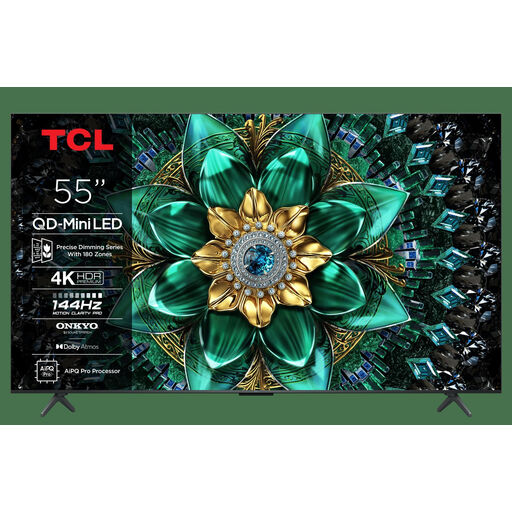
Choose this option: if you have room for a larger screen and want to compare Mini LED with other panel types. TCL lists QD Mini LED and a native refresh rate of 144 Hz for the 55C7K.
Keep in mind: the panel type and refresh rate alone don’t tell you how the screen handles reflections or how clearly it can be seen from your seats.
| What to consider | What should you look for? | Who should pay particular attention? |
|---|---|---|
| Screen size and visibility | Measure your cabinet or wall and viewing distance; check the dimensions, including the stand. | When I’m watching one screen with several players, I want those sitting at the sides to be able to follow the game too. Around 33% of consumers give group viewing the highest priority. |
| Responsiveness | Check ALLM, VRR and 4K/120 Hz support for the HDMI input, console and games you use. | For fast-paced matches, I want the TV and my equipment to support the output I’m after. Around 27% of consumers prioritise responsiveness. |
| Visibility in daylight | View the exact screen in similar lighting and consider the position of windows and lights. | If I play during the day, I want to assess the picture in the room where the TV will go. Around 20% of consumers give daylight visibility the highest priority. |
| Evening use and energy consumption | Check the audio output you want and compare SDR and HDR energy consumption on the EU label. | When my housemates need some peace and quiet, I want to check whether my console or TV supports the audio output I need. Around 20% of consumers prioritise quiet evening use and energy consumption. |
Panel refresh rate, HDMI output and the number of frames a game actually delivers are different things. 120Hz output only works with a compatible TV and a game that supports it.
Check the capabilities of the specific TV input, console and game. Assess ALLM and VRR separately too.
The TV’s dimensions, including the stand, also determine whether it will fit on the shared cabinet or in the space available.
Measure the available space and compare it with the dimensions of the exact version, including its stand.
You may need a different cabinet or mounting solution if the TV doesn’t fit in the space you have.
The five-year panel warranty LG describes for certain other series is no proof of cover for the C5.
Read the terms for the exact model and distinguish between the manufacturer’s warranty and your statutory rights in the Netherlands.
The 43PUS9060/12 is a compact 4K QLED option with Ambilight for spaces where a 43-inch TV will fit.
The 55C7K is a 55-inch QD Mini LED option for those with room for a screen of this size.
The Dutch OLED55C5ELB is a 55-inch OLED option for anyone looking to compare contrast and gaming features.
The 50-inch QN90F is a Mini LED alternative between the 43-inch and 55-inch sizes considered here.
These TV options are suited to local gaming, from compact models to larger screens for shared viewing. Check that the size, connections and gaming support of each version suit your room and equipment.
 No image available
A larger OLED option for shared viewing; check that a 55-inch TV will fit in your room.
The product description lists a native refresh rate of 120 Hz, VRR up to 165 Hz, ALLM and Dolby Vision. Check that your console and games support the output you want.
 No image available
A 55-inch option if you’re considering a larger screen; check the space available and viewing angles.
The product description lists a native refresh rate of 120 Hz, VRR up to 144 Hz, ALLM and HDMI 2.1. Check that the specific input and connected equipment support them.
 No image available
A 55-inch QD Mini LED option for shared gaming; measure the space and viewing distance first.
The product description lists a native refresh rate of 144 Hz, VRR, ALLM and HDMI 2.1. A high panel refresh rate doesn’t guarantee that every game will run at the same frame rate.
 No image available
A more compact 43-inch option for a smaller space; check that every player can see the screen clearly from their seat.
The product description lists 4K, a native refresh rate of 144 Hz, Game Mode and FreeSync Premium Pro. Check that your games and equipment support them.
 No image available
A larger 55-inch option for gaming together; check that the TV fits and can be seen clearly from the outer seats.
The product description lists 4K, VRR up to 144 Hz, HDMI 2.1 and support for 4K 120fps over HDMI. Check that your source device and game are compatible.
No, not for every local multiplayer setup. Nintendo describes playing together on one TV; 120Hz output is a separate feature for compatible TVs and games. Check your console and games before making this a deciding factor.
On a PS5, go to Settings > Screen and Video > Video Output to check which capabilities of the connected HDMI device are recognised. PlayStation says you need a compatible TV and game for 120Hz output; VRR performance also depends on the TV.
According to PlayStation, you can choose your audio output device on a PS5 under Settings > Sound. Check how audio is handled with your console, headset and shared gaming setup.
The EU label for televisions includes information such as SDR and HDR energy consumption, resolution and screen size. Energy consumption is shown in kWh per 1000 hours. Compare the same picture mode, and use your own viewing habits and electricity tariff to estimate the cost.
For a standard online consumer purchase, you generally have a 14-day cooling-off period from delivery; check for any exceptions and the returns terms. According to the ACM, a product must meet what you can reasonably expect when used normally. A commercial warranty period does not replace your statutory rights.