Who is this choice for?

Co-op group with seats spread around the room

You play with several people on the sofa or on chairs nearby. Measure the viewing distance and check the picture from the seats furthest to the side. The Dutch Consumers' Association highlights viewing angle as something to consider when comparing TVs.

Housemates who share the TV

If the TV is on for long periods, its model-specific energy consumption may be a factor. Compare the figures on the energy label, including consumption per 1,000 hours.

Players with multiple consoles

You switch between consoles and want to know whether the connections, 120Hz output and VRR are compatible with the devices and games you actually use.

What should you look for when buying?

OLED TV

Good for: players who often sit at an angle and value viewing angles and dark scenes.

Bear in mind: prolonged display of an unchanged image. An older test by the Dutch Consumers' Association does not predict how a specific current model will perform.

LCD, QLED or mini-LED TV

Good for: a bright room, or if you want to compare an LCD alternative. The Dutch Consumers' Association says QLED TVs can often be bright.

Bear in mind: viewing angles vary by model. Check the picture from the seats furthest to the side, too.

Basic 60Hz TV

Good for: anyone who mainly uses the original Nintendo Switch in TV mode and does not need a higher refresh rate. Nintendo lists TV settings of up to 1080p for this system.

Bear in mind: check the specifications again if you later use a different console or compatible 120Hz games.

What to consider What to look for Who is it important for?
Screen size and viewing angle Measure the viewing distance and available space; check the picture from seats off to the side. If several of us sit in different places, I want to be able to follow the text and action from the side, too. Around 33% of consumers prioritise visibility from different seating positions.
Shared use and energy consumption Compare the model-specific consumption per 1,000 hours, including for HDR, and agree how you will share the TV. If housemates often use the TV together, I want to know how the model's energy consumption compares with our usage. Around 25% of consumers prioritise considerations around shared use and energy consumption.
Console and picture output Check the supported output, connections and any 120Hz or VRR support for each console and game. When we switch between consoles, I want the TV to suit the games we play. Around 25% of consumers prioritise console compatibility.
Picture in daylight Assess the screen in similar lighting conditions and from the seats where players will sit. If the room gets a lot of daylight, I want to be able to follow the game clearly from my seat. Around 17% of consumers place particular importance on visibility in bright conditions.

Common mistakes

  • Assuming a high Hz figure is the frame rate of every game

    A game will not automatically run at the TV's maximum refresh rate. For 120Hz output, the game and console must both support the feature, among other things.

    First check which consoles and games you use, then compare their output and connections with those of the exact TV model.

  • Only checking the picture from the middle of the sofa

    With local co-op, players may sit at an angle to the screen, so the experience can differ from the seats furthest to the side.

    Map out the seating, measure the viewing distance and assess the model you choose from different viewing angles.

  • Focusing only on the purchase price and forgetting energy consumption

    If the TV is shared and used for long periods, its model-specific electricity consumption may also be relevant.

    Compare the energy labels for each model, including consumption per 1,000 hours for SDR and HDR.

Brands to compare

LG

An OLED option to compare if players sit in different places and you use compatible 120Hz games. For the Dutch OLED55C5ELB, LG lists a native 120Hz screen and VRR.

  • The refresh rate specifications quoted apply to this model.
  • Prolonged display of static images requires care. The Dutch Consumers' Association tested older TVs; that test does not establish a risk for this specific model.

TCL

A mini-LED alternative to compare for a bright shared room. For the Dutch 55C7K, TCL lists QD mini-LED and a native refresh rate of 144 Hz.

  • The stated 144 Hz may be relevant if the connected game and equipment support that output.
  • Check the viewing angle from your seats and what the connected console can actually output.

Philips

An OLED alternative to compare if you want to factor in Ambilight as well as gaming together. For the Dutch 55OLED810/12, Philips lists OLED and VRR 144 Hz.

  • The product page lists Ambilight as a feature of this model.
  • Claims about picture quality and the benefits of Ambilight come from Philips and have not been independently verified here.

Samsung

Compare models individually if multiple devices or higher refresh rates are important to you.

  • Samsung's Dutch gaming page lists features such as multiple HDMI connections.
  • Samsung states that 4K refresh rates from 144 Hz require compatible PC games and a suitable graphics card. The general page does not necessarily apply to every model.

Joybuy products

These TVs are worth comparing for co-op, with models from the OLED and QLED categories and a range of screen sizes and refresh rates.

Samsung QE55S99HATXXN 55-inch 4K QD-OLED TV

Samsung QE55S99HATXXN 55-inch 4K QD-OLED TV (2026)

An OLED model to compare if several housemates sit at an angle to the screen.

55 inch; 4K; QD-OLED; native 100 Hz; four HDMI 2.1 ports; VRR.

View on Joybuy
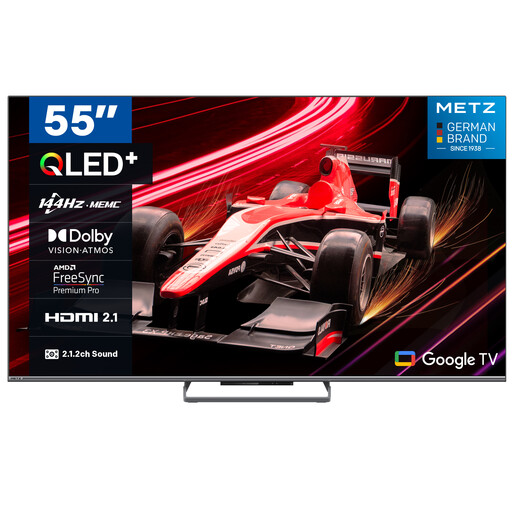
METZ 55MQE8000Z 55-inch QLED Google TV

METZ 55MQE8000Z 55-inch QLED Google TV

A QLED model to compare if you are looking for a 55-inch TV with a high stated refresh rate.

55 inch; 4K; 144 Hz; HDR 10+; 2.1.2 sound system.

View on Joybuy
TCL 55T8C 55-inch 4K QLED TV

TCL 55T8C 55-inch 4K QLED TV

An option to compare if you are looking for a 55-inch QLED screen with 144 Hz.

55 inch; 4K; QLED; 144 Hz.

View on Joybuy
Hisense 55E79Q PRO 55-inch 4K QLED TV

Hisense 55E79Q PRO 55-inch 4K QLED TV

A QLED model to compare if you want to factor in 144 Hz and FreeSync Premium.

55 inch; 4K; 144 Hz; VIDAA U9; Dolby Vision IQ.

View on Joybuy
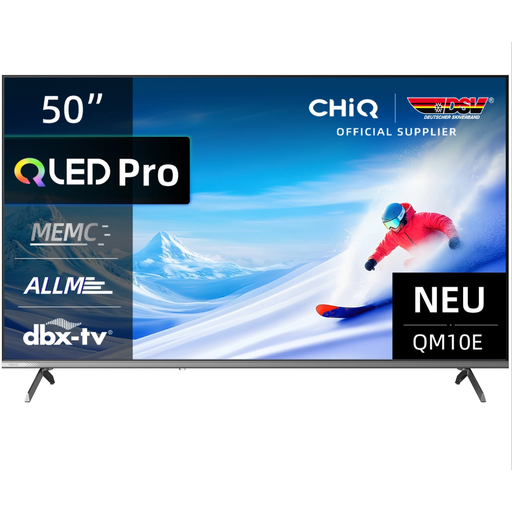
CHiQ U50QM10E 50-inch 4K QLED TV

CHiQ U50QM10E 50-inch 4K QLED TV

A smaller screen to compare if space in your shared room is a consideration.

50 inch; 4K; QLED; 120 Hz.

View on Joybuy

Frequently asked questions

Do we need a 120Hz TV for local co-op?

No, not for every console or game. Sony says 120Hz output on PS5 depends on having a compatible TV and a game that supports 120 Hz. Nintendo lists a maximum of 60 fps at 4K for Switch 2, so check the output supported by the console and games you use.

How should we set up a new TV in our shared room?

First measure the viewing distance and available space, then check the picture from every seat. At home, do not automatically use the extra-bright shop setting. Before wall-mounting the TV, check the mounting details and instructions for the exact model.

What should we do if a PS5 picture does not appear at 120 Hz?

On your PS5, check the information for the connected HDMI device under Screen and Video, as well as the 120Hz Output setting. Both the TV and the game must support 120 Hz; a TV with that screen specification alone is not enough.

How do we compare the energy consumption of TVs?

Compare the energy labels for the specific models, including their consumption in kWh per 1,000 hours for HDR. This lets you compare the models side by side without assessing energy consumption separately from your usage hours and conditions.

Can an OLED TV suffer from image retention during long gaming sessions?

Prolonged display of static images is something to bear in mind. The Dutch Consumers' Association observed image retention on older OLED TVs under prolonged test conditions and expects few significant issues with normal, varied viewing, but does not rule out the risk entirely. That test does not predict how a specific current model will perform.
