What should you look for when buying?
First, measure the viewing distance and check that the TV will fit in the room. Then assess the picture from different seats, and only then check which connections and gaming features your gaming device needs.
| Factor to consider |
What to look for |
Who is this important for? |
| Readability from a distance |
Measure the distance from your eyes to the screen and compare screen sizes with the viewing-distance table. Also check the TV’s width and height, and whether its stand will fit on your unit. |
If quiz questions need to be readable from the back seat, I want to know whether the screen size suits our viewing distance. Around 36% of consumers prioritise readability from a distance. |
| Viewing from around the seating area |
View the same text from the seats you actually use, including those to the side, and in your usual lighting. Compare viewing angles and reflections without automatically assuming one screen technology is best. |
When we sit spread out or play during the day, I want to be able to follow the text clearly from the side too. Around 29% of consumers prioritise visibility from around the seating area. |
| Quiz source and controls |
Work out whether you’ll play the quiz through a console, connected computer or TV app. Check that the exact model has the input, app and controls you need. |
If the quiz runs through an app or connected device, I want to know in advance whether that source will work with the TV. Around 21% of consumers prioritise connections and controls. |
| Extra console features |
Check which console and games you’ll use, which video outputs they support, and whether the exact TV model offers the feature you want on the input you’ll be using. |
If I also play console games, I only want to pay for features supported by my console and games. Around 14% of consumers prioritise additional console features. |
Joybuy TVs for viewing from a distance
This Joybuy selection includes 65, 75 and 85-inch TVs with listed gaming features. Compare the screen size with your measured viewing distance and available space, then check which features are compatible with your gaming device.
 No image available
TCL T8D 85-inch 4K QD Mini LED Smart TV
The 85-inch size is an option to compare with your measured viewing distance and available space.
- 4K QD Mini LED
- 144 Hz, VRR and FreeSync Premium
- HDMI 2.1
Joybuy
 No image available
TCL 65T8D 65-inch 4K QLED TV with QD Mini LED dimming
The 65-inch size is a useful point of comparison when you’re matching screen size to viewing distance.
- 4K with QD Mini LED dimming
- 144 Hz VRR and FreeSync Premium
- For wall mounting: use suitable fixings, keep the ventilation clear and leave at least 10 cm of space.
Joybuy
 No image available
TCL 75T8D 75-inch 4K QLED TV with QD Mini LED dimming
You can weigh the 75-inch size against the distance to the furthest seat and the space available for the TV.
- 4K with QD Mini LED dimming
- 144 Hz VRR and FreeSync Premium
- HDMI 2.1
- For wall mounting: use suitable fixings, keep the ventilation clear and leave at least 10 cm of space.
Joybuy
 No image available
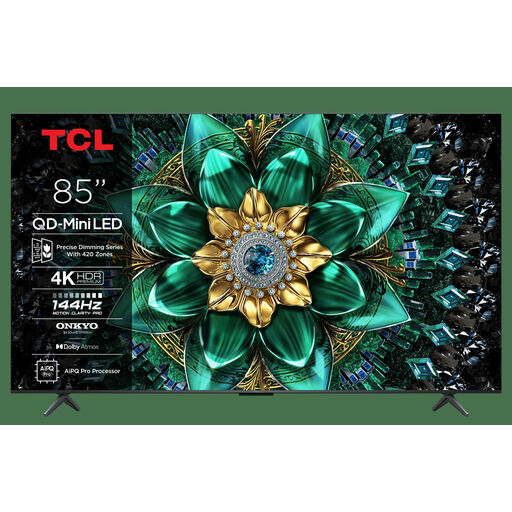
TCL 85Q6C 85-inch 4K QD Mini LED TV
This 85-inch size is worth comparing if you’re considering a large screen and have enough room for it.
- 4K QD Mini LED
- HDR Premium 1000 Nits
- 144 Hz VRR
Joybuy
 No image available
Hisense 75E8Q 75-inch 4K Mini LED Smart TV
The 75-inch size gives you an option to compare with your viewing distance and the space available in the room.
Joybuy
Frequently asked questions
Is 65 inches always big enough for a long viewing distance?
No, it depends on the distance to the screen and the size of the room. For 350 cm, the Consumers’ Association gives a range of 48–65 inches, and for 400 cm, 55–77 inches. Compare screen sizes and check that the TV and its stand will fit on your unit.
Does a family quiz need a 120 Hz TV?
Not just because you’re playing a quiz. PlayStation explains that 120 Hz output is for games that support 120 Hz; ALLM also requires a TV that supports this feature. So check which console and games you’ll be using first.
What should you consider when wall mounting and cleaning?
Before wall mounting, check the type of wall, the installation environment and the instructions for the exact model. LG recommends using a professional technician if necessary in its mounting advice. For the screen, the Consumers’ Association recommends using a slightly damp microfibre cloth.
How do you compare TVs’ electricity consumption?
Compare the energy labels for the exact models and consider how many hours you’ll use them. Milieu Centraal points out that screen size and usage affect electricity consumption. Without knowing how long the TV is used and your electricity tariff, an annual cost figure doesn’t tell you enough.
What are your rights when buying a TV in the Netherlands?
According to ACM ConsuWijzer, your statutory guarantee applies alongside any manufacturer’s guarantee. If a product breaks sooner than you could reasonably expect under normal use, the retailer is responsible for finding a solution. For online purchases, you generally have a statutory 14-day cooling-off period after delivery. Buying from a physical shop doesn’t automatically give you the same right to return an item.


