For solving puzzles together during the day, first check how the exact model handles reflections from windows and whether the screen stays bright; the Dutch Consumers’ Association and RTINGS highlight reflections and viewing angle as important considerations. Then compare the view from both ends of the sofa. Mini-LED and OLED are both options, but reflections need to be assessed for each model and room. For puzzle games, a responsive Game Mode is generally more relevant than the highest refresh rate; check that extra features are compatible with your console and games.
Who is this TV guide for?
Daylight gamers
You play with the curtains open and want to see puzzle clues when light from tall windows falls on the screen or reflects onto it. Reflections and brightness are separate considerations, as the Dutch Consumers’ Association and RTINGS explain.
Gamers sharing the sofa
You sit with other players spread along the sofa and want everyone to be able to see the clues. RTINGS and the Dutch Consumers’ Association point out that viewing angle matters when people are watching from different positions.
Casual console gamers
You want responsive controls, but there’s no need to pay for a refresh rate your console or games can’t make use of. Check which gaming features your equipment and games actually support.
What should you look for when choosing?
LCD with Mini-LED
Best for those who mainly play during the day and want to compare brightness and reflection handling.
Bear in mind a high quoted HDR peak brightness doesn’t prove that clues will remain readable when a window reflects directly on the screen.
OLED
Best for those who value contrast and also want to check how the picture looks from different seats.
Bear in mind OLED alone doesn’t guarantee protection from window reflections; compare reflection handling for each model.
The Dutch Consumers’ Association and RTINGS highlight reflections and viewing angle as factors to consider. The percentages below show which concern may be the priority when making this choice.
| Consideration |
What to look for |
Who is it important for? |
| Reflections and daylight |
Compare reflection tests for the exact model and check where the windows are in relation to the screen. |
If I play with the curtains open, I want to be able to make out clues despite the light from the windows. Around 36% of consumers prioritise readability in daylight. |
| Viewing angle and shared screen |
Compare viewing angle tests and check the picture from both ends of the sofa. |
If we sit spread along the sofa, I want other players to be able to see the clues from their seats. Around 29% of consumers prioritise visibility from every seat. |
| Controls and gaming features |
Check Game Mode and input lag with the settings you use, as well as support from your console and game. |
If I mainly play puzzle games, I want responsive controls without paying extra for features I won’t use. Around 21% of consumers prioritise responsiveness and suitable gaming features. |
| Purchase and running costs |
Compare the exact version, energy label and any delivery or installation costs. |
If I’m choosing between versions, I want to weigh up the total cost against the features I’ll use. Around 14% of consumers prioritise cost. |
Pitfalls to avoid
-
Focusing only on a matt finish or a high nits claim
Reflection handling and brightness aren’t the same thing. A direct reflection can obscure clues, even if the TV is quoted as having a high HDR peak brightness.
Look at reflection tests for the exact model and assess where you plan to put it in relation to the windows.
-
Choosing a fast gaming TV without checking the viewing angle
A high refresh rate doesn’t tell you whether players sitting away from the centre can see what’s on screen clearly.
First check the picture from your usual seats, then compare the gaming features with your equipment and games.
-
Confusing the manufacturer’s warranty with your statutory rights
A commercial warranty doesn’t determine your statutory rights in the Netherlands. ACM ConsuWijzer explains that the legal guarantee applies alongside any warranty offered by the seller or manufacturer.
Keep your proof of purchase and assess any fault in light of your statutory guarantee rights too.
Brands to compare
TCL
The Dutch 55C7K is a QD-Mini-LED version worth comparing for daytime use.
- TCL lists a native refresh rate of 144 Hz for the C7K series.
- The quoted zone and HDR specifications don’t represent measured daylight performance for every screen size. Also check reflections and the view from the side.
LG
The Dutch OLED55C56LB is a 55-inch OLED C5 version for anyone who wants to compare OLED contrast with their own window layout.
- According to LG’s own product information, this model offers deep blacks and Brightness Booster.
- These product claims don’t tell you how a window will reflect directly on the screen; assess reflections for the exact version.
Samsung
The Dutch 65-inch QE65S95HFTXXN is an S95H OLED version worth comparing in rooms with window light.
- Samsung lists Glare Free for the S95H.
- This doesn’t guarantee that every window setup will be problem-free. Extra gaming refresh rates are only relevant if your connected equipment and games can make use of them.
Sony
The BRAVIA 9 II is an RGB LED TV worth looking into if daylight performance matters to you.
- RTINGS includes the series in one of its own selections for bright rooms.
- That test result doesn’t confirm the performance or included parts of every Dutch screen size. Check the exact version and viewing angle.
Philips
The Dutch 55MLED910/12 offers a Mini-LED option with Ambilight for anyone who wants to compare the feature alongside gaming.
- The model name specifies QD MiniLED and Ambilight.
- Assess reflections and viewing angle for this version separately, and compare how they work with your own window setup.
Joybuy products for gaming together
This selection includes OLED and QD-Mini-LED TVs for gaming together. Assess reflections and the view from the sofa for the exact model and your room.
 No image available
LG OLED65C68LA C6 65-inch 4K OLED TV
An OLED version worth comparing if contrast matters to you; check reflections and visibility from the seats in your own room.
The product name lists 120 Hz and VRR up to 165 Hz. Check whether your console and games can make use of these features.
Joybuy
 No image available
TCL 65T8D 65-inch QD-Mini LED TV
A QD-Mini LED version worth comparing for a shared gaming setup; the name alone doesn’t tell you how the screen handles reflections from windows.
The product name lists 4K and 144 Hz VRR. Check that your equipment and games support them.
Joybuy
 No image available
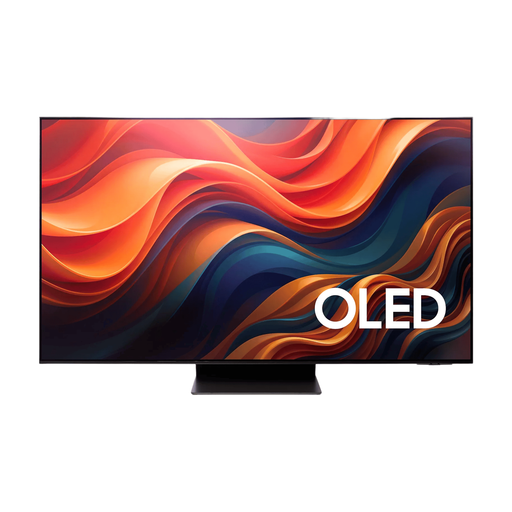
Samsung 65-inch S95H 4K OLED TV
An OLED version to compare with other options if contrast and sharing the screen matter to you; assess reflections in your own room.
The product name specifies a 65-inch 4K OLED TV.
Joybuy
 No image available
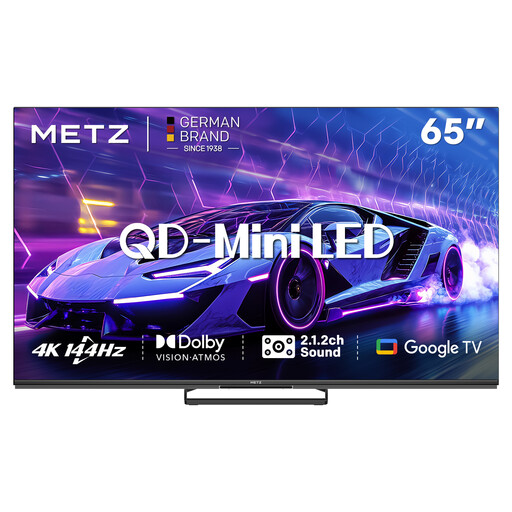
METZ 65MNE8000Z 65-inch QD-Mini LED TV
A Mini-LED version worth comparing for gaming together; assess reflections and viewing angle for your own seating and window layout.
The product name lists 4K, 144 Hz and Game Mode.
Joybuy
 No image available
TCL 75Q7C 75-inch 4K Mini-LED TV
A large Mini-LED screen to compare for gaming together; check that the size suits your viewing distance and seating arrangement.
The product name lists 144 Hz. Check which refresh rates your equipment and games support.
Joybuy
Frequently asked questions
Does a TV for co-operative puzzle games need 120 Hz or VRR?
Not necessarily: low input lag in Game Mode matters even at lower frame rates. According to PlayStation Support, 120 Hz output and VRR only work with compatible TVs and games, so check your console and games first.
What should you check when placing a TV opposite tall windows?
Check where direct reflections are visible from your seats and compare reflection tests for the exact model. A matt finish alone won’t tell you how the TV handles every type of reflection.
What are your rights if a TV bought online isn’t suitable or develops a fault?
For an online consumer purchase in the Netherlands, the cooling-off period generally ends 14 days after delivery, according to ACM ConsuWijzer; check the applicable exceptions and returns policy. Your statutory guarantee applies alongside any manufacturer’s or seller’s warranty. If the TV develops a fault, your entitlement depends on what you could reasonably expect from the product.
What energy information can you compare for TVs in the Netherlands?
EU rules for electronic displays include energy labelling and product information. Compare the energy label and product information sheet for the exact screen size and version, not just the series name.


