For a bright club room or a TV that often displays static menus or scoreboards, LCD—including QLED and mini-LED—is a sensible place to start. OLED is worth considering if contrast and visibility from different angles matter more. For every model, check the TV’s gaming features, the console or PC you use, and your viewing distance. A quoted 144 Hz refresh rate doesn’t mean every game will display 144 frames per second.
Who is this choice relevant to?
Club players with a console
If you play fast-paced basketball games, you’ll want the movement and controls to feel responsive. Check the game, console and HDMI connection. Consumentenbond explains why the TV’s refresh rate needs to match the source signal, while PlayStation Support specifies 120 Hz output for compatible TVs and games.
Players in a shared club room
If players won’t all be sitting directly in front of the screen, viewing angles, viewing distance and typical room lighting are important considerations. Consumentenbond points out that LCD viewing angles can vary and that viewing distance also affects your choice of screen size.
Club managers responsible for a shared screen
If you’ll also use the TV to display static menus or a scoreboard, consider how it will be used, where it will go and how much power it uses. Milieu Centraal recommends comparing energy consumption per 1,000 hours. Follow the manufacturer’s instructions for screen care.
What should you look for in a gaming TV?
LCD, QLED or mini-LED
When to choose it: if the club room is bright or the screen regularly displays static menus and scoreboards. Consumentenbond notes that LCD’s brightness can be an advantage in bright rooms.
What to consider: viewing angles and contrast vary between models. Assess the picture from seats at the sides and check the gaming connections on the exact model.
OLED
When to choose it: if contrast and visibility from different angles are important, and the screen won’t display the same static image for long periods.
What to consider: Consumentenbond observed image retention after prolonged display of static images on older OLED TVs. That test doesn’t predict how every current model will perform.
| What to consider |
What should you check? |
Who is this most relevant to? |
| Smooth gameplay |
Check the refresh rate, suitable HDMI input and gaming features of the exact model. Then check which output is supported by your console or PC and the game. |
I want fast movement and controls to feel responsive while playing. Around 36% of consumers prioritise responsive gameplay. |
| Visibility for the group |
Measure the viewing distance and assess the picture from the outermost seats and in the room’s usual lighting. |
If players sit in different places, I want everyone to be able to follow the game. Around 29% of consumers prioritise visibility for the group. |
| Shared use and static images |
Work out how long static menus or scoreboards will stay on screen, and check the care instructions for your chosen model. |
I want to know whether the TV is suitable for extended use with static on-screen elements. An estimated 21% of consumers make this usage pattern their main consideration. |
| Running costs and installation |
Check the dimensions, mounting details and energy consumption in kWh per 1,000 hours. Also ask which installation services are included with your order. |
For my club, power consumption and finding a practical place for the screen both matter. Around 14% of consumers prioritise these running and management costs. |
Common buying mistakes
-
Assuming a high Hz rating means every game runs at that frame rate
The console, game, TV input and settings all need to support the video output you want. PlayStation Support specifies 120 Hz output for compatible TVs and games; a higher figure on the TV won’t make a game run faster by itself.
Check the entire signal chain and review the video output settings using your own games console.
-
Treating OLED image retention as inevitable—or ignoring it altogether
Consumentenbond observed image retention after prolonged display of static images on older OLED TVs, but the test didn’t establish a fixed threshold or predict how every current model will perform.
Consider how you’ll actually use static scoreboards and menus, and follow the care instructions for your chosen model.
-
Looking only at the purchase price
Power consumption and practical installation matter too. A retailer may offer installation or wall mounting as a separate service.
Compare energy consumption per 1,000 hours and ask what installation or mounting is included before you order.
Allow for ongoing electricity costs, as well as the time or help you may need to position and mount the TV.
Brands to consider
Hisense
Hisense describes the 55E79Q PRO as a 55-inch Hi-QLED/LCD TV with 4K, 144 Hz and VRR. It’s worth considering if you’re looking at an LCD option with gaming features.
- The stated refresh rate and VRR are features to factor into your checks of the complete gaming setup.
- These are Hisense specifications, not an independent measurement of input lag. Also assess the viewing angle from the seats in your club room.
TCL
TCL describes the 55C8L as a 55-inch mini-LED/LCD model with local dimming zones and a quoted HDR peak brightness of up to 3,000 nits. The manufacturer presents it as an option for bright rooms.
- The quoted brightness and dimming zones are worth considering if room lighting is an important factor.
- These are manufacturer specifications, not measurements taken in your club room. Check the gaming connections and exact variant separately.
LG
LG lists the OLED55C68LA as a 55-inch OLED screen with 4K and VRR up to 165 Hz. It’s worth considering if you’re weighing up OLED alongside advanced gaming features.
- The quoted VRR features may be useful with a compatible gaming setup; the TV’s specification doesn’t guarantee that a game will run at 165 frames per second.
- Consider how long the TV will display static images. Consumentenbond tested older models, not this C6.
Philips
Philips lists the 55OLED761/12 as a 55-inch 4K OLED screen with 120 Hz and Ambilight. It’s an OLED option to consider alongside the alternatives.
- The manufacturer lists 120 Hz and Ambilight as features of this model.
- Ambilight doesn’t replace checks on viewing distance, HDMI functionality or the actual gaming output.
Gaming TVs at Joybuy
This Joybuy selection includes OLED and LCD/QD-Mini LED models to consider for basketball games in a shared club room. Choose a screen size to suit the seating distance, and check that the gaming features work with your console or PC.
 Image unavailable
LG OLED55C68LA 55-inch OLED evo AI C6 4K TV
An OLED option to consider if contrast and visibility from different angles matter; think about how you’ll use static menus or scoreboards.
55 inches; 120 Hz native refresh rate; VRR up to 165 Hz. Output also depends on the source and game you use.
View at Joybuy
 Image unavailable
TCL 65T8D 65-inch QD-Mini LED 4K TV
An LCD option for shared use; check whether 65 inches will suit the distance to the seats in your club room.
65 inches; QD-Mini LED; 4K; 144 Hz VRR.
View at Joybuy
 Image unavailable
TCL 50Q6C 50-inch QD-Mini LED 4K HDR TV
An LCD option to compare for a shared gaming room; check whether 50 inches will suit the viewing distance and the places players will sit.
50 inches; 4K HDR; 144 Hz.
View at Joybuy
 Image unavailable
TCL 55T8C 55-inch 4K QLED TV
A QLED option for basketball games in a shared room; compare the screen size with your actual viewing distance.
55 inches; 4K; 144 Hz.
View at Joybuy
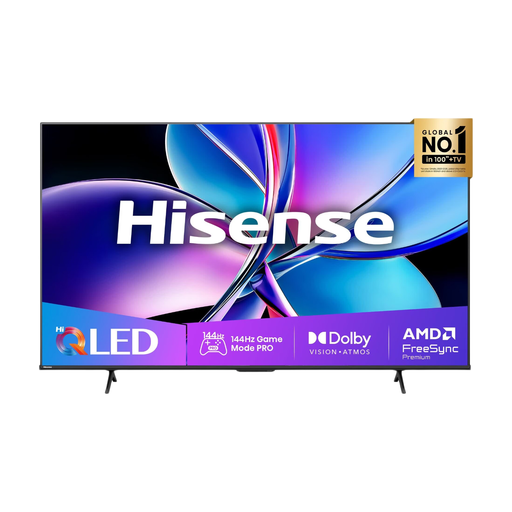 Image unavailable
Hisense 55E79Q PRO 55-inch 4K QLED TV
A QLED model to consider for your club room; assess the picture from the seats and in the room’s usual lighting.
55 inches; 4K; 144 Hz.
View at Joybuy
Frequently asked questions
Do you always need a 144Hz TV for basketball games on a PS5?
No, not always. Sony describes video output of up to 120 Hz for compatible TVs and games. On your PS5, go to Settings > Screen and Video > Video Output to see which capabilities the connected TV reports. A quoted 144 or 165 Hz won’t make the game run faster by itself.
How do you choose the screen size and position?
Measure the distance to the seats and assess visibility from the sides and in the room’s usual lighting. Before installation, check the dimensions and mounting instructions for the exact model you’ve chosen.
What does the energy label mean for your club?
Compare the stated energy consumption per 1,000 hours for the TVs you’re considering, and weigh it against the space available and how you’ll use the screen. For products covered by EU rules, energy labels must also be clearly displayed when sold online.
How can you reduce concerns about using an OLED club screen for long periods?
Where practical, avoid leaving the same image on screen for long periods and follow the care instructions for your chosen model. Consumentenbond found image retention on older OLED TVs after prolonged display of static images, but didn’t establish a set amount of time before it occurs.


