Who is this choice relevant to?

Players with daylight shining on the screen

You mainly play during the day and want to see the court and interface clearly when light from large windows falls on or around the TV. RTINGS.com highlights that direct reflections are worth considering in rooms with large windows.

Players who value quick controller response

You pay attention to the delay between a controller input and what happens on screen, and want to match the game settings to your gaming device. RTINGS.com describes Game Mode as a way to reduce input lag, potentially with less image processing.

Groups sitting in different positions

You play or watch with others from several seats and want to consider both screen size and the picture when viewed from an angle. The Consumentenbond highlights viewing angle as a factor to consider when comparing televisions.

What should you look for when choosing?

Mini-LED LCD

A good fit if Window light is your main concern. Compare reflection tests and brightness for the exact model.

Bear in mind High brightness or a particular screen finish alone does not prove that reflections from windows will disappear.

OLED

A good fit if Players sit in different places. The Consumentenbond says OLED TVs generally offer a wider viewing angle.

Bear in mind The Consumentenbond notes that QLED TVs can often reach higher brightness, so assess reflections and brightness separately for OLED models too.

What to consider What to check before buying Who is this important to?
Visibility in daylight Compare independent tests of direct reflections and brightness for the same model. Also consider whether you can position the TV differently in relation to the windows. When I play during the day, I want to be able to see the game clearly when sunlight from the windows falls on the screen. For around 33% of consumers, visibility in window light is the top priority.
Responsiveness while playing Compare input lag measurements in Game Mode at the resolution and frame rate you use. Only check for 120 Hz or VRR if your gaming device and game support that output; RTINGS.com points out that Game Mode can mean less image processing. When quick actions need to register straight away, I want to know how the TV performs with my own device and settings. For around 27% of consumers, controller response comes first.
Viewing from multiple seats Look at viewing angle tests for the outer seats and measure your viewing distance. The Consumentenbond suggests around 2.4 times the screen diagonal as a distance many people find comfortable, rather than a hard-and-fast rule for every player. When several of us sit around the TV, I want people sitting away from the centre to see the picture clearly too. For around 20% of consumers, visibility from different seats is the main consideration.
Purchase and running costs First compare screen sizes and features that suit your set-up, then check the European energy label for the exact version. The European Commission provides separate information for standard and HDR viewing. When I choose a TV for the long term, I want to consider energy use as well as the purchase price. For around 20% of consumers, purchase and running costs matter most.

Common buying mistakes

  • Assuming a matte finish or high brightness means window reflections are no longer a problem

    Direct reflections and scattered ambient light are different situations. The screen finish alone does not tell you how well a particular model handles reflections.

    Compare tests of direct reflections and brightness for the exact version, and consider where the TV will sit in relation to the windows.

  • Assuming the maximum Hz rating matches the game's frame rate

    A high stated refresh rate will not automatically make a game output extra frames that it does not support.

    Check your gaming device's output, the game settings and the TV input before factoring in a higher refresh rate.

  • Buying an extended warranty as if it replaced your statutory rights

    Your statutory rights with the seller are separate from any additional warranty they may offer. The Dutch government says there is no fixed statutory warranty period for all products in the Netherlands.

    Compare what an additional cover plan actually offers with your existing statutory rights.

Brands worth comparing

Samsung

The QN90F range in the Netherlands is a mini-LED TV option to compare with other LCD models for daytime viewing.

  • Samsung describes the 55-inch QN90F as a mini-LED TV.
  • Samsung's information about Glare Free refers to other specific models. So don't assume the QN90F has the same coating; compare reflection performance for the exact version.

LG

The OLED65C56LB in the Netherlands is an OLED option to consider if viewing from different seats matters.

  • For this C5 version, LG lists OLED and Brightness Booster.
  • LG says brightness can vary by model, size and market. The brand information does not tell you how this model handles reflections from your windows.

Philips

The 65MLED950/12 is a 65-inch QD mini-LED option to compare if you're looking for a large screen for a group.

  • Philips lists Ambilight and VRR up to 144 Hz for this model.
  • These are manufacturer specifications, not independent measurements of input lag or reflections. Whether 144 Hz is useful depends on the source, so check the connections and seating arrangement.

TCL

The 55Q6C is a QD mini-LED model to compare if a 55-inch screen suits your room.

  • TCL lists a native refresh rate of 144 Hz for the German 55Q6C; Joybuy also lists a model called 55Q6C.
  • The German specification does not automatically confirm every feature of the Dutch version. Neither listing is an independent reflection test.

Joybuy product picks

This selection includes OLED and mini-LED TVs to compare by screen size, gaming features and visibility from different seats. Check daylight reflection performance for the exact model and make sure it has the connections your gaming device needs.

LG OLED65C68LA, 65-inch OLED evo 4K Smart TV

LG OLED65C68LA 65-inch OLED evo C6 4K Smart TV

If several players sit at an angle to the screen, this OLED model is one to compare with LCD; the Consumentenbond says OLED TVs generally offer a wider viewing angle.

65 inches, 4K, 120 Hz and VRR up to 165 Hz. Check that your gaming device and game support your preferred frame rate.

Joybuy
LG OLED55C68LA, 55-inch OLED evo 4K Smart TV

LG OLED55C68LA 55-inch OLED evo C6 4K Smart TV

This 55-inch OLED is a size worth comparing if you're looking for a smaller screen for a group. Check visibility from the outer seats in your own set-up.

4K, native 120 Hz and VRR up to 165 Hz. The source and game determine which frame rate you can use.

Joybuy

LG OLED48G69LS, 48-inch OLED evo 4K Smart TV

LG OLED48G69LS 48-inch OLED evo G6 4K Smart TV

A 48-inch screen is an option worth comparing if that size better suits your viewing distance and seating arrangement. The Consumentenbond says OLED generally offers a wider viewing angle.

4K, native 120 Hz and VRR up to 165 Hz. Check that your gaming device and chosen game support these features.

Joybuy

Samsung S85F GQ55S85FAU, 55-inch OLED 4K TV

Samsung S85F GQ55S85FAU 55-inch OLED 4K TV

This 55-inch OLED model is worth comparing if several players watch from different positions. Check the picture from the seats you use.

The product name lists OLED and 4K. Before choosing, check the gaming features and connections you want on this version.

Joybuy
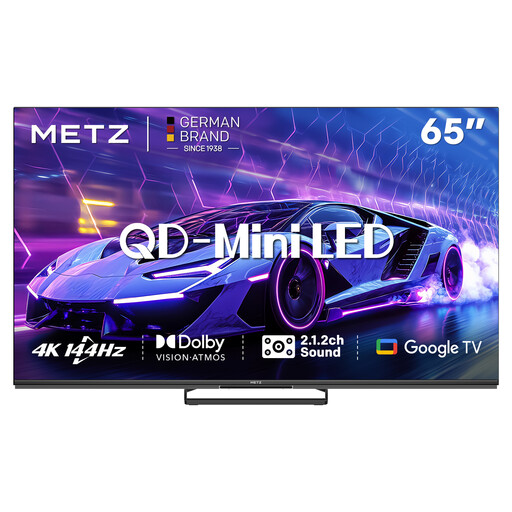
METZ 65MNE8000Z, 65-inch QD mini-LED Google TV

METZ 65MNE8000Z 65-inch QD mini-LED 4K Google TV

This 65-inch mini-LED TV is worth comparing if a larger screen for playing together suits your viewing distance. The listed features alone do not tell you how the model handles reflections from windows.

The product name lists 144 Hz, Game Mode, ALLM, VRR and HDMI 2.1. Check that the connections and output are compatible with your gaming device.

Joybuy

Frequently asked questions

Should I automatically choose a 144 Hz TV for basketball games?

No. First check which frame rate your game and gaming device can output. A TV with 120 Hz or more, and possibly VRR, can handle compatible output, but the maximum refresh rate does not prove that a particular game will reach it.

Which setting can help if the controls feel delayed?

Try Game Mode and compare input lag measurements at the resolution and frame rate you use. RTINGS.com explains that Game Mode can generally reduce lag, potentially at the expense of image processing.

How can I reduce the effect of window light while playing?

First, check where the windows are reflected on the screen, then assess reflections and brightness together for the exact model. Even a TV with reflection control can reflect light, so it may be worth considering a different position.

What information can help me compare TVs' energy use?

Check the European energy label for the exact version. The European Commission lists an efficiency class and separate information about HDR viewing; the label does not calculate your personal electricity bill.

What rights do I have in the Netherlands if a product is faulty or I buy online?

If a product is faulty, you can hold the seller responsible under your statutory rights. The Dutch government says there is no fixed statutory warranty period for all products in the Netherlands. For online purchases from a business, you generally have a 14-day cooling-off period, subject to legal exceptions.
