What should you look for?
First assess the light in the room and where people will be sitting, then compare the gaming performance and running costs of the specific models.
The breakdown below is for consumers looking for a TV for local basketball games in a bright living room. When comparing TVs, don’t base your choice on screen technology alone: reflections, input lag and viewing distance each need to be checked separately.
| What to consider |
What to look for when buying |
Who is this important for? |
| Visibility in daylight |
Look out for direct light and compare reflection and brightness tests for the exact model. RTINGS highlights that reflection handling is not the same as brightness. |
If I play during the day, I want to see the court clearly despite windows or lamps opposite the TV. Around 33% of consumers prioritise visibility in daylight. |
| Responsiveness when playing |
Compare measured input lag at the resolution and refresh rate you want to use. Also check which HDMI port and settings support the signals you need; Sony lists the available ports for each model. |
If I play fast-paced matches, I want my controls to respond quickly on screen. Around 27% of consumers prioritise responsive gameplay. |
| Screen size and seating positions |
Measure the viewing distance from the sofa and check the picture from the seats at either end. The Consumers’ Association recommends a distance of around 2.4 times the screen’s diagonal, based on its own research; this is a guideline, not a fixed rule. |
If several players and spectators are sitting on the sofa, I want everyone to be able to follow the action. Around 20% of consumers prioritise visibility from multiple seats. |
| Running costs and after-sales support |
Compare the EU energy label for the exact models and check who the seller is and what terms apply. The European Commission uses a scale from A to G for electronic displays. |
If I’m choosing a TV for the long term, I also want to consider energy use and what happens if something goes wrong. Around 20% of consumers prioritise running costs and after-sales support. |
Gaming TVs on Joybuy
This selection includes OLED TVs, as well as QNED and SQD Mini LED models to compare for gaming in a bright living room.
 No image available
LG OLED65C68LA 65-inch OLED Evo AI C6 4K Smart TV
An OLED option to compare if you’re looking for a 65-inch screen for multiplayer games.
The product title lists 4K, 120 Hz and VRR up to 165 Hz. Check that these signals work with your console and game.
View at Joybuy
No image available
LG OLED55C68LA 55-inch OLED Evo AI C6 4K Smart TV
An OLED option in a 55-inch size to weigh up against your viewing distance and where the players will sit.
The product title lists 4K, 120 Hz native and VRR up to 165 Hz. Check which signals your console and game use.
View at Joybuy
 No image available
LG OLED48G69LS 48-inch OLED Evo AI G6 4K Smart TV
A more compact OLED option to compare if you have a shorter viewing distance or limited space.
The product title lists 4K, 120 Hz native and 165 Hz VRR. Check that it supports the signal used by your console and game.
View at Joybuy
 No image available
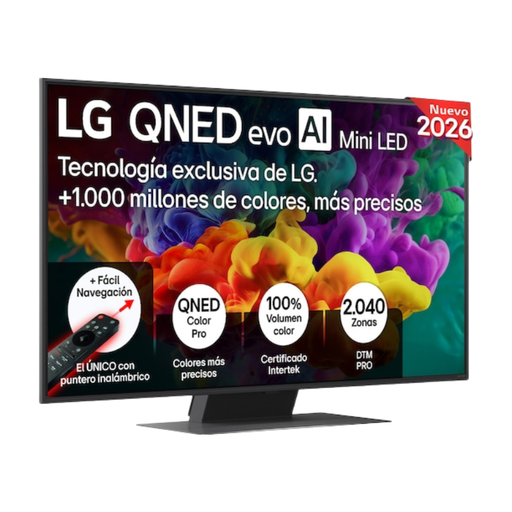
LG 50QNED85B6B 50-inch 4K QNED Evo AI Mini LED Smart TV
A QNED Mini LED option to compare with OLED if you’d like to consider a different screen technology, too.
The product title lists 50 inches and 4K. Assess reflections and support for your gaming signal on this specific model.
View at Joybuy
 No image available
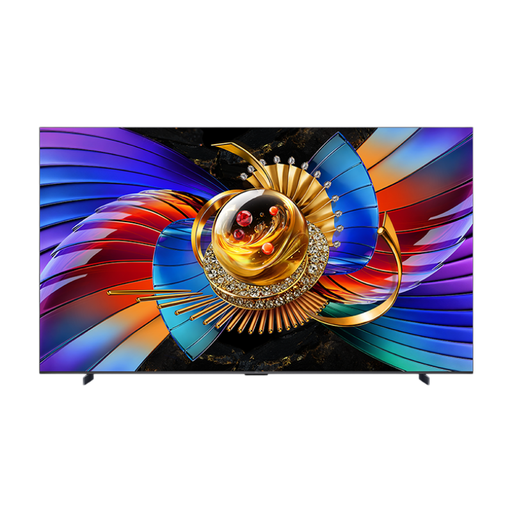
TCL Q7D Pro SQD Mini LED TV 65
A 65-inch SQD Mini LED option to compare if this screen size and technology suit your living room.
The product title lists the Q7D Pro and SQD Mini LED. Check reflections and the gaming features you need separately for your setup.
View at Joybuy
Frequently asked questions
Do I need 144 or 165 Hz for a multiplayer basketball game?
Not necessarily. Check which picture signals your console and the specific game can output, and compare input lag with that signal. The maximum screen refresh rate alone doesn’t tell you how quickly the controls respond.
How do I choose the right screen size for our sofa?
Measure the viewing distance and check the picture from the seats at either end. The Consumers’ Association recommends a distance of around 2.4 times the screen’s diagonal, based on its own research; use this as a guideline, not a requirement.
How should I factor in electricity use?
Compare the EU energy label for the exact models. The European Commission lists a scale from A to G for electronic displays, with separate information for HDR use; scan the QR code on the label to find additional model information in EPREL.
What can I do if the TV develops a fault after purchase?
In the Netherlands, ACM ConsuWijzer says the seller is responsible if a product used normally doesn’t do what you could reasonably expect it to. The applicable legal guarantee depends on what you could reasonably expect from the product; a manufacturer’s guarantee doesn’t take away your legal rights.
Do I have a cooling-off period when buying online?
For eligible distance purchases from a business, the Dutch Government says you’ll often have a 14-day cooling-off period. An online purchase from a private individual isn’t covered by the distance-selling rules described in that government information.


