
Traveller with a full bag
You want a tablet that’s easy to take with you, and to play adventure games on a smaller screen. Check that the text and controls are comfortable to use at that size.


Start with the adventure games you want to play. Check whether they’re available for iPadOS or Android, and whether you can install them on the tablet or want to stream them from a PC. Then choose a more compact model if you’ll be taking the tablet with you often, or a larger screen if readable dialogue and playing in one place matter more. Also check in advance what connection, downloads and charger you’ll need.
You want a tablet that’s easy to take with you, and to play adventure games on a smaller screen. Check that the text and controls are comfortable to use at that size.
You have particular games in mind. First, check their operating system, requirements and play style to make sure your tablet is a good match.
You mainly play in one place and want to see dialogue and visuals on a larger screen. Bear in mind that a tablet like this takes up more room in your luggage.
Choose this option: if you’ll be taking the tablet with you often and your chosen games are available on the operating system you select.
Bear in mind: there’s less screen space for text and controls than on an 11-inch model.
Choose this option: if you mainly play in your hotel room and extra screen space matters to you.
Bear in mind: a larger tablet is less compact to carry, and screen and chip specifications don’t guarantee that every game will run well.
Choose this option: only if you specifically want to stream a PC game and can use the required computer and connection.
Bear in mind: according to Steam, the host computer must be switched on and running Steam. Performance also depends on your connection.
| What to consider | What should you check? | Who is this important for? |
|---|---|---|
| Availability of your games | For each game, check the app store, system requirements, supported controls and whether you’ll play locally or stream. | If you already have specific adventure games in mind, you’ll want to know whether they’ll work on the tablet. Around 26% of consumers prioritise the availability of the games they want. |
| Portability | Compare the weight and dimensions of the exact version, and consider whether the game will remain easy to read on the smaller screen. | If the tablet will often be in your luggage, you’ll want a manageable size without text or controls becoming uncomfortably small. Around 21% of consumers give portability top priority. |
| Playing over a hotel connection | Install your game in advance and test the offline features, sign-in and storage requirements. If you’re streaming, check that the host PC will be available. | If you don’t want to rely on a working connection during your stay, check in advance which way of playing your game requires. Around 21% of consumers prioritise reliability. |
| Screen and controls | Compare screen size and resolution, and check whether the game supports controller input. | If you want to read dialogue clearly and play comfortably, screen space matters alongside portability. Around 16% of consumers give screen comfort top priority. |
| Configuration and accessories | Check the storage, what’s included in the box and which accessories you actually need. | If you don’t want to choose features or accessories your games don’t require, compare the full configuration with the way you’ll use it. Around 16% of consumers prioritise this trade-off. |
Specifications alone don’t tell you how fast or suitable a tablet will be in practice. The Consumentenbond warns that specifications aren’t a complete measure of this.
Check the requirements and controls for the games you want to play. Don’t take a screen’s refresh rate as a guaranteed frame rate.
According to Steam, the host computer must be switched on and running Steam for Steam Link. Streaming therefore depends on that computer and a working connection.
Choose this way of playing only if you can set up everything you need, and test it before you leave.
The Joybuy listing consulted for an iPad Air M4 doesn’t mention a charger. This doesn’t automatically tell you anything about other models or listings.
Check what’s included with the exact version and whether you already have a suitable charger or controller.
The iPad mini is a compact iPad option, while the 11-inch iPad Air offers a larger screen. Check the iPadOS version and requirements for each game.
The Legion Tab Gen 5 is a compact Android option if your chosen games are available on Android.
The Galaxy Tab S11 is an Android option with an 11-inch screen for anyone looking for more screen space than compact models offer.
This selection includes compact Android tablets, larger Android models and an 11-inch iPad Pro. Check that the operating system, requirements and preferred way of playing are right for your adventure game.
 No image available
A compact Android option to compare if you want to take your tablet with you. Check that your games are available on Android.
The screen measures 8.7 inches and, according to the product description, the tablet weighs 337 g. Other stated specifications include a 90 Hz refresh rate and a Helio G99 processor.
 No image available
An 11-inch Android option to compare if you want more screen space in your hotel room. Check that your adventure game is compatible with Android.
The product information lists an 11-inch screen with a 90 Hz refresh rate, 6 GB of memory and 128 GB of storage.
 No image available
An Android model with a larger screen to compare if you mainly play in one place. Check your game’s requirements before choosing.
The product title lists a 12-inch FHD+ screen, Android 15, a 90 Hz refresh rate and a Helio G100 processor.
 No image available
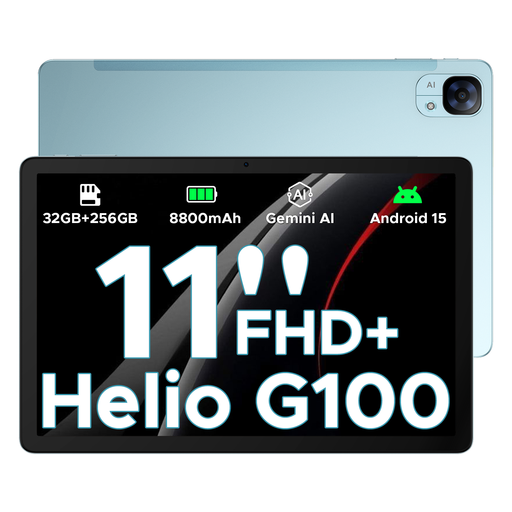
An 11-inch Android model to compare if you want more screen space in your room than a more compact tablet offers.
The product title lists an 11-inch FHD+ screen, Android 15, a 90 Hz refresh rate and a Helio G100 processor.
 No image available
An 11-inch iPad option to compare if you want a larger Apple screen. Check that your game is available for iPadOS.
The product information lists an 11-inch OLED screen and 256 GB of storage. This version is Wi-Fi + Cellular.
No, your choice of tablet alone isn’t enough. According to Steam, the host PC must be switched on and running Steam for Steam Link. Also check your game’s requirements and the connection you’ll need.
Apple explains how to pair compatible Xbox, PlayStation and other Bluetooth game controllers with an iPad. Also check whether your specific game supports controller input.
No, don’t assume that it will. Google Play Help confirms offline play for a few built-in games, but not all games. Check and test your game’s offline functionality before you leave.
There’s no fixed two-year statutory warranty period in the Netherlands. Whether a product is of satisfactory quality depends, among other things, on what you could reasonably expect. According to ACM ConsuWijzer, the retailer is responsible for providing a suitable solution if the product proves faulty too soon during normal use.
According to the Netherlands Authority for Consumers and Markets, online purchases usually come with a 14-day cooling-off period. Check the terms of your purchase; this period is separate from your statutory rights if a product is faulty.