
Vandaag of morgen in huis

Kwaliteit gegarandeerd

Welkomstaanbiedingen ontgrendelen: GRATIS bezorging | Tot 80% korting | Gratis 30 dagen JoyPlus-proefperiode
Download de app
Building a gaming setup seems simple: choose a colourful keyboard, a fast mouse and an ultrawide monitor. In practice, costly mistakes often come down to details that only become apparent after purchase. Think of the wrong keyboard layout, insufficient desk space or a monitor that is not properly suited to your PC.
As a Joybuy Product Recommendation Officer, I filter product specifications for practical usability. Below, you can find out which points to check before investing in a gaming and work setup.
A 165Hz gaming monitor can display smooth images, but you also need a suitable graphics card and connection. So check whether your PC or console supports the desired resolution and refresh rate via DisplayPort or HDMI. Also pay attention to the combination of resolution and refresh rate: an ultrawide screen at 5120 × 1440 places greater demands on your system than a standard Full HD monitor.
The same applies to a gaming keyboard or mouse. A high polling rate sounds appealing, but the difference is only relevant if your computer, game and usage scenario support it.
A 60% keyboard takes up little space, but it lacks, among other things, a numeric keypad and often separate arrow and function keys. This can be convenient for gaming, but less practical for spreadsheets, programming or administrative work.
A 75% model generally retains the arrow and F keys while keeping your desk organised. Also check the layout. A QWERTY US layout differs from a Dutch or German QWERTZ layout. As a result, the keys for symbols and special characters, among other things, may feel different.
RGB LED strips and smart RGB lighting create more atmosphere around a gaming desk, but lighting does not automatically make a product more practical. Check whether the strip can be extended, which controls it supports and whether the length is suitable for your desk, monitor or TV.
According to Yeelight’s product information, certain models support control via an app and voice commands. This is a claim made by the brand; before purchasing, check which app, connection and compatible devices are required for your situation.
Start by measuring your desk. Allow space for the monitor stand, mouse movements, cables and a possible laptop. A 49-inch gaming monitor has a 32:9 aspect ratio and requires a sturdy, deep desk. According to the CRUA model’s product information, it is relatively heavy and a load capacity of at least 15 kg is recommended. Two-person assembly is therefore advisable.
When choosing input devices, pay attention to:
A mechanical gaming keyboard usually offers a more distinct key feel, but it can be louder. A model with hot-swap sockets allows you to replace compatible switches later without soldering.
An ultrawide gaming monitor is useful for multitasking, simulation games, content creation and working with multiple windows. Before purchasing, check:
Features such as HDR10, 120% sRGB, low blue light and flicker-free are listed as product features in the product information. Do not treat these as a guarantee of a specific viewing experience; image quality also depends on settings, source material and the surrounding environment.
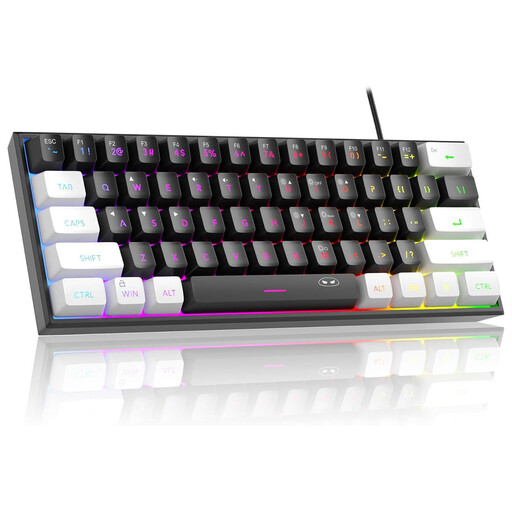
Why it suits this profile: The compact 61-key layout is suitable for small desks and leaves more room for mouse movements. However, you should check the QWERTY US layout in advance.
The product clearly states its 60% size and US layout. According to the product information, the circuit board is described as IPX4-certified; the connection itself is not waterproof.
RGB lighting, wired connection, a weight of 400 grams and compatibility with Windows and Mac OS according to the product information.

Why it suits this profile: This wide screen combines gaming with multiple work windows, video editing and content creation. It is particularly suitable for users with a large, sturdy desk.
The resolution, 165Hz refresh rate, ports and VESA size are clearly specified. However, check whether your graphics card can handle 5120 × 1440 at 165Hz.
32:9 format, 5120 × 1440, 165Hz, 1500R curvature, AMD FreeSync and HDMI 2.1/DisplayPort 1.4 according to the product description.
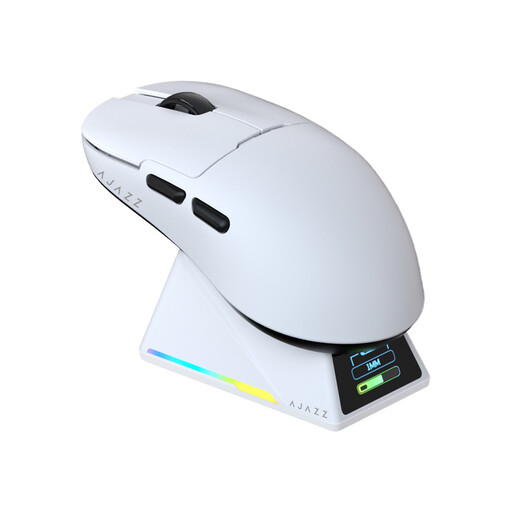
Why it suits this profile: The combination of Bluetooth, 2.4GHz and USB-C is ideal for gamers who switch between a PC, laptop and everyday office work.
You are not dependent on a single connection type. The polling rate and sensor specifications are listed, but the practical benefit depends on the game, system and settings.
PAW3950 sensor, up to 42,000 DPI, 8K polling rate, 56 grams and a magnetic RGB charging dock according to the product information.
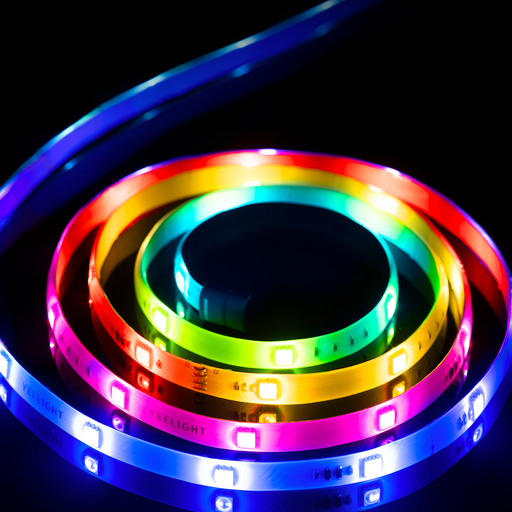
Why it suits this profile: The 1-metre extendable strip is practical when you want to light your desk, TV unit or monitor setup gradually.
The length and extendability are stated in the product name. Before purchasing, check how many sections you need and whether the desired controls work with your network.
RGBIC lighting, extendable by 1 metre and designed for app and voice control according to Yeelight’s product information.
We have put together a complete, up-to-date list of products that fully meet these strict selection criteria and the applicable European safety regulations.
That depends on your priorities. A basic setup can start with a keyboard, mouse and existing monitor. A wide monitor, wireless gaming mouse, smart RGB lighting and ergonomic gaming desk accessories will increase the budget. Start by buying the component that limits you most in everyday use, such as a screen that is too small or an awkward keyboard layout.
Yes, a gaming monitor for work and gaming can be useful for multiple windows, video editing and games with a wide field of view. However, check your desk size, connections and PC performance. With a 49-inch gaming monitor, a suitable monitor arm or sturdy stand is also important.
Lifespan depends on usage, construction, maintenance and wear parts. Wired models do not have a battery that loses capacity. For wireless products, check the stated battery life and whether use via USB-C is possible. Keep RGB LED strips free from sharp bends, and use the correct replacement parts for keyboards and mice when available.
