
Vandaag of morgen in huis

Kwaliteit gegarandeerd

Welkomstaanbiedingen ontgrendelen: GRATIS bezorging | Tot 80% korting | Gratis 30 dagen JoyPlus-proefperiode
Download de app
Buying a new gaming setup is a major investment. Whether you're building your first complete PC gaming setup or upgrading your current one, the options can be overwhelming. The market is flooded with products that promise the world but don't always live up to their price tag. Before you invest, it's wise to recognise the common pitfalls that can unnecessarily drive up costs.
Here are three marketing traps many people fall for:
Setting up a gaming room starts with the basics: your desk and chair. This is where you'll spend most of your time, so comfort and functionality are crucial.
A good ergonomic gaming chair is an investment in your health. Focus on the following specifications instead of just the aesthetics:
A gaming desk should be more than just a plank on legs. Stability is paramount.
Your monitor is your window to the gaming world. Its specifications directly define your gameplay experience. A curved gaming monitor can enhance immersion by filling your field of view more effectively.
Pay attention to these three core specifications:
Not every setup fits every user. Here are some products tailored to different profiles.
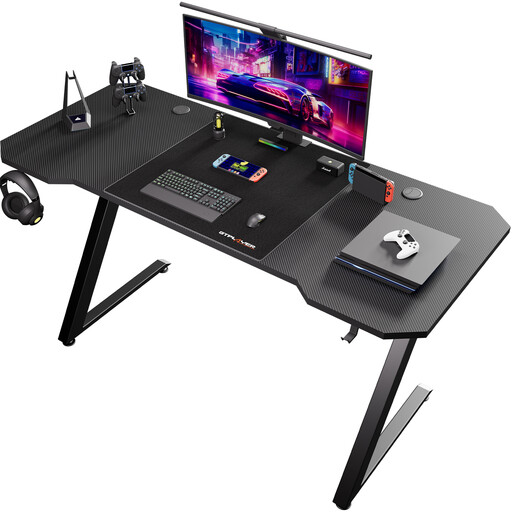
Why This Fits Their Persona: Ideal for those seeking a solid foundation without breaking the bank. The 120x60 cm size is perfect for a first-time, single-monitor setup and provides ample space for a mouse and keyboard.
This desk focuses on what truly matters: a sturdy frame and a functional surface. It avoids the pitfall of a wobbly 'gaming' desk by offering a robust construction.
Provides a stable base with a scratch-resistant carbon fibre surface and convenient extras like a headphone hook, all without a high price tag.
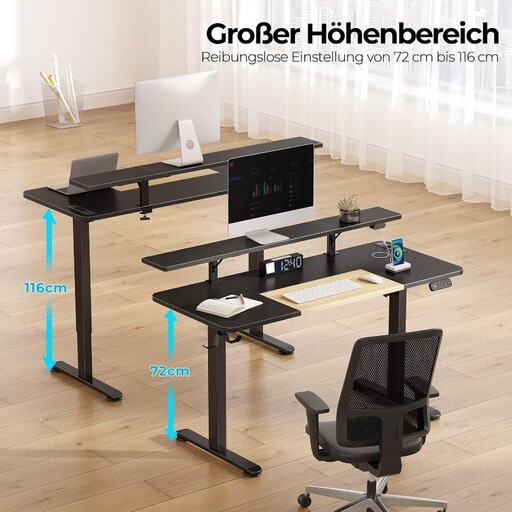
Why This Fits Their Persona: Perfect for those who use their desk for both work and gaming. The electric height adjustment makes it easy to switch between sitting and standing, improving posture during long days.
This is more than a desk with an 'ergonomic' label. The electric height adjustment is a tangible feature that contributes to a healthy posture, avoiding the trap of empty marketing buzzwords.
Electric height adjustment with a quiet motor. Built-in power outlets and USB ports keep your workspace tidy and all your devices charged.
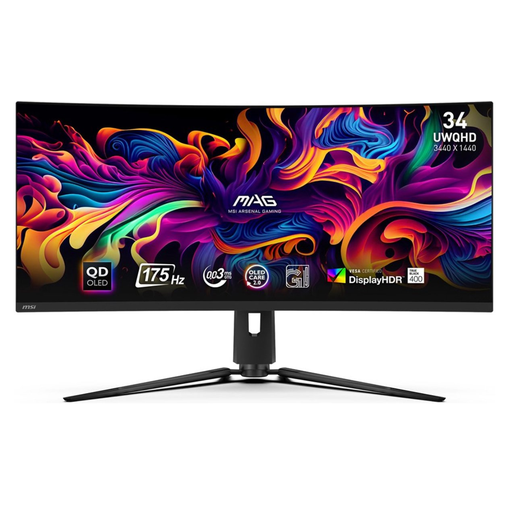
Why This Fits Their Persona: For gamers where every millisecond counts. The combination of a QD-OLED panel, 175 Hz refresh rate, and 0.03ms response time provides a noticeable advantage in fast-paced, competitive games.
This product focuses on pure performance rather than superfluous RGB frills. The specifications are geared towards speed and image quality, which directly contribute to a better gaming experience.
The QD-OLED panel delivers deep blacks and vibrant colours. The extremely low response time eliminates motion blur, which is crucial in shooters.
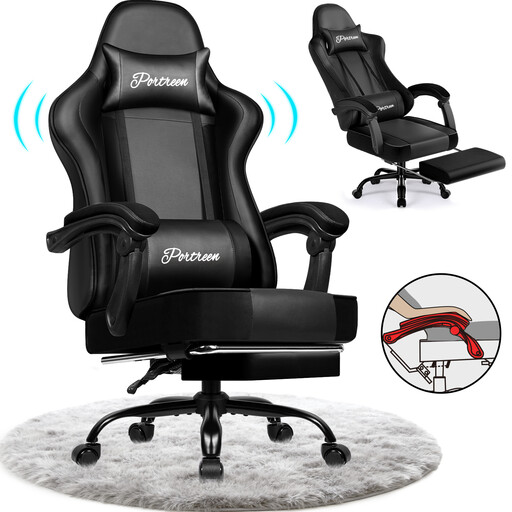
Why This Fits Their Persona: For those who prioritise comfort above all else during long gaming or work sessions. The retractable footrest and deeply reclining backrest also allow for relaxation.
This chair offers concrete, tangible comfort features instead of just an 'ergonomic' label. The BIFMA and SGS certifications mentioned by the manufacturer indicate a focus on safety and durability.
The backrest can recline up to 170 degrees, and the retractable footrest provides leg support. According to the manufacturer, the PU leather is water-repellent and scratch-resistant.
We have compiled a complete, up-to-date list of products that meet these selection criteria and comply with Dutch safety regulations.
For a comfortable single-monitor setup, a space of about 2 metres wide and 1 metre deep is recommended. This gives you enough room for a 120-140 cm desk and sufficient clearance for your chair. Always measure your available space before purchasing a gaming desk.
This depends on the games you play. For fast-paced, competitive games like shooters, a high refresh rate (144 Hz or more) is more important for a fluid experience. If you primarily play visually stunning, cinematic games, a higher resolution (1440p or 4K) and better colour accuracy will contribute more to the immersion.
Not necessarily. The term 'gaming' is mostly marketing. However, a good ergonomic gaming chair often combines the best features of both: the high backrest and design of a gaming chair with the certified, adjustable ergonomics of a quality office chair. Always look at the specific features, such as adjustable lumbar support, 4D armrests, and material, instead of relying blindly on the name.
