Who plays in a shared bedroom?

Playing while your roommate sleeps

If someone else is sleeping in the same room, audible cooling, clear ventilation and lighting are all important considerations. Redux Gaming explains why the space around the air intake and exhaust matters. Exactly how much noise a PC makes depends on the computer and the conditions you play in.

Playing a range of strategy games

If you play other strategy games as well as tower defence, it’s worth checking the requirements of each game and your preferred screen settings before choosing a PC configuration.

Short on desk space

If your PC needs to fit in a shared bedroom, compare the dimensions of the exact configuration with the space available. Remember to leave room for cables and ventilation openings too; the case size alone won’t tell you how noisy or suitable it is.

What should you look for?

Mini PC

Choose this option if: you mainly want to save desk space and the exact configuration suits the games you’ve chosen.

Bear in mind: different versions may have different processors. Check whether memory, storage and an operating system are included too.

Compact gaming desktop

Choose this option if: you want a gaming desktop that will fit on or beside a small desk.

Bear in mind: a compact size doesn’t prove that the whole PC will be quiet while you’re gaming. Check whether the lighting can be switched off too.

Larger tower

Choose this option if: you have room for a larger case and want expandable memory or storage.

Bear in mind: check how much space the chosen configuration takes up. A claim about cooling won’t tell you how much noise the PC makes when you’re playing your game.

What to consider What should you check? Who should prioritise this?
Noise and lighting Look for information about noise while gaming; check how the fans and lighting are controlled, and keep the air vents clear. If I’m playing while someone else is sleeping in the bedroom, I want to minimise distracting noise and light. Around 36% of consumers put quiet operation and low levels of light first.
Suitability for your games Make a note of the games, screen settings and programmes you use at the same time, then compare these with the full configuration of the exact model. I want to play my own tower defence games and any other strategy games at the settings I use. Around 29% of consumers put suitability for their games first.
Space and positioning Measure the available space, including room for cables and airflow, and compare it with the dimensions of the specific configuration. If there’s not much room on my desk in a shared bedroom, I want to know that the PC will fit without blocking the vents. Around 21% of consumers put available space first.
Configuration and support Check which components and operating system are included, and read the support and warranty terms for the exact offer. With a mini PC, I want to know in advance whether I’ll need to arrange memory, storage or an operating system myself. Around 14% of consumers prioritise a complete configuration and support.

Avoiding common buying mistakes

  • Assuming a compact PC is a quiet PC

    The dimensions or a description of the cooling won’t tell you how much noise the complete configuration makes while you’re playing your game.

    Where possible, look for noise measurements under load and check how much clearance is needed around the air vents. Consider the lighting separately from fan noise.

  • Choosing a mini PC version without checking what’s included

    A listing that mentions several processor options may cover different configurations. With a barebone, memory, storage and an operating system may not be included.

    Check the selected version and the components included with that configuration, rather than relying only on the product title or potential upgrades.

    With a barebone, you may need to arrange memory, storage and an operating system yourself.

  • Choosing a PC based only on the ‘gaming’ label

    The requirements of your games and the settings you want to use determine which configuration is right for you. You won’t automatically need a more powerful version for every tower defence game.

    First, make a note of the games you play and your screen settings. Then compare these with the full specifications of the exact model.

Brands and configurations to consider

Acer

The Nitro 20 N20-101-RPL is a compact desktop option. Its stated case dimensions can help you compare it with the space you have available.

  • For configuration DG.E5VEH.001, Acer Netherlands lists dimensions of 348 × 160 × 306 mm, 16 GB of memory and an RTX 5050.
  • These specifications don’t tell you how much noise the PC makes while gaming or how it performs with your specific games.

HP

The OMEN 16L TG03-0640nd is a compact gaming desktop configuration to consider if you’re looking for a PC with a dedicated graphics card.

  • For this configuration, HP lists a Ryzen 7 8700F, 16 GB RAM, 1 TB SSD and RTX 5060. HP says the front lighting can be customised.
  • A description of the cooling isn’t the same as a noise measurement. Check the exact configuration and whether you can set the lighting as you wish.

Lenovo

The Legion Tower 5 Gen 10 (30L AMD) is a tower option for anyone with enough room who values expandable memory or storage.

  • Lenovo describes expandable memory and storage within this series, and mentions air or liquid cooling.
  • A description of quiet cooling isn’t an independent noise measurement for every configuration or gaming workload.

MSI

The MAG Infinite Z 8B is a tower range to consider if you have more room for a case.

  • MSI lists a 25 L case and two M.2 slots for the range.
  • Processor, graphics card and power supply options vary. A mention of a possible graphics card doesn’t necessarily apply to every configuration, and the specifications don’t include a measurement of overall noise.

Gaming PCs at Joybuy

These Joybuy products include compact gaming desktops and larger towers. For each configuration, compare the components, the space available and the ventilation requirements with the games you play and your bedroom setup.

OMEN 16L Gaming Desktop TG03-0057nd C3YP0EA#ABH

OMEN 16L Gaming Desktop TG03-0057nd C3YP0EA#ABH

The compact 16-litre case may be a good fit if you have limited desk space. Leave the recommended clearance around the PC.

The listed configuration includes a Core Ultra 7 265F, RTX 5050, 16 GB DDR5 and a 1 TB SSD.

The product information specifies at least 10 cm of clearance all around and warns against using the PC in an enclosed cabinet.

View at Joybuy

Shark Ultimator R700 Gaming PC RTX5070/R7/16GB/1TB, Powered by MSI

Shark Ultimator R700 Gaming PC RTX5070/R7/16GB/1TB – Powered by MSI

This larger tower may suit a setup with room for a bigger case. Check the dimensions and make sure there’s enough room for airflow where you plan to put it.

The listed configuration includes a Ryzen 7 7800X3D, RTX 5070, 16 GB DDR5, 1 TB NVMe storage and Windows 11 Home.

The product information mentions a 360mm liquid cooler and customisable ARGB lighting via MSI Center. These features aren’t a measure of noise levels.

View at Joybuy

SHARK Max Bite R502 Gaming PC, Ryzen 5 5500, Radeon RX 9060 8GB, 16GB DDR4, 500GB NVMe SSD and Windows 11 Home

SHARK Max Bite R502 Gaming PC – Ryzen 5 5500, Radeon RX 9060 8GB, 16GB DDR4, 500GB NVMe SSD, Windows 11 Home

The SHARK WAVE MINI case described may be worth considering if you’re looking for a desktop setup for a small space. Keep the vents clear.

The listed configuration includes a Ryzen 5 5500, Radeon RX 9060 8GB, 16 GB DDR4, 500 GB NVMe storage and Windows 11 Home.

The product information calls for sufficient airflow around the PC and warns against blocking the vents.

View at Joybuy
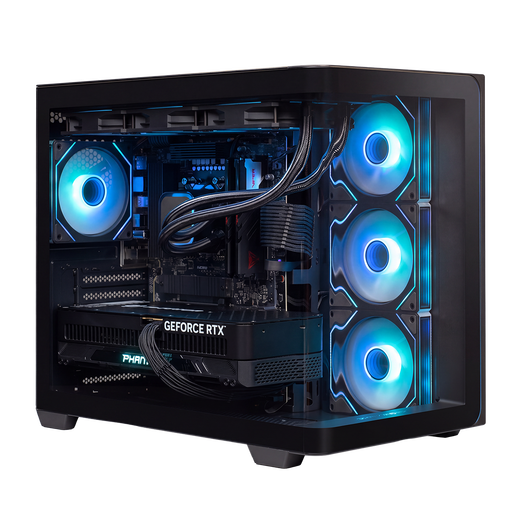
Almighty Shark Speldator R900 Gaming PC RTX5090/R9/32GB/2TB

Almighty Shark Speldator R900 Gaming PC RTX5090/R9/32GB/2TB

This tower needs a spot with enough room and clear airflow. Check this before deciding where to set up your PC.

The listed configuration includes a Ryzen 9 9900X3D, RTX 5090, 32 GB DDR5, 2 TB NVMe storage and Windows 11 Home.

The product information mentions a 360mm liquid cooler and a 1200 W power supply. Compare the configuration with the requirements of your games and settings.

View at Joybuy
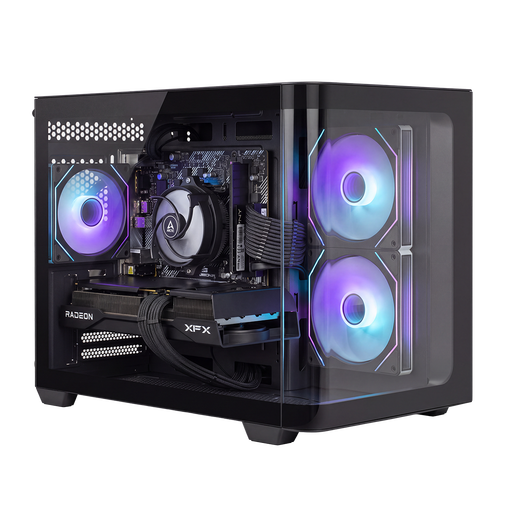
Shark Bloodlust R700 Gaming PC RX9070/R7/16G/1TB

Shark Bloodlust R700 Gaming PC RX9070/R7/16G/1TB

This tower may suit a setup where upgrade options matter. Check the space available and leave at least 10 cm of clearance around the vents.

The listed configuration includes a Ryzen 7 processor, Radeon RX 9070, 16 GB of memory, 1 TB of storage and Windows 11 Home.

The product information mentions expandable memory and support for additional storage drives. Keep the vents clear.

View at Joybuy

Frequently asked questions

Do I always need a powerful dedicated graphics card for tower defence?

No, not just because of the genre. Start with the games and screen settings you use, then compare them with the PC’s full configuration. The game pages from Valve, Ninja Kiwi and Numantian Games don’t set a general hardware threshold for all tower defence games.

Can I put a small PC in a closed cabinet to make it quieter?

Don’t put a PC in a closed cabinet if that blocks the air intake or exhaust. Redux Gaming points out that an enclosed space can restrict cooling. Follow the installation instructions for your chosen PC, and assess the noise where you plan to play.

How can I keep an eye on cooling without disturbing the room?

Keep the airflow paths clear and follow the manufacturer’s maintenance instructions. If your PC or fan controls support speed settings, check these without disabling essential cooling. be quiet! lists PWM control as an option when supported by the relevant controls.

What are my rights if the PC I bought online is faulty?

In the Netherlands, the seller must provide a solution if a product is faulty, according to the Dutch Government. There’s no fixed statutory warranty period, and a manufacturer’s warranty doesn’t replace your legal rights. For a standard online consumer purchase, you’ll also often have 14 days to change your mind, with some exceptions.

Can I have my old computer taken away when I buy a new one?

The Dutch Government describes a free one-for-one take-back scheme for similar appliances bought by consumers, including online purchases. Agree with the seller how to hand over your old computer.
