What should you look for when buying?
Match the PC to the simulator and settings you actually plan to use, and check that the display and controls will work with your setup.
| What to consider |
What should you check? |
Who is this important for? |
| Simulator performance |
Compare the processor, graphics card and video memory of the exact model with your simulator’s requirements and settings. For iRacing, the mid-range profile includes a six-core CPU and at least 6 GB of dedicated video memory; this doesn’t guarantee a particular frame rate. |
If I want to set up my chosen simulator to run smoothly, I look at the complete specification, not just the graphics card model name. Around 36% of consumers make simulator performance their top priority. |
| View on a single monitor |
Check that the PC has an output compatible with your monitor. To set up the cockpit view, measure your screen width and the distance between your eyes and the screen, as described by iRacing Support. |
I want to see the pit-lane entry and the information I need on my existing screen, so the view needs to suit my seating position. Around 29% of consumers prioritise visibility and information on a single monitor. |
| Pit controls and connections |
Make a note of the monitor and driving controls you use, then check that the required ports are available. Check which pit functions are available for each car and session in your chosen simulator. |
If I want to practise pit-lane entries, I need to be able to set up my controls to suit me and brake in time myself. Around 21% of consumers focus mainly on controls and connections. |
| Software and expandability |
Compare the model with the software you plan to use. If you’re planning ahead, check whether the exact tower has room for extra memory or storage. |
I want to know what my chosen simulator and any future upgrades require before choosing a configuration. Around 14% of consumers prioritise software needs and room for expansion. |
Gaming PCs at Joybuy
These gaming desktops are options to compare with your racing simulator’s requirements and single-monitor setup. Specifications alone don’t predict frame rate or make pit-lane entries easier.
 No image available
Shark Max Bite R500 gaming PC
Compare this configuration with your chosen simulator’s requirements and the settings you plan to use.
Ryzen 5 5500; RTX 5060 with 8 GB of video memory; 16 GB RAM; 500 GB NVMe storage; Windows 11 Home.
View at Joybuy
 No image available
RGB gaming PC, RTX 5060 and Ryzen 5
Compare the listed configuration with your simulator’s requirements and check that the storage suits your needs.
6-core Ryzen 5 5500; RTX 5060 with 8 GB of video memory; 16 GB RAM; 480 GB M.2 SSD; Windows; Wi-Fi adapter included.
View at Joybuy
 No image available
Panoramic gaming PC with Ryzen 7 5700X
Compare the graphics configuration and storage with your simulator’s requirements; the specifications don’t guarantee how it will perform for you.
Ryzen 7 5700X; RTX 5060 Ti with 8 GB of video memory; 16 GB DDR4 RAM; 480 GB NVMe PCIe SSD.
View at Joybuy
 No image available
Shark Max Bite R502 gaming PC
Use the listed components to compare with the system requirements of your chosen racing simulator.
Ryzen 5 5500; Radeon RX 9060 with 8 GB of video memory; 16 GB DDR4 RAM; 500 GB NVMe SSD; Windows 11 Home.
View at Joybuy
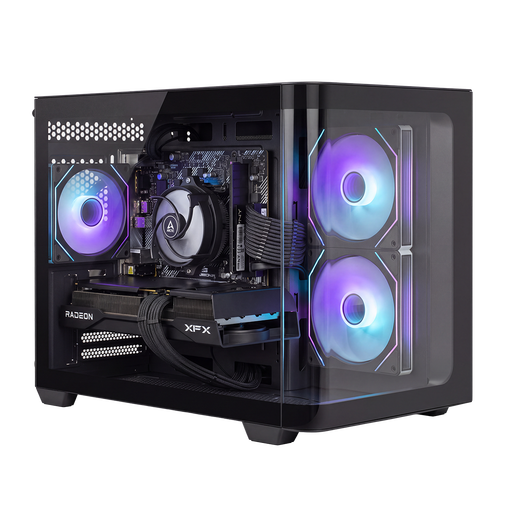 No image available
Shark Bloodlust R700 gaming PC
Compare this model with your simulator and monitor; the listed components alone don’t show which settings will work for you.
Radeon RX 9070; Ryzen 7; 16 GB memory; 1 TB SSD.
View at Joybuy
Frequently asked questions
Do I need a very powerful PC straight away to practise pit-lane entries in iRacing?
Not just for this purpose. iRacing distinguishes between minimum graphics settings in test mode, a mid-range profile for different sessions at medium settings, and a profile for higher settings. Compare the exact PC with the relevant profile and your monitor setup; system requirements don’t guarantee a particular frame rate for you.
How do I set up a single monitor to suit my seating position?
As advised by iRacing Support, measure the distance from your eyes to the screen and the screen width from your usual racing position, then use these measurements to adjust the display settings. Also check which information displays you need while practising.
Will the automatic pit limiter brake for me?
No. According to iRacing Support, you need to slow down to below the pit-lane speed limit yourself before entering the pit lane. The automatic limiter depends on the session; iRacing mentions test sessions and certain official sessions.
What software requirements should I consider for iRacing?
iRacing describes membership as the first purchase and says that the cars and tracks for the ranked Rookie series are included. Check what additional content or membership renewal you need for the series you want to race in.
How can I check whether a gaming PC is suitable for my racing simulator?
Compare the full specification of the exact model with the system requirements and usage profile of your chosen simulator. Also check the connection for your monitor, and bear in mind that system requirements don’t guarantee a particular frame rate on your screen.


