If you’re using extra monitors for separate windows, first check that the graphics card has enough suitable ports. If you want one continuous game image, also check that your simulator and screen layout support this display mode. For example, AMD describes three 1920 × 1080 screens as a single 5760 × 1080 desktop, but this doesn’t guarantee in-game performance. Then compare the specifications of the exact PC configuration with the requirements of your simulator and monitors.
Who is this guide for?
Building a wide ship’s bridge
You want the simulator to span multiple screens. First, check that the game, graphics card and chosen screen layout work together to support the wide display you want. AMD and NVIDIA each describe separate display technologies for this.
Playing with separate secondary screens
You want to play the simulator on one screen and use the others as separate workspaces. Microsoft Support explains how to arrange multiple displays in Windows; you should also check that the PC can connect all the monitors you need.
Buying an upgradeable desktop
You want to allow for possible upgrades later on. For example, Lenovo lists four RAM slots for the Legion Tower 5 Gen 8 (AMD), but always check upgrade options for the exact configuration.
What should you look for?
Separate screens
Choose this setup if: you want to keep the game on one monitor and use the others for separate windows.
Trade-off: connecting several screens doesn’t automatically create a wide game image. Microsoft Support describes arranging screens in Windows as a separate setting.
One wide game image
Consider this setup if: you want the simulator to span several monitors and the game supports the display mode you want.
Trade-off: AMD Eyefinity and NVIDIA Surround use settings to combine screens. Check that the total resolution, game interface and screen bezels work for your needs.
Microsoft Support explains how to arrange separate screens, while AMD and NVIDIA also document technologies for combining displays. So start by deciding which display mode you want to use.
| Buying concern |
What to check |
Who it matters more to |
| Ports and screen layout |
Count your monitors and check the outputs on the exact graphics card, as well as the display mode you want. |
I want to use my monitors as separate screens and make sure everything can be connected in advance. Screen connectivity is the main buying concern for around 36% of consumers. |
| Graphics demands of a wide image |
Note the combined resolution and check that the game supports your chosen display mode. |
If I want one wide game image, I want to take the total resolution and my simulator’s settings into account. A panoramic display is the main buying concern for around 29% of consumers. |
| Simulator requirements |
Note the game title and compare its current requirements with the processor, graphics card, memory and available storage. |
The simulator I actually want to play comes first for me; I’ll choose the PC afterwards. Around 21% of consumers prioritise the requirements of the game they play. |
| Upgradability and purchase costs |
Check upgrade options and service terms for the exact model. |
I want to be able to make changes later without paying for unnecessary extras. Around 14% of consumers are most concerned about upgradability and additional costs. |
What to watch out for when buying
-
Confusing the number of connected monitors with a wide game image
Separate Windows displays and a combined display using Eyefinity or Surround are different setups. So, a PC with several display outputs doesn’t guarantee that your simulator will span all your monitors.
Before you buy, decide which display mode you want, then check the connections, graphics card and support for your specific simulator separately.
-
Assuming every configuration has the same product-line specifications
Configurable desktop ranges can include different processors, graphics cards and ports. A description of a product range doesn’t automatically tell you what’s inside the specific PC you’re looking at.
Compare the full model or part number with the specifications for that exact configuration.
-
Assuming there’s a fixed two-year statutory warranty
According to the Dutch government, the Netherlands has no fixed statutory warranty period; your legal rights don’t depend on buying an additional warranty package.
First, understand your statutory rights, then check what extra cover or service a paid package actually provides.
Brands worth comparing
HP OMEN
The OMEN 35L GT16-1689nd is a specific ready-made gaming desktop you can compare at model level.
- HP lists a Ryzen 7 9700X, 32 GB RAM, 2 TB SSD and RTX 5080 with 16 GB for this configuration.
- These specifications aren’t measured results in a ship simulator. If you’re looking at a different configuration, check the connections and components again.
Acer Predator
The Predator Orion 5000 PO5-660, part number DG.E4EEH.005, is another model with specifications you can compare individually.
- Acer lists a Core Ultra 7 265F, 32 GB RAM, 2 TB SSD and RTX 5070 with 12 GB for this configuration.
- Check that the complete PC supports the number of monitors you want, with suitable connections.
Lenovo Legion
The Legion Tower 5 Gen 8 (AMD) is a configurable product range to compare with fixed desktop configurations.
- Lenovo describes features including four RAM slots and configurations with a Ryzen 7000 processor and an RTX 40 Series graphics card.
- The product-range description doesn’t confirm which graphics card, outputs or upgrade options are available on a specific configuration.
MSI MAG Infinite
The MAG Infinite Z 8B is another desktop range you can use to compare configurations at model level.
- MSI lists options up to a Ryzen 9000 processor and RTX 5070 Ti.
- Specifications vary by SKU. Check the exact configuration, connections and setup you’re considering.
Joybuy products to compare
This selection includes gaming desktops and a compact PC to compare for a multi-monitor setup. For each configuration, check your simulator’s requirements, the screen resolution you want and the connections you’ll need.
 No image available
Shark Ultimator R700 Gaming PC
Compare this gaming desktop with your simulator’s requirements and the number of screens you want to use.
Ryzen 7 7800X3D, RTX 5070, 16 GB DDR5 and 1 TB NVMe storage.
View at Joybuy
 No image available
Shark Max Bite R501 Gaming PC
Compare this configuration with your simulator’s requirements and check that the connections suit your screen layout.
Ryzen 5 5500, RTX 5060, 16 GB DDR4 and 1 TB NVMe storage.
View at Joybuy
 No image available
Shark Bloodlust R700 Gaming PC
Compare the listed components with the game and screen setup you actually want to use.
Ryzen 7, RX 9070, 16 GB memory and 1 TB storage.
View at Joybuy
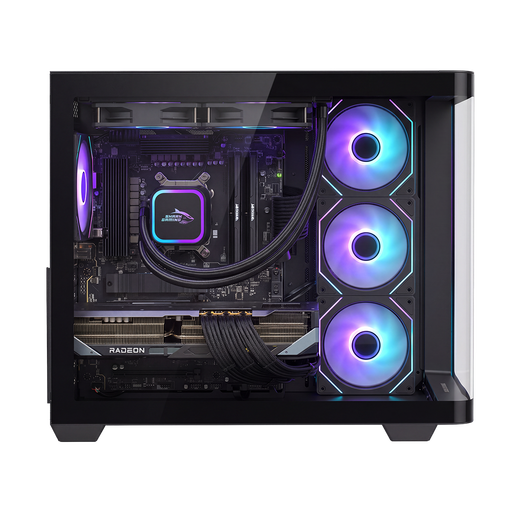 No image available
Shak RGBeast R700 Gaming PC
Check that the exact configuration meets your simulator’s requirements and suits the screen layout you want.
Ryzen 7 9800X3D, RX 9070 XT with 16 GB graphics memory, 16 GB system memory and 1 TB storage.
View at Joybuy
 No image available
FIREBAT Mini PC A6
The product name lists support for three screens; check that the connections and display mode suit your setup.
Ryzen 7 7735HS, Radeon 680M, 16 GB RAM, 512 GB SSD and dual M.2 slots.
View at Joybuy
Frequently asked questions
Can I connect three screens and assume the simulator will automatically play across all of them?
No. Connecting several screens doesn’t automatically create one wide game image. Windows can arrange screens separately, while combined displays use dedicated settings such as AMD Eyefinity and NVIDIA Surround. Also check that your simulator and the exact graphics card are suitable for the screens you want to use.
How do I set up my screens after installation?
Use the Windows display settings to identify connected screens and arrange them in the right order. If you want one wide image, then set up the relevant AMD or NVIDIA feature and check that the simulator supports that display mode.
Do I need to buy an extra warranty for a gaming PC in the Netherlands?
No, you don’t need an extra package to have statutory rights. According to the Dutch government, the Netherlands has no fixed statutory warranty period, so compare a paid package based on the additional cover or service it actually provides.
Do I have a cooling-off period when I buy a gaming PC online?
For applicable distance sales to consumers, the Dutch government says you generally have 14 days to change your mind, subject to exceptions. Check the seller’s information for the terms that apply to your purchase.


