
Pilot with limited space
You want to place a PC next to or underneath a compact cockpit and need to weigh up case size, cable space and cooling against expandability.


Start with the requirements of your flight simulator and the screen setup you want to use, then measure the space available for your PC, cables and airflow. A compact desktop may suit a single-screen cockpit, while VR or multiple screens call for extra checks on connections, the exact graphics configuration and available space. Published system requirements do not guarantee a particular frame rate.
You want to place a PC next to or underneath a compact cockpit and need to weigh up case size, cable space and cooling against expandability.
You’re choosing mainly based on your simulator and screen requirements, without setting aside space for a VR setup just yet.
You want a wider field of view, so you need to assess your intended headset or screens, graphics card connections and cockpit space together.
A good fit if: space is your main constraint and you want to get started without VR or an elaborate screen setup.
Bear in mind: measure the case and check the connections and expandability for the exact configuration.
A good fit if: 32 GB RAM and 12 GB of graphics memory matter more to you than having the smallest possible case; the Lenovo Legion T5 90YJ008KMH is an example configuration, according to Lenovo.
Bear in mind: allow space around the larger case and check that the connections suit your screen and controls.
A good fit if: VR or multiple screens are part of your concrete plans and your cockpit has room for a tower.
Bear in mind: according to MSI, the MSI MPG Infinite Z3 X3D 9NVRR7-848EU measures 235,1 × 481,23 × 485 mm; having the right connections alone does not confirm that your setup will perform well.
A good fit if: you want to tailor the RAM, graphics card, cooling or ports to your simulator and cockpit controls in advance.
Bear in mind: check the final parts list and dimensions; configurations can vary.
| What to consider | What should you check? | Who should pay particular attention? |
|---|---|---|
| Space and airflow | Measure the space and check the case dimensions, room for cables and ventilation. | If I want to put a PC in a compact cockpit, it needs to fit without cables or air intakes getting trapped. Around 27% of consumers put available space first. |
| Simulator requirements | Compare the full PC configuration with the requirements of your chosen simulator and settings. | I want to match my mountain flights to the software I play, not just a general label such as ‘flight-sim PC’. Around 27% of consumers give the simulator’s requirements top priority. |
| VR and multiple screens | Check the exact graphics card outputs and the requirements of your headset or screens. | If I’m planning VR or multiple screens, I want to know in advance whether the connections and chosen configuration will work together. Around 20% of consumers put this setup first. |
| Cockpit controls | Make a list of your devices and check compatibility, available ports and cable routes. | I want to connect my planned flight controls and keep the cables accessible in a cramped cockpit. Around 13% of consumers start with the controls and connections. |
| Complete setup | Check which components are included and which you need to choose separately or may want to add later. | If I’m planning the PC and cockpit components together, I want to know exactly what the chosen configuration includes. Around 13% of consumers make the complete setup their top priority. |
Microsoft Flight Simulator 2024 lists 16 GB RAM as the minimum, 32 GB as recommended and 64 GB as the ideal specification. These are system requirement levels, not frame-rate measurements for mountain routes; X-Plane 12 has its own published requirements.
The case depth and height, connections and airflow all need to work in your actual setup. According to MSI, the MSI MPG Infinite Z3 X3D 9NVRR7-848EU measures 481,23 mm deep.
Measure before you buy and compare the dimensions with the exact configuration, not just a product photo or the name of a product range.
A poorly suited space may mean you need to rearrange the case or change how the cables are routed.
Microsoft distinguishes between minimum, recommended and ideal specifications for Flight Simulator 2024. According to HP, the HP OMEN 16L TG03-0640nd has 16 GB RAM, while Microsoft recommends 32 GB.
Compare the full PC with your simulator, screen and settings; system requirements are not FPS measurements.
If your personal requirements are higher, you may need to upgrade the memory or graphics card later.
Configurations vary, and a headset’s requirements may be higher than the simulator’s minimum requirements.
Check the full model code, the graphics card outputs and the requirements of your chosen headset or screens.
You may need a different PC configuration, headset setup or connection solution.
The OMEN 16L is a compact, ready-made desktop range. For the TG03-0640nd, HP lists a Ryzen 7 8700F, 16 GB RAM, 1 TB SSD and RTX 5060 with 8 GB of graphics memory, among other specifications.
According to Lenovo, the Legion Tower 5 Gen 10 configuration 90YJ008KMH comes with a Ryzen 7 7700X, 32 GB RAM, 1 TB SSD and RTX 5070 with 12 GB of graphics memory.
According to MSI, the MPG Infinite Z3 X3D 9NVRR7-848EU is a tower with a Ryzen 7 9800X3D, 32 GB RAM and RTX 5070 Ti with 16 GB of graphics memory.
The ROG NUC 16 range is worth exploring if a mini PC form factor is important to you. ASUS lists both vertical and horizontal placement options, with configurations up to an RTX 5080 Laptop GPU.
Twente PC offers configurable flight-sim desktops, with options to choose components such as the graphics card, memory and cooling.
This selection includes desktops for different space and screen requirements, plus a cockpit accessory for a simulator setup.
 No image available
A roomier desktop to consider if you have space for a tower and are looking for a configuration for multiple screens.
The product information lists 32 GB DDR5, a 1 TB SSD and an RTX 5070. It also mentions support for up to four displays; check that the connections suit your screens.
Allow for the space taken up by a 30-litre tower and the ventilation it needs.
 No image available
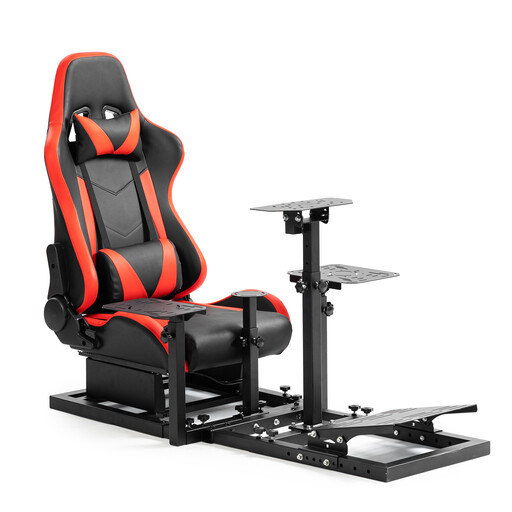
This is a cockpit accessory, not a gaming PC; consider it only if you’re also putting together the physical simulator setup.
The product name lists compatibility with Logitech G29, G923, Fanatec CSL-DD and Thrustmaster T300. The steering wheel, pedals, handbrake and joystick are not included.
 No image available
A mini PC to consider if a small form factor is important; check the simulator requirements before deciding whether this configuration will suit your settings.
The product name lists 16 GB RAM, a 512 GB SSD, two M.2 slots, support for three displays and Wi-Fi 6. Compare the listed components with the requirements of your chosen simulator and screen setup.
Not as a general requirement. Microsoft lists 16 GB as the minimum, 32 GB as recommended and 64 GB as the ideal specification for Flight Simulator 2024. Choose based on your software and setup; these categories do not guarantee a specific frame rate.
Yes, you can start with a basic setup. Check which controls you want to use and measure the space for the PC, cables and airflow before choosing a desktop.
Compare the requirements of your chosen simulator with those of your specific headset. Laminar Research warns that VR hardware requirements for X-Plane may be higher than its own VR minimums. A general graphics card name does not confirm that your setup meets those requirements.
Online consumer purchases generally come with a statutory 14-day cooling-off period after delivery, subject to exceptions described by ACM ConsuWijzer. You are also entitled to a product that is fit for purpose. The Dutch government states that there is no fixed statutory warranty period in the Netherlands; if a product is faulty, the retailer is your point of contact.