
Player with an existing monitor
You want to choose a PC that suits the resolution of your single monitor and the simulation you actually play. The number of screens alone isn’t a performance requirement.


Start with the exact game and your monitor’s resolution: using a single screen doesn’t, by itself, determine how much graphics processing power you need. Compare the game’s requirements and your preferred settings with the PC’s full specification. The developer’s announcement for Kerbal Space Program 2 linked the minimum specification to 1080p on low settings and the recommended specification to 1440p on high settings. Don’t automatically apply those requirements to the original Kerbal Space Program or another simulation.
You want to choose a PC that suits the resolution of your single monitor and the simulation you actually play. The number of screens alone isn’t a performance requirement.
You want to check that the graphics card and other components are suited to your preferred resolution and settings. The developer’s announcement for Kerbal Space Program 2 distinguishes between 1080p on low and 1440p on high.
You want to know the memory, storage and upgrade options for the exact desktop configuration, rather than relying on the product line name alone.
First, note down the game title, monitor resolution and settings you want. Then use this information to assess the components and connections on a specific PC configuration.
| What to consider | What should you check? | Who is this important for? |
|---|---|---|
| Game performance | Look up the requirements for the exact title and version, then compare them with the PC’s processor, graphics card and RAM. | If I want to avoid an unnecessarily powerful configuration, I start with the game I actually play. Around 40% of consumers would say the requirements of the exact game are the main deciding factor. |
| Compatibility with your monitor | Check the resolution, preferred settings and monitor input against the video outputs on the exact desktop configuration. | With one existing monitor, I want the PC to suit its resolution and available input. Around 30% of consumers would prioritise connectivity and monitor compatibility. |
| Future upgrades | Check the available memory slots, storage bays and dimensions of the specific configuration. | If I want to add memory or storage later, I check the upgrade options for the full model number. Around 20% of consumers would consider upgradability their main buying concern. |
| Purchase and after-sales support | Check what the offer includes, who the seller is, and what support and additional warranty are available. | When buying, I want to know exactly what I’m getting and who to contact if there’s a fault. Around 10% of consumers would give most weight to the purchase and after-sales support. |
Kerbal Space Program and Kerbal Space Program 2 are different games. The requirements listed for Kerbal Space Program 2 therefore don’t automatically apply to another spaceflight simulation.
First, note down the title and version, your monitor’s resolution and the settings you want to use. Only then should you compare PC configurations.
Manufacturers publish specifications for specific model numbers. For example, with the Acer Predator Orion 3000, ‘up to an RTX 5070’ refers to the maximum configuration, not the graphics card in every configuration.
Check the full model number and the components actually listed in the offer before comparing models.
According to the Dutch government, there is no fixed statutory warranty period in the Netherlands, so a manufacturer’s warranty doesn’t, by itself, tell you what your statutory rights are.
Keep your proof of purchase and check your rights with the seller if something goes wrong.
The MPG Infinite Z3 X3D is worth considering if you’re looking for a ready-to-use tower with published component and upgrade information.
The OMEN 35L is an option to compare if you’re looking for a gaming desktop with published information about cooling and upgrades.
The Legion Tower 5 offers another specific tower configuration to compare with your chosen game’s requirements.
The Predator Orion 3000 may be worth considering if you need to factor in the space available for a desktop case.
These Joybuy products are ready-to-use gaming desktops. Compare the listed components of the configuration you choose with your game’s requirements, your settings and your monitor’s resolution.
 No image available
A complete desktop configuration to compare with the requirements of your chosen simulation.
Ryzen 5 5500, RTX 5060 and 16 GB DDR4.
500 GB NVMe storage and Windows 11 Home.
 No image available
A ready-to-use desktop to compare with the requirements of your chosen game and monitor.
Ryzen 5 5500, RTX 5060 and 16 GB DDR4.
1 TB NVMe storage and Windows 11 Home.
 No image available
The listed components give you specific details to compare with the requirements of your chosen simulation.
Ryzen 5 5500, RTX 5060 and 16 GB DDR4.
480 GB M.2 PCIe 4.0 storage, four ARGB fans and a USB Wi-Fi adapter included.
 No image available
Compare the listed processor and graphics card with your game’s requirements and the settings you want.
Ryzen 7 5700X, RTX 5060 Ti with 8 GB of graphics memory and 16 GB DDR4.
480 GB NVMe SSD and a USB Wi-Fi adapter included.
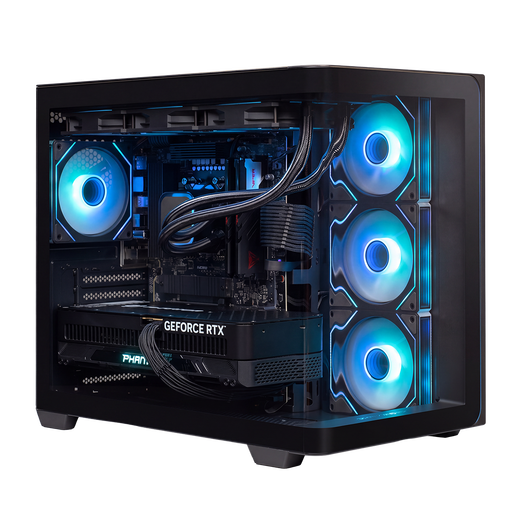 No image available
A configuration with the listed components to weigh up against the requirements and settings of your chosen game.
Ryzen 9 9900X3D, RTX 5090 with 24 GB of graphics memory and 32 GB DDR5.
2 TB NVMe SSD, Windows 11 Home, 360mm liquid cooler and 1200W power supply.
No, the number of monitors doesn’t determine that on its own. Look at the exact game, resolution and settings you want; the developer’s announcement for Kerbal Space Program 2 gives 1080p on low and 1440p on high as different reference points.
Compare your monitor’s input with a video output on the exact desktop configuration. MSI lists HDMI and DisplayPort in the graphics specifications for the MPG Infinite Z3 X3D 9NVRR7-848EU; check the connections on every other model separately.
Check the available slots and storage bays for the full model number. MSI publishes upgrade information for the 9NVRR7-848EU, and HP describes how easy it is to upgrade a specific OMEN 35L configuration; this information doesn’t automatically apply to every model from these brands.
According to the Dutch government, when you buy as a consumer you’re entitled to a product that meets reasonable expectations, with no fixed statutory warranty period in the Netherlands. For distance purchases, a 14-day cooling-off period applies in many cases; check the terms and any exceptions that apply to your purchase.
The Dutch government states that electronic equipment placed on the market in the EU must have a CE mark. Check the marking and product information for the specific PC; a general description of a product line is no substitute.