What should you look for when buying?
Choose your simulator first, then check the complete configuration against its system requirements. Finally, make sure the noise, controls and positioning will work in your room.
| What to consider |
What to look for |
Who should consider this? |
| Noise in the bedroom |
Ask for noise measurements of the complete PC under load and check how much ventilation space it needs. A sound-dampened case alone doesn’t tell you how loud the complete system is. |
I want to practise without the fan noise disturbing my roommate. Around 25% of consumers make noise their top priority. |
| Simulator requirements |
Microsoft Flight Simulator Support lists 32 GB RAM, 8 GB of video memory and 50 GB of storage for the recommended level of MSFS 2024. X-Plane lists 16–24 GB RAM or more for X-Plane 12; compare the requirements of the simulator you choose. |
If I choose MSFS 2024 or X-Plane 12, I want to compare the entire configuration with that simulator’s requirements. Around 25% of consumers prioritise system requirements. |
| Reading and operating instruments |
Check the video outputs on the exact PC, the connections on your monitor and the compatibility of any controls. Microsoft Flight Simulator Team lists extra peripherals and multiple monitors as PC options. |
I want to see the instruments clearly and only add controls that suit my setup. Around 20% of consumers make display and control options their top priority. |
| Available space |
Measure the space and leave room for cables and airflow. Lenovo lists a 30L version of the Legion Tower 5; ASUS lists a 58-litre case for the G700TF-07265F200W. |
When space is limited, I want to fit the tower and controls without blocking the ventilation openings. Around 15% of consumers prioritise space for their setup. |
| Complete setup |
Check what’s included with the PC and which software, monitors or controls you already own. Microsoft Flight Simulator Team describes such peripherals as optional additions. |
I want to start with a practical basic setup and only expand it later if needed. Around 15% of consumers make the overall setup their top priority. |
Gaming PCs and simulator equipment
This selection includes gaming desktops and a separate racing simulator cockpit. The cockpit doesn’t replace the PC; check that this type of equipment suits the controls you plan to use.
 Image unavailable
Lenovo Legion T5 30IAX10 Gaming Desktop
A ready-made desktop to compare with the requirements of the simulator you want to use. The listed components together determine whether the configuration is right for you.
Processor: Intel Core Ultra 7.
Memory: 32 GB DDR5.
Storage: 1 TB PCIe 4.0 SSD.
Graphics card: NVIDIA GeForce RTX 5070.
Other listed features: Wi-Fi 7, Windows 11 Home and Eclipse Black.
View on Joybuy
 Image unavailable
HP OMEN 35L Gaming Desktop GT16-0160nd C2FK7EA#ABH
A desktop from the OMEN 35L range. Check the full configuration against your simulator’s requirements and the space you have available.
According to the instructions for use, leave at least 10 cm of clear space, ensure good ventilation and don’t place the PC in an enclosed cabinet.
View on Joybuy
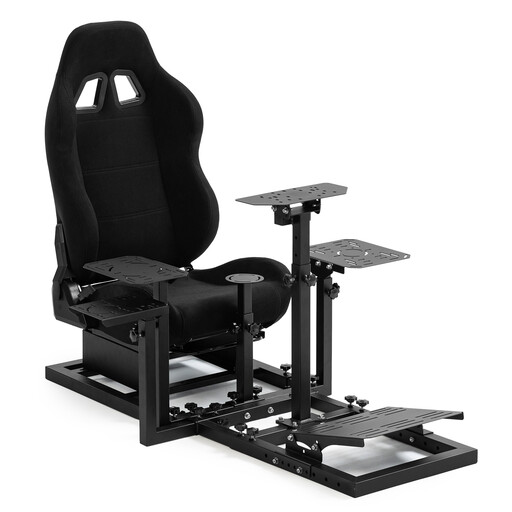 Image unavailable
Dardoo Flight Racing Simulator Cockpit
This is a cockpit with a seat, not a gaming PC. Check whether a racing simulator cockpit is suitable for the controls you want to use for instrument approaches.
The product title mentions Logitech, Fanatec and Thrustmaster, and excludes a steering wheel, pedals, handbrake and joystick.
View on Joybuy
Frequently asked questions
Do I need to buy an elaborate cockpit straight away for MSFS 2024?
No, you can start with a PC setup and add controls later. Microsoft Flight Simulator Team lists a stick or yoke, pedals and extra avionics among the possible additions. Check that the controls suit your way of practising and the space you have available.
Are the system requirements for MSFS 2024 the same as those for X-Plane 12?
No, compare the requirements of the simulator you actually want to use. Microsoft Flight Simulator Support lists 32 GB RAM and 8 GB of video memory for the recommended level of MSFS 2024; X-Plane lists 16–24 GB RAM or more. These are published system requirements, not a guarantee of a particular frame rate.
How can I make a gaming PC practical in a shared bedroom?
Measure the space for the PC and any controls, keep ventilation openings clear and check whether you can adjust the lighting and fan settings. For a reliable indication of noise, ask for a measurement of the complete PC under relevant loads; a sound-dampened case alone isn’t proof.
What are my rights if a PC bought in the Netherlands doesn’t work properly?
According to the Dutch government, you’re entitled to a product that works as it should, and you can contact the retailer if it doesn’t. The Netherlands has no fixed statutory guarantee period; a manufacturer’s warranty or an additional warranty comes on top of your legal rights. Many online purchases come with a 14-day cooling-off period.
Does practising on my gaming PC automatically count towards instrument training in the Netherlands?
No, don’t assume that it does. The Human Environment and Transport Inspectorate describes a separate qualification and approval framework for flight simulators and organisations that use them for training. Ask your training provider whether practising at home counts towards your course.


