
Hospital management sim player
If you mainly play a hospital management game, compare the PC’s full configuration with the requirements for that specific title. SEGA Support publishes the recommended system requirements for Two Point Hospital.


Start with the specific game and your monitor’s resolution; don’t choose a powerful gaming PC based on the label alone. For Two Point Hospital, SEGA Support recommends a Windows configuration that includes 8 GB RAM and a GeForce GTX 1060 with 3 GB or Radeon RX 580 with 4 GB. However, this doesn’t guarantee any particular performance on your screen. Extra capacity is mainly relevant if you also want to use more demanding games or other applications. For a dark room, assess screen comfort and any PC lighting separately.
If you mainly play a hospital management game, compare the PC’s full configuration with the requirements for that specific title. SEGA Support publishes the recommended system requirements for Two Point Hospital.
If you often play in a dark room, look for adjustable screen brightness, distracting reflections and visible case lighting. Arboportaal discusses reflections and glare from workplace lighting; this is something to bear in mind, not specific gaming advice.
If you also play other games or use several programmes at once, compare the PC’s exact processor, graphics card, memory and storage. Lenovo and Acer offer configurations that vary by model.
First, check the game’s system requirements and your monitor’s resolution. Then consider whether you need extra capacity for other uses and whether you can comfortably adjust your setup in a dark room.
| What to consider | What should you check? | Who is this important for? |
|---|---|---|
| Gaming performance | Compare the chosen game’s system requirements with the exact CPU and GPU models, RAM and operating system. | Do I mainly want to play a hospital management game and find out whether my current PC is up to the job? Around 40% of consumers prioritise suitable gaming performance. |
| Comfort in a dark room | Check whether you can adjust the screen brightness and any case lighting; look out for reflections too. | If I play in the evening, I want to be able to adjust the screen and visible lighting to suit my room. Around 30% of consumers prioritise comfort in a dark room. |
| Total purchase cost | Check what’s included with the exact offer, such as a monitor, keyboard and mouse. | I want to know in advance which components I still need, and avoid paying for hardware my chosen game doesn’t require. Around 20% of consumers prioritise the total cost. |
| Other uses and upgrades | Compare the RAM, storage and any upgrade options for the specific model. | If I play other games as well or use programmes at the same time, I want to know whether the configuration will suit me. Around 10% of consumers prioritise flexibility for other uses or future upgrades. |
The published system requirements for Two Point Hospital alone don’t justify buying a high-end gaming desktop.
First decide which title you want to play and compare the full configuration with its system requirements. Only choose extra capacity if you need it for other uses.
Case lighting won’t eliminate distracting reflections or make an uncomfortable screen setting more pleasant.
Assess the screen, the light sources in the room and the PC’s lighting controls separately.
Acer states that the keyboard and mouse aren’t included with the Acer Nitro N50-660 DG.E4FEH.003. This doesn’t automatically apply to other models.
Check what’s included with the exact variant and whether it comes with a monitor and input devices.
In the Netherlands, the legal guarantee depends on what you can reasonably expect from the product. The Authority for Consumers and Markets (ACM) says there’s no fixed general time limit.
Check any commercial warranty terms separately and refer to the Authority for Consumers and Markets for information about your legal rights.
Lenovo offers gaming desktops in its LOQ and Legion ranges. Assess the configuration of the specific model rather than relying on the range name alone.
HP describes Victus as a more compact gaming range and OMEN as a range offering more performance and flexibility. This is HP’s own description.
The Nitro 50 is a range of gaming desktops with a dedicated graphics card; the specific model determines which components and accessories you get.
MSI describes Codex as a desktop range for beginner gamers and also offers the Infinite range.
These gaming desktops are aimed at anyone who wants to play other games or use other applications as well as hospital management games. Compare the model’s specification with your own game requirements and room setup.
 No image available
An option to compare if you want to play other games as well as hospital management games. Check whether the configuration suits your games and monitor.
Intel Core i7-14700F, 20 cores, up to 5.4 GHz, NVIDIA GeForce RTX 5060 with 8 GB GDDR6, 16 GB RAM and a 1 TB SSD.
 No image available
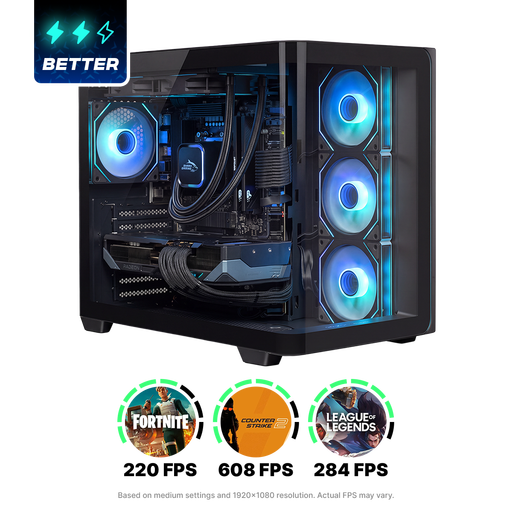
Compare this gaming PC if you play other games and are considering visible lighting for your setup; check whether the lighting is right for your dark room.
Ryzen 5 5500, RTX 5060 with 8 GB memory, 16 GB DDR4 and a 480 GB SSD. The product name states Windows 11 (not activated); bear this in mind when making your choice.
 No image available
A configuration to compare if you want to use other games or applications as well as hospital management games; choose components to suit your needs.
Ryzen 7 9800X3D, Radeon RX 9070 XT with 16 GB, 16 GB DDR5 and a 1 TB NVMe SSD. Windows 11 Home is listed.
Not based on the published system requirements alone. For Windows, SEGA Support recommends a configuration that includes 8 GB RAM and a GeForce GTX 1060 with 3 GB or Radeon RX 580 with 4 GB. Compare the full configuration of your current or intended PC with those requirements; they don’t guarantee any particular performance on your screen.
No. Two Point Hospital and Project Hospital are separate games. First decide which title you want to play and check that game’s requirements; don’t use the requirements for Two Point Hospital as a specification for Project Hospital.
Adjust the screen brightness to suit the room, watch out for reflections and decide whether visible PC lighting bothers you. Arboportaal discusses lighting, reflections and glare in workplaces; this information is something to bear in mind for your setup, not specific gaming advice.
According to ACM ConsuWijzer, when you buy a product online you generally have a statutory cooling-off period of up to 14 days after delivery; check whether an exception applies. You’re also covered by the legal guarantee if a product doesn’t meet what you can reasonably expect. The Authority for Consumers and Markets states that there’s no fixed general warranty period.