What should you look for?
Start with your game’s requirements, then assess the full specification. Finally, check that the PC will fit and has enough room for air to circulate.
| What to consider |
What should you check? |
Who should pay particular attention? |
| Noise while gaming |
Ask for a measurement or demonstration of the complete system under gaming load, and keep the air vents clear. |
If I play while my room-mate is asleep, I want to know how noisy the whole PC is during a long session, not just when it’s idle. Around 33% of consumers put gaming noise at the top of their list. |
| Game requirements |
Compare the processor, installed RAM, graphics card and operating system of the exact version with your game’s requirements. For Europa Universalis V, Paradox lists 16 GB RAM as the minimum and 32 GB as recommended. |
I want to know first whether the specification suits the grand strategy game I play; around 33% of consumers prioritise their game’s requirements. |
| Complete specification |
Check exactly what’s included, including RAM and operating system. Don’t compare only the series name or base specification. |
I want to assess the complete system before buying, even if the memory or software varies between versions. Around 20% of consumers focus mainly on the full purchase specification. |
| Space and airflow |
Measure the space available and check the dimensions and position of the air intake and exhaust on the exact model. |
If space is limited, I want a PC that fits without covering the air vents. Around 14% of consumers make ease of placement their top priority. |
Gaming PCs on Joybuy
These ready-to-use gaming PCs are for anyone who wants to compare the listed components with the requirements of their own grand strategy games.
 Image unavailable
Gaming desktop with Ryzen 7 7800X3D
The listed 32 GB DDR5 matches Paradox’s RAM recommendation for Europa Universalis V; check your game’s other requirements too.
Specifications: Ryzen 7 7800X3D, RTX 5080 with 16 GB, 32 GB DDR5 and 1 TB NVMe SSD. Windows 11 Trial is listed.
View on Joybuy
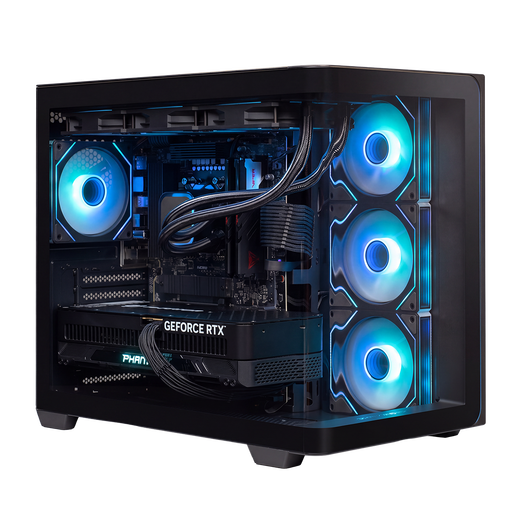 Image unavailable
Almighty Shark R900 gaming PC
The listed 32 GB DDR5 matches Paradox’s RAM recommendation for Europa Universalis V; compare the processor and graphics card with your game too.
Specifications: Ryzen 9 9900X3D, RTX 5090 with 24 GB, 32 GB DDR5 and 2 TB NVMe SSD.
View on Joybuy
 Image unavailable
AlmightyShark R700 gaming PC
The listed 32 GB DDR5 matches Paradox’s RAM recommendation for Europa Universalis V; check that the other components meet your game’s requirements.
Specifications: Ryzen 7 9800X3D, RTX 5090 with 24 GB, 32 GB DDR5 and 2 TB NVMe SSD.
View on Joybuy
 Image unavailable
ASUS ROG G700TF-07265F666W
The listed 32 GB DDR5 matches Paradox’s RAM recommendation for Europa Universalis V; compare the full specification with the requirements of your other games.
Specifications: Core Ultra 7 265F, RTX 5070 with 12 GB, 32 GB DDR5 and 1 TB NVMe SSD.
View on Joybuy
 Image unavailable
Lenovo Legion T5 30IAX10
The listed 32 GB DDR5 matches Paradox’s RAM recommendation for Europa Universalis V; check your game’s exact processor and graphics card requirements.
Specifications: Core Ultra 7, RTX 5070 with 12 GB, 32 GB DDR5 and 1 TB SSD.
View on Joybuy
Frequently asked questions
Is 16 GB RAM enough for Europa Universalis V?
Paradox lists 16 GB as the minimum and 32 GB as the recommended amount for Europa Universalis V. Check the processor, graphics card and operating system too; RAM alone doesn’t determine whether a PC meets all the listed requirements.
Can I set a fan to run more quietly without compromising cooling?
A PWM fan can run more slowly, and some models can stop at low loads. That doesn’t prove that the complete PC will be quiet or stay cool enough during a game; assess noise and temperature at the settings you actually use.
Where should I put a gaming PC in a shared bedroom?
First, measure the available space and keep the air intake and exhaust on your chosen case clear. Make sure the room is ventilated too: the Dutch government warns that inadequate ventilation at home can cause problems.
What can I expect the seller to do if there’s a problem with my PC?
For a consumer purchase in the Netherlands, the seller is your point of contact if a product is faulty. According to the Dutch government, there’s no fixed statutory guarantee period; what you can expect from a product depends, among other things, on the product, its price and the information provided when you bought it.
Can I always return a PC bought online within 14 days?
No. A 14-day cooling-off period applies to many distance purchases, but not every contract. Check the seller’s information and whether an exception applies to your order.


