For deck-building games in a shared bedroom, you don’t automatically need a gaming tower. Start by checking the requirements of the games you actually play and the space available for your PC. The Epic Games Store lists integrated graphics in Balatro’s minimum Windows requirements. Check Slay the Spire and other games individually, and only choose a more powerful tower if you’re also considering other games or future upgrades. A compact PC isn’t necessarily a quiet one.
Who is this guide for?
People sharing a bedroom who value peace and quiet
If you play while someone else in the same room is resting or asleep, you’ll want to consider more than performance: fan noise, lighting and clear airflow all matter too. Information about a case won’t necessarily tell you how noisy the complete PC is. Information from be quiet! and Fractal Design can help you assess ventilation and case features.
People who mainly play less demanding deck-builders
If you mainly play titles such as Balatro or Slay the Spire, check each game’s requirements first before opting for a powerful graphics card. The Epic Games Store and GOG.com list the system requirements for their respective games.
People short on space who want to upgrade later
In a shared workspace, your PC needs to fit without blocking its ventilation openings. If you might want to play other games or upgrade components later, compare the dimensions and upgrade options of the exact model. HP and Lenovo describe a range of desktop and tower configurations.
What should you look for when choosing?
Compact desktop with integrated graphics
Choose this option if: Balatro and similar games, which you’ve checked individually, are your priority and you have limited desk space. The Epic Games Store lists integrated graphics in Balatro’s minimum Windows requirements.
The trade-off: compact doesn’t automatically mean quiet or well ventilated. Check each game’s requirements and consider where you’ll place the PC.
Compact gaming desktop with a dedicated graphics card
Choose this option if: you want to play more graphically demanding games as well as card games, but need to fit your PC into a limited space.
The trade-off: a dedicated graphics card doesn’t prove that a system will be quiet under load, and it isn’t automatically necessary for the card games you play.
Larger, upgradeable gaming tower
Choose this option if: you also want to play more demanding games, have space for the case and value the option to upgrade.
The trade-off: a larger tower takes up more room. There’s no evidence that you need a powerful graphics card just for the deck-building games covered here.
| What to consider |
What should you check? |
Who should pay particular attention? |
| Noise and disruption |
Compare information about the complete configuration while it’s in use. Also check whether the lighting can be adjusted and whether the air intakes will remain clear. A sound-dampening panel doesn’t prove that the whole PC is quiet. |
If someone else is resting in the room, I want to consider noise, lighting and airflow. Around 36% of consumers say avoiding disruption to a roommate is their main purchasing concern. |
| Game compatibility |
For each title, compare the operating system, processor, graphics support, memory and storage requirements with those of the exact model. For Balatro, the Epic Games Store lists integrated graphics with OpenGL 2.1 support, among other requirements; GOG.com lists OpenGL support and 1 GB of video memory for Slay the Spire, among other requirements. |
If I want to play my own card games without an unnecessarily powerful setup, I check each title’s requirements. Around 29% of consumers prioritise compatibility with the games they play. |
| Space and ventilation |
Compare the dimensions of the exact PC with the space available, and allow for clear air intakes and exhausts. A small case doesn’t guarantee quiet or cool operation. |
In a shared workspace, I want the PC to fit without taking up someone else’s space or blocking airflow. Around 21% of consumers say space and ventilation are their main purchasing concern. |
| Cost and upgrades |
Decide which other games you genuinely want to play, then compare the required configuration and upgrade options for each model. Don’t choose based on the brand name or the ‘gaming’ label alone. |
If I’m thinking about both my budget and the games I might play in future, I want to know how much capability I actually need. Around 14% of consumers prioritise cost and upgradeability together. |
Common buying mistakes
-
Choosing a powerful graphics card without checking the games
The label ‘gaming PC’ doesn’t tell you what graphics capability a particular game needs. The Epic Games Store lists integrated graphics with OpenGL 2.1 support in Balatro’s minimum Windows requirements.
First, make a list of the games you want to play and check the published requirements for each one. Only factor in future games if you genuinely plan to play them.
-
Assuming a compact or sound-dampened case means a quiet PC
The case size or a panel won’t tell you how noisy the complete system will be during a gaming session. Information from be quiet! about interchangeable panels shows that sound dampening and airflow need to be considered together.
Look for information about the exact configuration in use, and make sure the air intakes remain clear where you plan to place it.
-
Confusing the power supply’s wattage with power consumption
The stated wattage of a power supply isn’t the same as the power actually used while gaming.
To estimate consumption, use the measured power draw of the complete setup, how long you use it for and your own rate per kWh.
Brands to consider
HP
HP offers both compact desktops and its OMEN gaming range. Assess the exact model against the games you play.
- The HP OmniDesk Slim S03-0602nd is listed with 8 GB RAM, a 512 GB SSD and integrated Intel UHD graphics.
- The product configuration for the OMEN 16L TG03-0057nd lists a dedicated RTX 5050 graphics card.
- These are different configurations. Compare the noise and ventilation of the complete PC; the range name or case size won’t tell you this on its own.
Lenovo
The Legion Tower 5 may be worth considering if you want to play other games as well as deck-builders, or if upgradeability matters to you.
- Lenovo lists the Legion T5 90YJ008KMH as a 30 L tower, with 32 GB RAM, an RTX 5070 and storage expansion options.
- These features apply to the specified model. Check the exact model and how much space the case takes up.
- The specifications don’t include a noise measurement for the complete PC.
Acer
The Predator Orion 3000 is a tower range whose case size and graphics configurations you can compare with your own requirements.
- Acer describes an Orion 3000 model with a 28 L case and lists configurations up to an RTX 5070 for the range.
- ‘Up to’ doesn’t describe every model. Check the configuration you’re considering; this isn’t evidence that the PC is quiet.
MSI
The MAG Infinite Z 8B is a desktop range whose connectivity and upgrade options you can weigh against the space you have available.
- MSI lists a 25 L case for the range, with space for multiple storage drives.
- The range includes different processors and power supplies. Check the exact model and allow for the space and ventilation available.
Gaming PCs at Joybuy
These gaming desktops have dedicated graphics cards. Compare their configurations and ventilation clearance with the games you play and the space you have available.
 No image available
OMEN 35L Gaming Desktop GT16-0160nd C2FK7EA#ABH
An option to compare if you’re looking for a gaming desktop and want to factor in memory upgrades.
35L case; Intel Core i7-14700F; RTX 5060; 16 GB DDR5; 1 TB SSD; Windows 11 Home. According to the product description, the memory is expandable up to 128 GB. Don’t use the PC in an enclosed cabinet, and leave at least 10 cm of clearance around it for ventilation.
Joybuy
 No image available
OMEN 16L Gaming Desktop TG03-0057nd C3YP0EA#ABH
A compact gaming desktop to compare if you’re looking for a dedicated graphics card and have limited space.
16L case; Intel Core Ultra 7 265F; RTX 5050; 16 GB DDR5; 1 TB SSD; Windows 11 Home. According to the product description, don’t use the desktop in an enclosed cabinet, and leave at least 10 cm of clearance around it for ventilation.
Joybuy
 No image available
Shark Ultimator R700 Gaming PC RTX5070/R7/16GB/1TB
A configuration to consider in your comparison if you’re looking for a dedicated graphics card and adjustable lighting.
AMD Ryzen 7 7800X3D; RTX 5070; 16 GB DDR5; 1 TB NVMe SSD; Windows 11 Home. The product description lists adjustable ARGB lighting via MSI Center.
Joybuy
 No image available
SHARK Max Bite R502 Gaming PC
A PC to compare if you’re looking for a gaming desktop with a dedicated graphics card and can keep its ventilation openings clear.
AMD Ryzen 5 5500; Radeon RX 9060 with 8 GB graphics memory; 16 GB DDR4; 500 GB NVMe SSD; Windows 11 Home. The product description lists a SHARK WAVE MINI case and recommends keeping its ventilation openings clear.
Joybuy
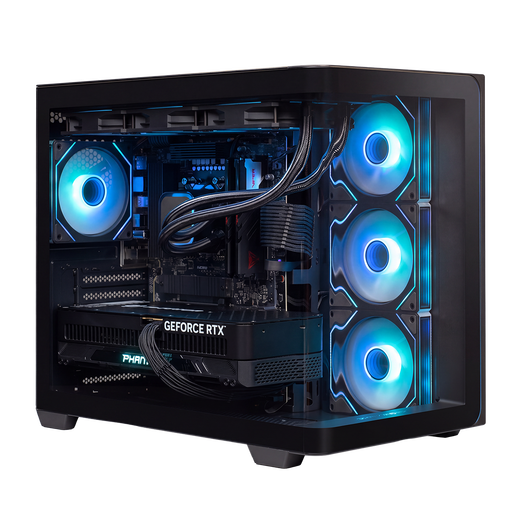 No image available
Almighty Shark Speldator R900 Gaming PC RTX5090/R9/32GB/2TB
A generous graphics and storage configuration to compare if your chosen games or applications need those specifications.
AMD Ryzen 9 9900X3D; RTX 5090; 32 GB DDR5; 2 TB NVMe SSD; Windows 11 Home. The product description lists built-in Wi-Fi and recommends allowing plenty of airflow around the system.
Joybuy
Frequently asked questions
Do I need a dedicated graphics card for Balatro?
Not according to the minimum Windows requirements published by the Epic Games Store, which list integrated graphics with OpenGL 2.1 support. Check that the exact PC supports those graphics; the minimum requirements don’t tell you how noisy the PC is.
Can I put a compact PC in an enclosed cabinet to reduce noise?
Only if the air intakes and exhausts remain clear. A small cabinet or sound-dampening panel isn’t a substitute for good airflow. be quiet! describes interchangeable panels as a trade-off between sound dampening and ventilation.
How can I estimate power consumption while gaming?
Use the measured power draw of the complete setup, multiply it by the hours of use, then calculate the cost using your own rate per kWh. The power supply’s wattage isn’t the same as the measured consumption while gaming.
What do the cooling-off period and warranty mean when buying online in the Netherlands?
When a consumer buys online, there is generally a statutory 14-day cooling-off period after delivery, subject to applicable exceptions. ACM ConsuWijzer explains that the seller is also responsible for the statutory guarantee if a product doesn’t meet the standards you were entitled to expect.
Is the CE logo a quality mark for quietness or quality?
No. Business.gov.nl explains that CE isn’t a quality mark; it is the manufacturer’s declaration that the relevant EU requirements have been met. The logo isn’t a noise measurement and doesn’t tell you whether a PC is quiet while gaming.


