
Vandaag of morgen in huis

Kwaliteit gegarandeerd

Welkomstaanbiedingen ontgrendelen: GRATIS bezorging | Tot 80% korting | Gratis 30 dagen JoyPlus-proefperiode
Download de app
Building a gaming PC seems straightforward until you start comparing components. Manufacturers highlight high speeds, RGB lighting and gaming claims, but these features do not always indicate whether a component is suitable for your system. Choosing the right combination of gaming PC components helps prevent compatibility issues, unnecessary costs and a computer that is difficult to upgrade later.
A DDR5 kit rated at 6000 MT/s will not automatically run at that speed in every computer. The processor, motherboard and BIOS must support the memory profile. Therefore, check:
A 32 GB memory kit is practical for many gaming and multitasking scenarios. For video editing, virtual machines or large creative projects, 64 GB DDR5 RAM may be more suitable.
An RGB PC case may look appealing, but the available space determines whether your graphics card, CPU cooler and radiator will actually fit. Pay attention to the maximum graphics card length, CPU cooler height and supported motherboard form factors.
A case without a bundled power supply gives you more choice, but it also means you need to buy a suitable PSU yourself. Also check whether the case has enough fan positions, dust filters and space for cable management.
A mechanical gaming keyboard, wireless keyboard and mouse or gaming headset will not offer the same benefits to every user. For example, a compact 60% keyboard does not have a number pad and may not include dedicated arrow keys. A wireless set may work via Bluetooth or a 2.4GHz receiver, but check beforehand which connections your devices support.
The type of connection is important when choosing a headset. A model with a 3.5mm jack is widely compatible, but surround-sound features may require software or an activation code. According to Razer’s own information, the BlackShark V2 X’s 7.1 feature is activated via software.
With DDR5 RAM, you will usually see three key specifications:
According to the product specifications, the G.Skill Flare X5 32GB consists of 2 x 16 GB, DDR5-6000, CL36, 1.35 V and support for AMD EXPO. The modules are 33 mm high, which can be useful when using a large CPU cooler. The Kingston Fury Beast RGB also offers 32 GB via 2 x 16 GB, DDR5-6000, CL36 and support for both XMP 3.0 and AMD EXPO.
Before buying, check:
According to the listed specifications, the Corsair 3500X ARGB Midi Tower White supports E-ATX, graphics cards up to 410 mm, CPU coolers up to 170 mm and radiators up to 360 mm. The case comes with three 120mm ARGB fans. However, check that your chosen components will not obstruct one another.
A gaming keyboard should suit the way you use it:
The Rapoo 9010M combines 2.4GHz and Bluetooth 4.0/5.0 and, according to the product specifications, can be paired with up to four devices. The included mouse has adjustable DPI settings from 800 to 2400. For competitive gaming, a wired or dedicated mechanical gaming keyboard with an adjustable actuation point may better suit your preferences.
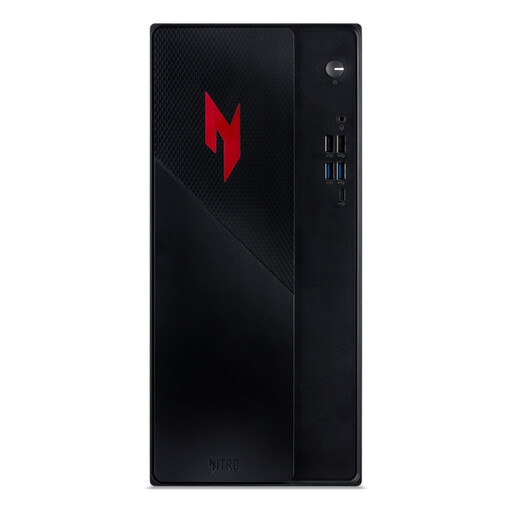
Why it suits this profile: A pre-built gaming desktop is ideal if you do not want to select or install individual components yourself. The configuration includes an Intel Core 5 210H, RTX 5050, 16 GB DDR4, 1 TB SSD and Windows 11 Home.
The key components have already been combined for you. However, check that the 400W power supply and expansion options match your future plans.
RTX 5050 with 8 GB, 1 TB PCIe NVMe SSD, Wi-Fi 6E and multiple video outputs.
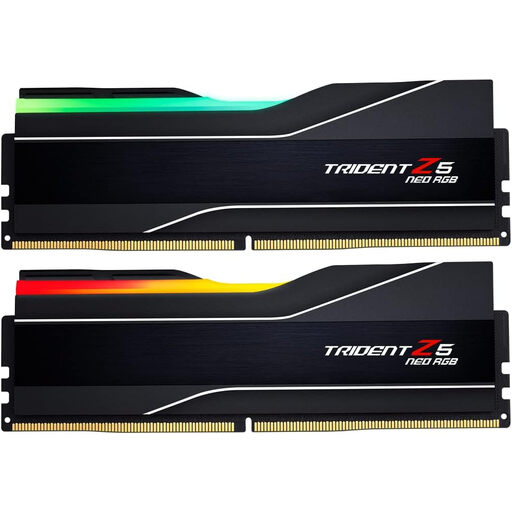
Why it suits this profile: This kit is aimed at users who need plenty of memory for gaming, content creation and demanding multitasking. It consists of 2 x 32 GB DDR5-6000 with CL30.
The capacity is clearly specified. Check beforehand that your motherboard supports 64 GB DDR5 and AMD EXPO.
64 GB total, DDR5-6000, CL30 and RGB lighting according to the listed product specifications.
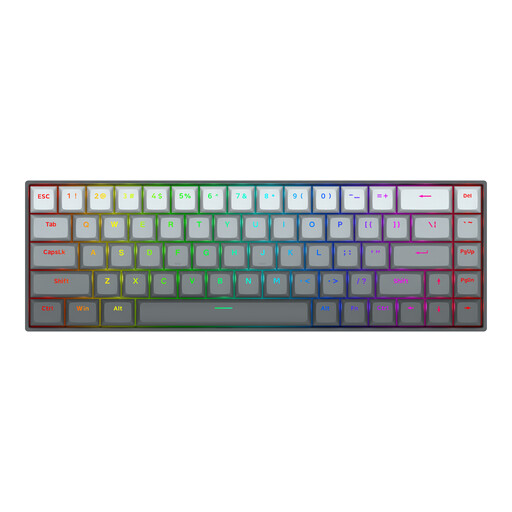
Why it suits this profile: Designed for players looking for a compact keyboard with adjustable actuation and Rapid Trigger. The model has 68 keys, a USB-C cable and a US layout.
The features are clearly described, but they require software settings. Check whether a US layout is suitable for you.
Magnetic switches, adjustable actuation from 0.2 to 4.0 mm and a stated polling rate of 8000 Hz.
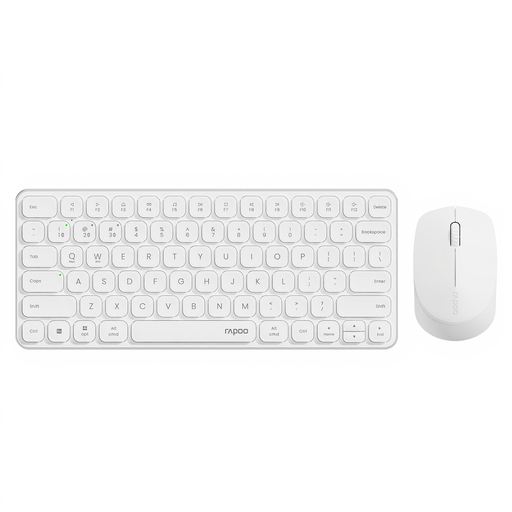
Why it suits this profile: Ideal for home users who want to use one set with a PC, laptop and tablet. The keyboard has a low-profile design and quiet click keys.
The connection options are clearly stated. Keep battery usage in mind and check that the key layout matches your preference.
Support for up to four paired devices and a mouse with adjustable DPI settings.
We have put together a complete, up-to-date list of products that fully meet these strict selection criteria and the applicable European safety regulations.
At a minimum, you need a processor, motherboard, DDR5 RAM or other compatible memory, storage, power supply, graphics card and PC case. You will often also need a CPU cooler, fans and an operating system. First check the compatibility of the socket, memory and dimensions.
Lifespan depends on usage, temperature, dust and the quality of the power supply. A PC case and memory can last through several upgrades. A graphics card or processor may need replacing sooner as new games demand more powerful systems. Good ventilation and regularly removing dust help keep components within their normal operating conditions.
Power consumption depends mainly on the processor, graphics card, power supply and playing time. A compact gaming desktop with a less powerful graphics card will generally use less power than a system designed for high resolutions or intensive rendering. Check the stated wattage of the power supply, but do not treat it as a direct measure of consumption: it is the PSU’s maximum capacity, not its constant energy usage.
