
Vandaag of morgen in huis

Kwaliteit gegarandeerd

Welkomstaanbiedingen ontgrendelen: GRATIS bezorging | Tot 80% korting | Gratis 30 dagen JoyPlus-proefperiode
Download de app
Building a gaming PC seems straightforward until you discover that not every component works with every other one. A powerful component can also be an unnecessary expense if the rest of your system limits its performance. Use this guide to gaming PC components to check the key specifications before you order.
A memory module with a high clock speed or a 240Hz gaming monitor might sound appealing, but the rest of your setup needs to support it. Your motherboard, processor, graphics card and power supply all work together as one system. Always check the compatibility list and the connections you need.
DDR4 RAM and DDR5 RAM use different memory slots. A DDR5 module won’t fit in a DDR4 motherboard. Even within DDR5, supported speeds and profiles can vary. Before you buy, check which memory type your motherboard supports and whether AMD EXPO or Intel XMP is available.
A gaming graphics card might be physically too long for your PC case. Check the maximum GPU length, the number of slots it takes up and the power connector it requires. For a monitor, also check whether HDMI or DisplayPort supports your preferred resolution and refresh rate. There’s little point in having a 240Hz gaming monitor if your cable or graphics card can’t run it at that setting.
An AM5 motherboard is designed for compatible AMD Ryzen processors with an AM5 socket. The COLORFUL BATTLE-AX B650M models use the AMD B650 chipset and are listed as supporting Ryzen 7000, 8000 and 9000 Series processors, subject to the manufacturer’s current processor list.
Keep these points in mind:
The COLORFUL BATTLE-AX B650M Frost WIFI V15 has four DDR5 slots, two M.2 connections, Wi-Fi 6, Bluetooth 5.2 and a 2.5G network port. Its M-ATX dimensions are 245 × 245 mm. The COLORFUL BATTLE-AX B650M-E WIFI V14 has two DDR5 slots and a gigabit network port. Its exact dimensions are 244 × 235 mm. These differences matter if you want to upgrade your memory or storage later.
For many modern games, 32GB DDR5 RAM, split across two 16GB modules, is a practical setup. Two modules can run in dual-channel mode when installed in the correct slots. Check your motherboard manual for the recommended positions.
The Kingston FURY BEAST RGB KF560C36BBE2AK2-32 consists of two 16GB DDR5 modules running at 6000 MT/s, with CL36 and support for AMD EXPO and Intel XMP 3.0. The Kingston FURY BEAST KF556C36BBE2-32 is a single 32GB module running at 5600 MT/s. A single module leaves room for an upgrade, but check that your system supports the dual-channel configuration you want.
A 16GB G.Skill AEGIS module, by contrast, uses DDR4-3200. This means it isn’t suitable for a DDR5 motherboard. The product information also lists a 288-pin DIMM form factor and CL16. This makes it most relevant for an existing DDR4 system.
Your choice of gaming graphics card depends on your resolution, the games you play and the frame rate you want. An RTX 5050 graphics card such as the ASUS Dual GeForce RTX 5050 OC Edition has 8GB GDDR6, three DisplayPort 2.1b connections and one HDMI 2.1b connection. The manufacturer recommends a 550W power supply and one 8-pin PCIe connector. Always check that your power supply has the right connection.
For more demanding graphics, the ASUS Prime Radeon RX 9070 XT is listed with 16GB GDDR6 and a PCIe 5.0 interface. With this type of card, pay particular attention to the space available in your case, your power supply and your monitor’s connections.
Match your monitor to your graphics card’s performance:
A high refresh rate doesn’t guarantee smooth visuals in every game. The actual frame rate depends on your graphics card, processor, settings and game engine.
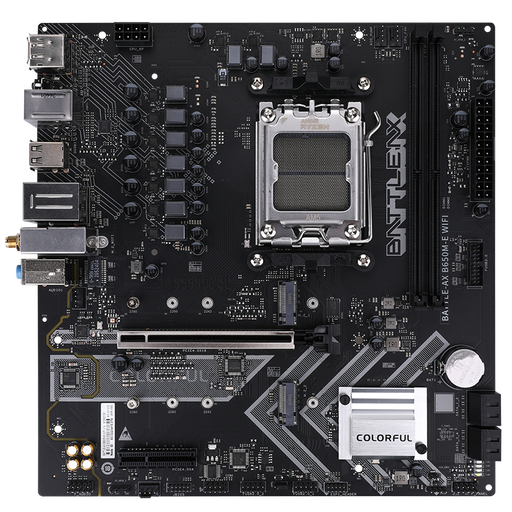
Why it suits this profile: This M-ATX AM5 motherboard provides a straightforward foundation for a new AMD setup with DDR5 memory, Wi-Fi 6 and two M.2 slots.
The socket, chipset, M-ATX form factor and DDR5 support are clearly listed. Make sure you check the manufacturer’s current CPU and memory lists.
AM5, two M.2 slots, Wi-Fi 6 and Bluetooth 5.2.
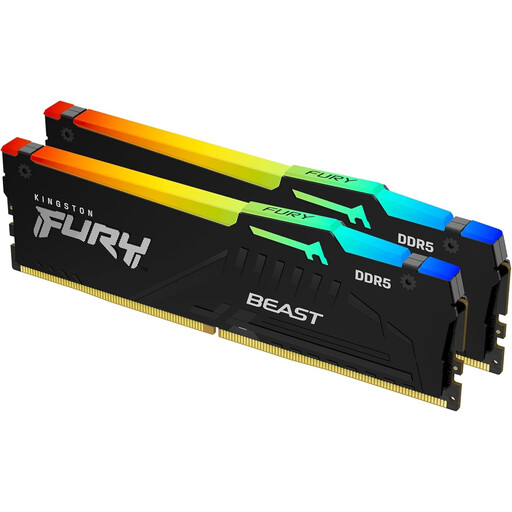
Why it suits this profile: This 2×16GB kit is a good fit for a modern DDR5 gaming PC where capacity, memory profiles and room for future upgrades matter.
The product lists DDR5, 6000 MT/s, CL36 and support for AMD EXPO and Intel XMP 3.0. Still, check that it’s compatible with your motherboard.
32GB across two modules, DDR5-6000 and RGB lighting.
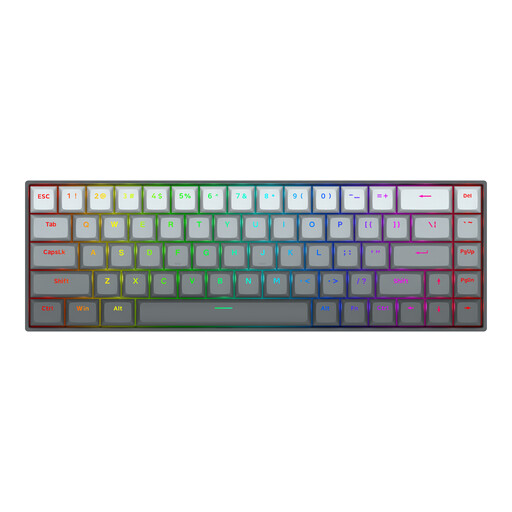
Why it suits this profile: For players of fast-paced competitive games, this Hall Effect keyboard offers adjustable actuation and a compact 68-key layout.
The product information specifies magnetic switches, Rapid Trigger, an adjustable actuation point of 0,2 to 4,0 mm and a USB-C cable.
Hall Effect switches, Rapid Trigger and a listed polling rate of 8000Hz.
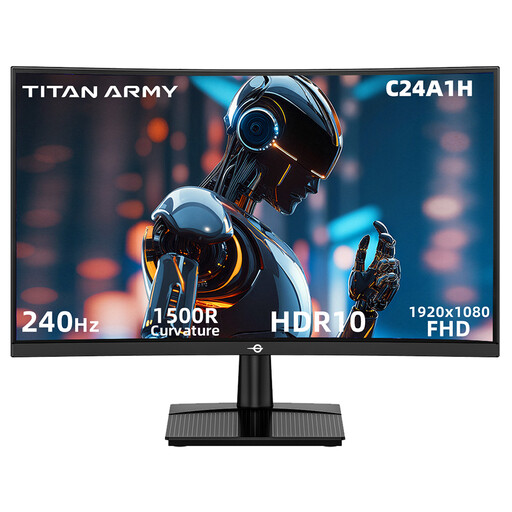
Why it suits this profile: This model is designed for users who want to combine Full HD with a high refresh rate for fast-paced games.
The specifications list HDMI 2.0 and DisplayPort 1.2 at 1920×1080 and 240Hz. Check your cable and graphics card before selecting this mode.
23,6-inch VA panel, 240Hz, FreeSync compatibility and VESA 100×100 mm.
Use this checklist:
A spacious case such as the MSI MEG PROSPECT 700R supports ATX, E-ATX, M-ATX and Mini-ITX, with a maximum GPU length of 400 mm and room for a CPU cooler up to 185 mm tall. Before you order, also check the maximum power supply length and the size of the radiator you’ve chosen.
We’ve put together a complete, up-to-date list of products that meet these strict selection criteria and current European safety regulations.
The essentials are a processor, motherboard, RAM, SSD, graphics card, power supply and PC case. Add a CPU cooler if one isn’t included with your processor. You’ll also need a monitor, keyboard, mouse and, if you like, a headset.
Lifespan depends on how you use them, cooling, dust management and your preferred game settings. Components don’t all wear out at the same rate. You may need to replace an SSD, power supply or graphics card sooner as new games become more demanding, while a case or keyboard may remain useful for longer.
The total price depends mainly on the graphics card, processor, monitor and storage capacity. Start by making a list of your preferred resolution and frame rate. This helps you avoid spending money on a 240Hz gaming monitor if your system can’t reach that frame rate in your favourite games.
