
Vandaag of morgen in huis

Kwaliteit gegarandeerd

Welkomstaanbiedingen ontgrendelen: GRATIS bezorging | Tot 80% korting | Gratis 30 dagen JoyPlus-proefperiode
Download de app
Putting together a gaming PC might seem straightforward until you factor in compatibility, heat management and upgrade potential. Eye-catching RGB lighting or a long list of ports doesn't tell you much about how your system will actually perform. If you buy gaming PC components without checking the specifications, you could end up with memory that doesn't run at its rated speed, a case that won't fit your graphics card, or accessories that aren't comfortable to use.
With this practical selection guide, you can compare gaming desktops, memory, PC cases and gaming PC accessories based on verifiable features.
A memory kit with DDR5 6000MHz won't automatically run at that speed in every computer. Your motherboard and processor need to support DDR5. You may also need to enable an XMP or EXPO profile in the BIOS/UEFI. Without that profile, the memory could run at a lower default frequency.
Also pay attention to the form factor. DIMM memory is designed for desktops; laptops typically use SO-DIMM modules. What's more, DDR5 is not interchangeable with DDR4 or DDR3.
An RGB PC case might look the part, but lighting is no substitute for proper airflow. Check how many fans are included, where they're positioned, and what radiator sizes are supported. A case with a glass side panel also requires careful transport and regular dust maintenance.
A midi tower PC case often fits neatly under or beside a desk, but the available space varies from model to model. Before you buy, check:
A full tower PC case generally offers more room for storage, fans and expansion cards, but it also takes up more space and can be heavier.
When looking at a gaming desktop, start by comparing the combination of processor, graphics card, RAM and storage. A powerful processor won't make up for limited graphics performance if the graphics card isn't suited to your resolution. So think about how you'll use it:
According to the product description, the OMEN 35L GT16-0160nd features an Intel Core i7-14700F, NVIDIA GeForce RTX 5060 with 8 GB GDDR6, 16 GB DDR5 RAM and a 1 TB SSD. The RAM is listed as expandable up to 128 GB. With a pre-built system, always check the included components and ports before you order.
For many modern games and multitasking, DDR5 RAM 32GB is a practical configuration. A kit of 2 × 16 GB uses two memory modules, enabling dual-channel operation on a compatible motherboard.
Alongside speed, also compare the CAS latency, such as CL30 or CL36. A lower latency doesn't automatically mean a kit will run faster in every system; the combination of frequency, timings, processor and motherboard all play a part. According to the specifications, the G.SKILL Trident Z5 RGB has DDR5-6000, CL30, 1.35 V and Intel XMP. The Kingston FURY Beast RGB lists DDR5-6000, CL36, 1.35 V and support for Intel XMP 3.0 and AMD EXPO.
A gaming keyboard with a compact 60% layout saves desk space, but it lacks a numeric keypad and often separate arrow keys. So check whether a QWERTY US layout suits your preferences. If you type a lot in English, you might find a different layout more practical.
With a mechanical gaming keyboard, consider the type of switches, adjustable actuation distance, polling rate and connection. A high polling rate is especially relevant if you actually make use of the accompanying settings and software.
For a gaming headset, the connection and platform are key. The Razer BlackShark V2 X uses an analogue 3.5mm connection and, according to the product information, is compatible with PC, Mac, PlayStation 4, Xbox One, Nintendo Switch and mobile devices. Some desktops with separate microphone and headphone jacks will require a splitter.
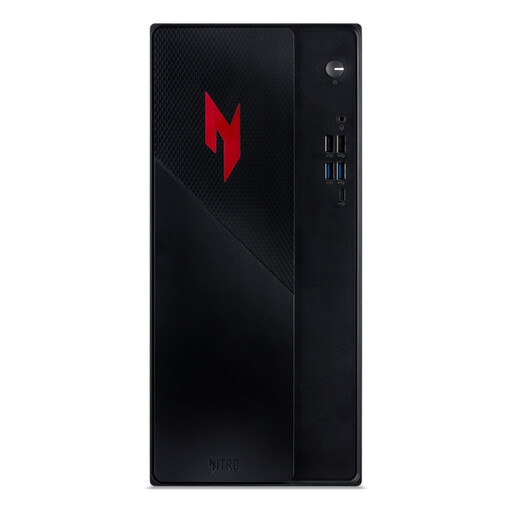
Why this fits the profile: A ready-to-go system for anyone who doesn't want to select and assemble all the gaming PC components themselves. The desktop comes with 16 GB DDR4 RAM, a 1 TB PCIe NVMe SSD and multiple display outputs.
The key components are listed as a complete configuration. However, do check beforehand whether DDR4 fits with your intended upgrade path.
RTX 5050 with 8 GB, 1 TB NVMe storage, Wi-Fi 6E, Bluetooth and Windows 11 Home according to the product details.
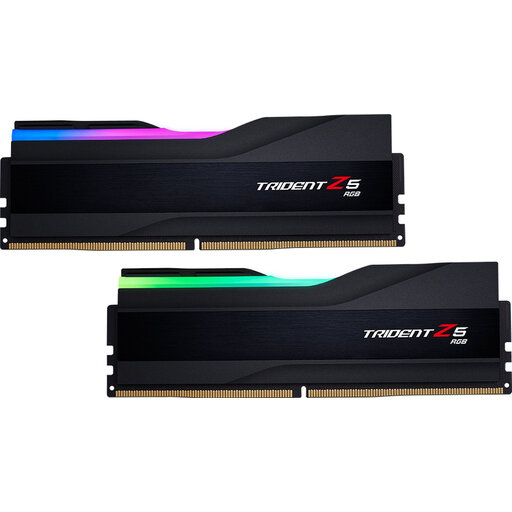
Why this fits the profile: For builders looking for DDR5 6000MHz memory, a 2 × 16GB configuration and RGB RAM. The kit is aimed at compatible Intel platforms with XMP.
The product details list speed, CL30, voltage and XMP. Still check your motherboard and CPU before enabling the profile.
32 GB, DDR5-6000, CL30 and customisable RGB lighting according to the product description.
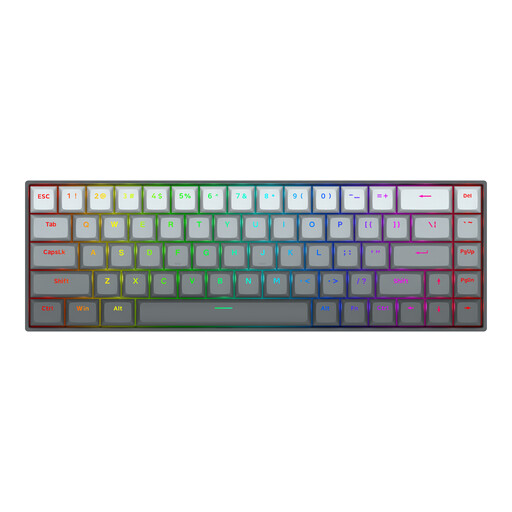
Why this fits the profile: For players of fast-paced competitive games who want a compact mechanical gaming keyboard with adjustable actuation.
According to the product information, the actuation distance is adjustable from 0.2 to 4.0 mm. This lets you tailor the response to your usage, rather than focusing solely on lighting.
Hall Effect magnetic switches, Rapid Trigger, 68 keys, USB-C and a listed polling rate of 8000 Hz.
Use this quick checklist:
We've put together a full, up-to-date list of products that fully meet these strict selection criteria and comply with current European safety regulations.
For a self-build system, you'll need at least a processor, motherboard, RAM, graphics card, storage, power supply, CPU cooler and a PC case. An operating system and peripherals, such as a gaming keyboard, mouse and gaming headset, can be added as required.
A 32 GB kit, usually 2 × 16 GB, is a good starting point for most games and everyday multitasking. For heavy video editing, virtual machines or intensive content creation, more memory may be practical. Always check motherboard and processor support.
Power consumption depends on the processor, graphics card, power supply, usage time and settings. A more powerful graphics card typically uses more energy during gaming than during light office work. Check the rated wattage of the power supply and use sleep mode or shut down the PC when it's not needed.
