
Vandaag of morgen in huis

Kwaliteit gegarandeerd

Welkomstaanbiedingen ontgrendelen: GRATIS bezorging | Tot 80% korting | Gratis 30 dagen JoyPlus-proefperiode
Download de app
Building a powerful gaming PC doesn’t start with the most expensive component. Choosing the right combination of gaming PC components matters more than a single impressive specification on the box. For example, a fast graphics card won’t perform as well if the power supply doesn’t have the right connectors, the case is too small or the motherboard isn’t compatible with the memory.
The most common buying mistakes come down to three pitfalls:
Your gaming graphics card has a major impact on image quality and frame rates. Don’t just look at the GPU series; check these details too:
When choosing a Radeon RX 9070 graphics card, check the power connectors and airflow too. According to the product information, the Acer Predator BiFrost Radeon RX 9070 OC has 16 GB GDDR6, measures 297 mm in length, takes up three slots and has two 8-pin connectors. Always check the latest manual and product specifications before installing it.
The choice between DDR4 RAM and DDR5 RAM is primarily determined by the motherboard and processor. The notch on each module is in a different position, so you can’t fit DDR5 into a DDR4 slot.
Keep these points in mind:
A DDR4 motherboard such as the MSI PRO H610M-G supports two DDR4 slots and up to 64 GB, according to its product specifications. A B650 motherboard such as the COLORFUL Battle-AX B650M Frost WIFI V15, on the other hand, is designed for AMD AM5 processors and DDR5 memory.
A gaming power supply needs enough power, the right connectors and a suitable form factor. A 650W power supply may suit an entry-level system, but that doesn’t mean it’s automatically suitable for a powerful RTX 5080 build. The MSI MAG A650BN has 650 W, an 80 Plus Bronze rating and two PCIe connectors, but it isn’t modular. This makes the cables less flexible to route neatly.
A modular power supply such as the Corsair SF850 delivers 850 W, has an 80 Plus Platinum certification and a fully modular design. Bear in mind that it uses the SFX form factor: it’s designed for compact cases and won’t necessarily fit in every ATX case.
When choosing a PC case, check the:
For example, the MSI MEG PROSPECT 700R supports E-ATX, ATX, Micro-ATX and Mini-ITX, has room for graphics cards up to 400 mm long and comes with four 140mm ARGB fans. The MSI MAG PANO 100R PZ supports cards up to 380 mm long and also has several mounting points for fans and radiators.
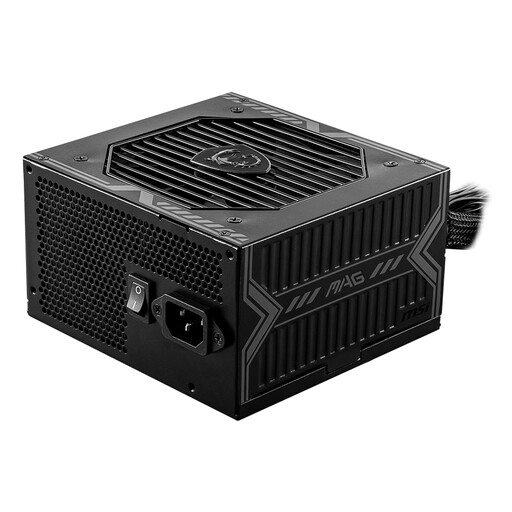
Why it suits this type of user: A straightforward choice for an affordable PC with modest to average power needs, provided the connectors match your configuration.
The power rating and available PCIe connectors are clearly listed. Just check that 650 W is enough for your graphics card.
650 W, ATX form factor, 80 Plus Bronze and protection against short circuits and overloads, among other things.
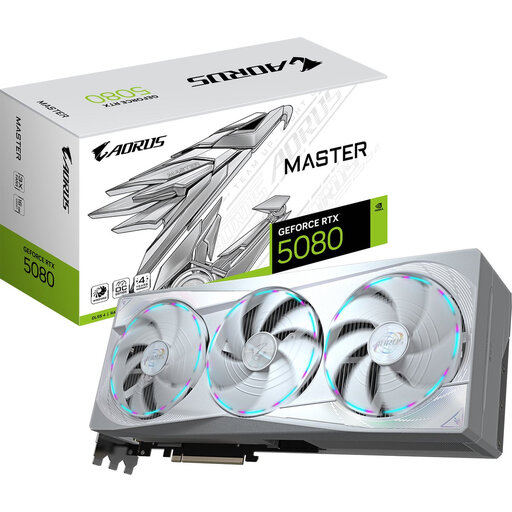
Why it suits this type of user: Designed for gamers and content creators who combine high resolutions and multiple screens with demanding graphics applications.
The dimensions, stated power consumption of 360 W and 12+4-pin connector are listed. A large case and a suitable PSU are essential.
16 GB GDDR7, PCIe 5.0 x16, three DisplayPort connectors and a triple-fan design.
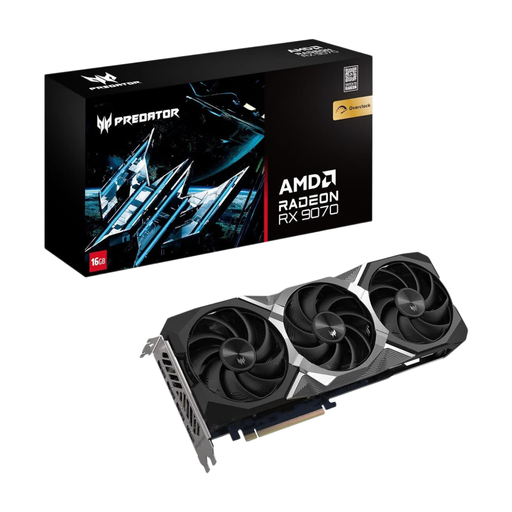
Why it suits this type of user: A good fit for users who game, stream and use graphics applications, and want a card with plenty of video memory.
The card has a stated length of 297 mm and takes up three slots. This makes it easy to check in advance whether it will fit in your PC case.
16 GB GDDR6, DisplayPort 2.1, HDMI 2.1a and two 8-pin power connectors.
PC cooling is all about creating a sensible airflow pattern: intake at the front or bottom, with exhaust at the back or top. Check that the fans are compatible with 4-pin PWM connectors. The Corsair iCUE LINK RX120 supports PWM and has a diameter of 120 mm. However, the product specifications don’t mention LED lighting, despite descriptions that refer to RGB. Always check the technical specifications table.
The same applies to RGB PC components. A 5V ARGB connector isn’t the same as a 12V RGB connector. Don’t connect them incorrectly. Also check whether you need a controller, for example for a standalone LED strip or a specific ecosystem.
We’ve put together a complete, up-to-date list of products that meet these strict selection criteria and current European safety regulations.
At a minimum, you’ll need a processor, motherboard, RAM, storage, power supply, case and graphics card. Add a CPU cooler if one isn’t included with the processor. Then check the connectors, dimensions and support for DDR4 or DDR5.
Power consumption depends mainly on the graphics card, processor and how many hours you spend gaming. A higher PSU power rating doesn’t mean the PC uses that amount of power all the time. Check the components’ actual power consumption and choose a power supply with enough headroom.
The lifespan varies by component and operating environment. Dust, high temperatures and poor airflow can lead to problems sooner. Keep the case clean, use suitable cooling and regularly check cables, fans, BIOS updates and driver updates.
