What should you look for when choosing?
Start with your game and preferred settings, then assess your whole setup. After that, consider which case features or upgrade options matter to you.
Configuration for one competitive game
Choose this if: you mainly play one familiar game and are happy to adjust the graphics settings.
Trade-off: minimum or recommended system requirements don’t prove that your PC will deliver a fixed FPS.
Higher-spec pre-built gaming tower
Choose this if: you also want to consider other games, higher image quality or running tasks at the same time.
Trade-off: a higher-spec configuration may cost more without a proven benefit for your game and monitor.
Tower with adjustable lighting or upgrade options
Choose this if: you want to adjust the case lighting or replace components in the future.
Trade-off: features vary by model and don’t, on their own, prove how quiet or upgradeable the PC is.
| What to consider |
What should you check? |
Who is this for? |
| Gaming performance |
Compare the exact CPU and GPU with your game’s requirements, your monitor resolution and your intended settings. Look for tests using similar settings; system requirements are not measured FPS results. |
If I play competitively, I want to know how the PC performs with my game and settings. Around 33% of shoppers prioritise gaming performance. |
| Comfort in a dark room |
Check that you can set a comfortable screen brightness and light the room appropriately; consider case lighting separately. |
When I practise in the evening, I want to be able to balance my screen with my surroundings. Around 27% of shoppers prioritise comfort in a dark room. |
| Complete setup |
Check what’s included with the exact item number and which monitor or input devices you already have. |
I want to know in advance what else I need besides the PC, so my budget also covers the monitor and any missing accessories. Around 20% of shoppers prioritise having a complete setup and knowing its cost. |
| Space and customisation |
Check the dimensions of the model, available space for connections and stated upgrade options. Look for independent noise measurements if quiet operation is a deciding factor. |
If space is limited or I want to make changes later, I want to know what the specific case allows. Around 20% of shoppers prioritise space and customisation. |
Gaming PCs at Joybuy
These gaming PCs offer specific configurations to compare with your game’s requirements and the components you need for your setup.
 No image available
Shark Max Bite R500 Gaming PC
The listed CPU and GPU give you specific specifications to compare with your own game’s requirements; they don’t guarantee any particular FPS.
Ryzen 5 5500, RTX 5060, 16 GB DDR4 and a 500 GB NVMe SSD. The description mentions adjustable ARGB lighting via MSI Center; this is no substitute for room lighting.
View product
 No image available
Shark Ultimator R700 Gaming PC
Compare this higher-spec configuration with your game’s requirements and the rest of your setup; the specifications don’t predict measured gaming performance.
Ryzen 7 7800X3D, RTX 5070, 16 GB DDR5, a 1 TB NVMe SSD and a 360 mm liquid cooler. The description states that the power cable/charger must be purchased separately.
View product
 No image available
RGB Gaming PC RTX 5060 Ryzen 5, 16 GB, 480 GB SSD, Windows 11 (not activated)
Use the listed CPU and GPU as a starting point when comparing with your own game; no FPS results are given for this configuration.
Ryzen 5 5500, RTX 5060, 16 GB DDR4 and a 480 GB SSD. The product title states Windows 11 (not activated); the description mentions four ARGB fans.
View product
 No image available
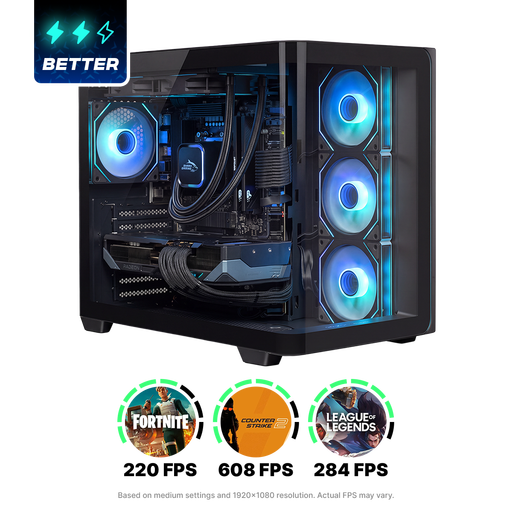
Shak RGBeast R700 Gaming PC
The listed CPU and graphics card give you specific details to compare with your own game’s requirements, but they don’t guarantee any particular FPS.
Ryzen 7 9800X3D, Radeon RX 9070 XT, 16 GB DDR5, a 1 TB NVMe SSD and a 240 mm liquid cooler.
View product
Frequently asked questions
Should you choose your PC based on a stated FPS figure?
No. Start with the requirements of the game you play, then compare performance at your preferred settings and monitor resolution. Riot Games lists separate specifications for VALORANT at 30, 60 and 144+ FPS; these don’t guarantee a particular FPS in other games or on a specific pre-built PC.
Does Fortnite’s Performance Mode help with competitive practice?
According to Epic Games, Performance Mode can increase FPS by lowering graphics quality. You can use this setting if the trade-off suits your aims, then assess the results on your own PC.
Is RGB lighting inside the PC enough for a dark room?
No. Assess case lighting and room lighting separately. The American Optometric Association recommends matching room lighting to screen brightness; Thuisarts also recommends blinking regularly during prolonged screen use.
What can you do if a PC bought online is faulty or unsuitable?
In the Netherlands, the retailer is your point of contact for a remedy if a product is faulty; your statutory rights are separate from any manufacturer’s warranty. According to the Dutch government, when you buy at a distance you generally have a 14-day cooling-off period, with some exceptions. Check the terms that apply to your purchase.
What should you check when buying a PC from outside the EU?
Check who the seller is, whether import charges may apply and which product requirements are relevant. The Dutch government points out that rights and additional costs can vary, and that you may not always be able to confirm whether a product meets European safety requirements. A Dutch-language online shop doesn’t, by itself, prove that the seller is based in the EU.


