
Vandaag of morgen in huis

Kwaliteit gegarandeerd

Welkomstaanbiedingen ontgrendelen: GRATIS bezorging | Tot 80% korting | Gratis 30 dagen JoyPlus-proefperiode
Download de app
Buying or building a new gaming PC is a significant investment. You carefully select a processor and graphics card, but the computer case is often an afterthought. That's a mistake. The wrong choice can lead to overheating, excessive noise, and the frustration of your expensive components not even fitting. As a Product Recommendation Officer at Joybuy, I see where things often go wrong. Let's skip the marketing jargon and focus on what really matters.
Before you get tempted by flashy lights, watch out for these three common pitfalls:
To avoid these pitfalls, you need to pay attention to a few objective specifications. These are the factors that make the difference between a good purchase and a source of frustration.
Your case's dimensions determine everything. Check these three specifications before you buy anything:
Good airflow is essential for a stable and quiet gaming PC. A case with a mesh (perforated) front panel is almost always a better choice than one with a solid panel. Also, pay attention to the following points:
A good computer case makes the building process easier and is built to last.
Below are some popular choices, matched to different user profiles. This is not a ranking, but a guide to help you find a model that fits your specific needs.
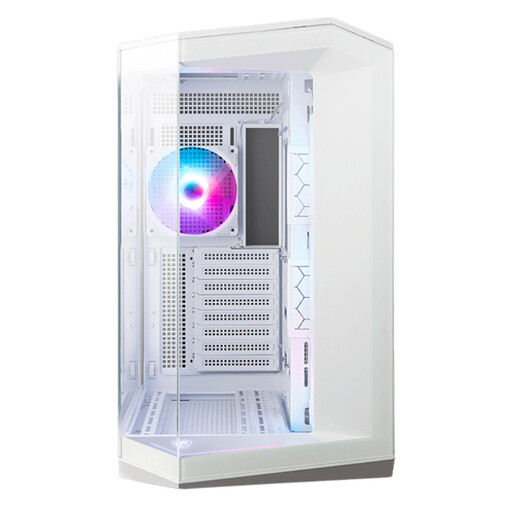
Why This Fits Their Persona: For those who want a visual centrepiece on their desk. This white PC case with panoramic glass showcases your components in all their glory, without completely sacrificing performance. Ideal for a clean, modern setup.
Instead of a sealed front panel, this case provides space for three side-mounted fans. This creates an alternative airflow path that bypasses the "glass trap" of overheating.
The dual-chamber design separates the power supply and cables from the hot components, ensuring an exceptionally clean look and better cable management.
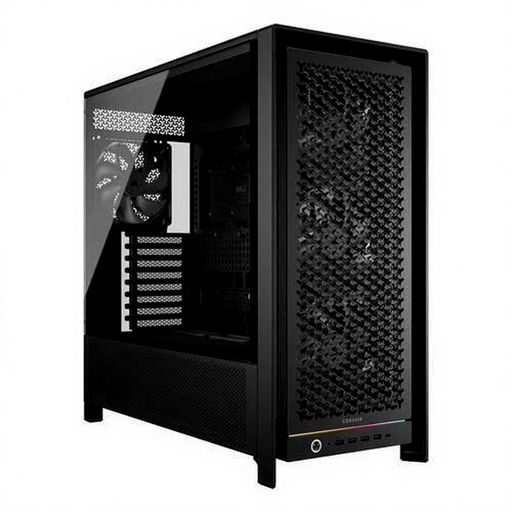
Why This Fits Their Persona: For the user who demands maximum cooling performance. This Corsair case is designed for optimal airflow, keeping high-end components cool and quiet, even under heavy load.
This case tackles both the airflow and compatibility pitfalls. Its optimised front panel and spacious interior accommodate the largest graphics cards (up to 450mm) and ensure a constant supply of cool air.
The modular design and internal cable covers make this a highly flexible and clean case to build in. The numerous fan and radiator positions offer unparalleled cooling options.
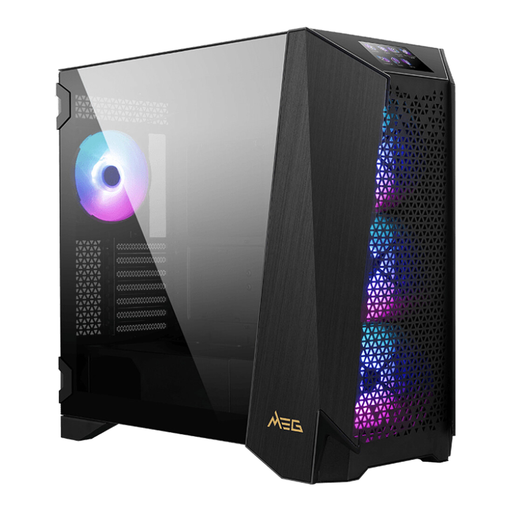
Why This Fits Their Persona: For the serious enthusiast who wants room for the most powerful components and future upgrades. This MSI case is built for extreme systems, including custom water cooling and EATX motherboards.
This case is the definition of 'no compromises'. It's so spacious that compatibility issues are virtually eliminated, and its cable management options are so extensive that a clean build is guaranteed.
The modular panels and unique front ARGB touchscreen offer an unprecedented level of customisation and control. It can accommodate up to three 360mm radiators simultaneously.
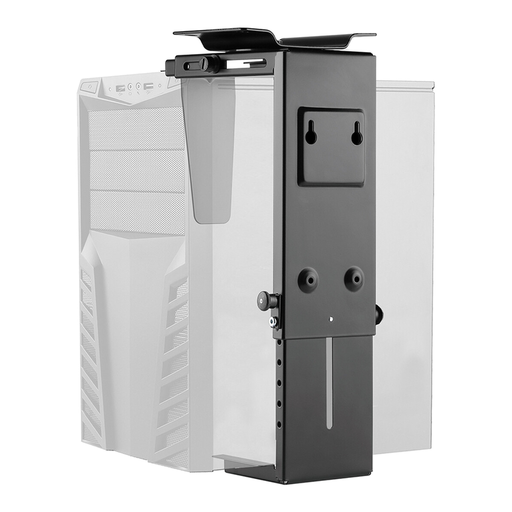
Why This Fits Their Persona: For the professional or home user who wants a powerful PC but not a large case on or under their desk. This solution is aimed at creating a minimalist and clean workspace.
This isn't a case, but a CPU holder. It solves the problems of space and aesthetics by mounting the entire computer case under the desk. This keeps the PC off the floor, which reduces dust intake.
Creates an extremely tidy desk and can improve the PC's lifespan by keeping it away from floor dust. The holder is adjustable and fits most tower and desktop PCs.
Whether you're looking for a pre-built gaming PC or building one yourself, the right case is the foundation. Explore our full range for more choices that meet these criteria.
For most gaming systems, a three-fan setup is a solid foundation: two at the front pulling cool air in (intake) and one at the rear pushing hot air out (exhaust). This creates positive air pressure, which helps keep dust out and ensures a constant flow of cool air over your components. For very high-performance systems, additional fans at the top (exhaust) can help lower temperatures even further.
No, absolutely not. This is one of the most common mistakes. Always check the specifications of both the graphics card (its length in mm) and the computer case (the maximum supported GPU length). High-end graphics cards are often longer than 300mm and won't fit in every compact mid-tower.
That depends. A more expensive case often offers better build quality (thicker steel, less plastic), superior cable management, more space, better stock fans, and convenient features like tool-less panels. For a budget build, a simple case is fine, but if you're investing in expensive components, a good case that ensures optimal cooling and protection is definitely worth the extra money. It's the foundation of your entire system.
