
First-time buyer with one screen
You want to play a cargo ship simulator on your existing monitor and choose a PC to suit the game’s requirements. Check the system requirements for the specific title before selecting a configuration.


Start with the system requirements of the ship simulator you actually want to play, along with your monitor’s resolution and connections. Having one screen doesn’t, by itself, mean you need a particular GPU. For Seafarer: The Ship Sim, astragon lists 16 GB RAM as the minimum and 64 GB as the recommended amount, so compare the complete PC with the target you have in mind for the game. A minimum requirement is no guarantee of image quality or performance.
You want to play a cargo ship simulator on your existing monitor and choose a PC to suit the game’s requirements. Check the system requirements for the specific title before selecting a configuration.
You may be aiming for the recommended configuration of a more demanding ship simulator. Compare the processor, graphics card and RAM individually with the game’s requirements.
You’re looking for a complete desktop and may want to add more memory or storage later. Check the upgrade options for the exact model; the maximum capacity isn’t the same as what comes as standard.
For Seafarer: The Ship Sim, astragon lists 16 GB RAM as the minimum and 64 GB as the recommended amount. Also check the requirements of the game you choose, and make sure the PC suits your monitor and any plans to upgrade.
| What to consider | What should you check? | Who is this important for? |
|---|---|---|
| Game requirements | Compare the current minimum and recommended system requirements with the processor, graphics card and RAM in the exact PC configuration. | I want my desktop to suit the ship simulator I’m actually going to play; around 40% of consumers make game requirements their top priority. |
| Your existing monitor | Check your monitor’s resolution and the display quality you want, and make sure the exact PC configuration has a suitable connection. | I want to keep using my current screen and know which connection it needs; around 30% of consumers give connection and display quality their top priority. |
| RAM and upgrades | Check the included memory, the maximum supported by the exact model and the available memory slots. | I want to be able to add more memory later if my simulator requires it; around 20% of consumers start by looking at upgrade options. |
| Complete purchase and aftercare | Check which peripherals are included, which operating system is listed and who the seller is. | I want to know what I can use straight away and who to contact if there’s a problem; around 10% of consumers make completeness and aftercare their top priority. |
For Seafarer: The Ship Sim, astragon lists 16 GB RAM as the minimum and 64 GB as the recommended amount. These figures relate to different targets and don’t, by themselves, indicate how well the game will perform on your setup.
First decide which game you want to play and what configuration you’re aiming for. Then compare all the relevant components with the corresponding system requirements.
Acer lists a maximum of 32 GB RAM for the Nitro N50-660 DG.E4FEH.003. MSI lists a maximum of 64 GB for the MAG Infinite S3 14th series. This is a series specification and doesn’t mean every configuration comes with that amount.
Check the maximum memory and the exact configuration before counting on a future upgrade.
Acer states that a keyboard and mouse aren’t included with the Nitro N50-660 DG.E4FEH.003.
Check what’s included and make sure you already have the peripherals you need and a suitable connection for your monitor.
The OMEN 35L GT16-0606nd is a specific configuration to compare if you’re looking for a ready-to-use desktop with a dedicated graphics card.
The Nitro N50-660 DG.E4FEH.003 has a specific configuration you can assess for its memory, graphics card and included components.
The Legion Tower 5 Gen 10 90YJ002AMH is a ready-to-use desktop configuration with a dedicated graphics card to compare.
The MAG Infinite S3 14th series is worth considering if you want to check memory upgrade options and differences between configurations.
These gaming desktops are options to compare with the requirements of your chosen ship simulator. Check the connections on the exact configuration to make sure it suits your monitor.
 Image unavailable
A gaming desktop to compare with the system requirements of the simulator you’ve chosen.
The product name lists a Ryzen 5 5500, RTX 5060, 16 GB RAM, a 480 GB SSD and Wi-Fi.
For Seafarer, astragon recommends 64 GB RAM; this PC lists 16 GB.
 Image unavailable
An option to assess against the requirements of the ship simulator you want to play.
The product name lists an AMD Ryzen 7 5700X, GeForce RTX 5060 Ti with 8 GB video memory, 16 GB DDR4 RAM and a 480 GB NVMe PCIe SSD.
For Seafarer, astragon recommends 64 GB RAM; this PC lists 16 GB.
 Image unavailable
A gaming desktop to compare with your gaming target and your monitor’s connection.
The product name lists a Ryzen 7 7800X3D, GeForce RTX 5080, 32 GB DDR5, a 1 TB NVMe SSD and Windows 11 Trial.
For Seafarer, astragon recommends 64 GB RAM; this PC lists 32 GB.
 Image unavailable
A gaming desktop to compare with the system requirements of your chosen simulation game.
The product name lists an AMD Ryzen 5 5500, Radeon RX 9060 with 8 GB video memory, 16 GB DDR4 RAM, a 500 GB NVMe SSD and Windows 11 Home.
For Seafarer, astragon recommends 64 GB RAM; this PC lists 16 GB.
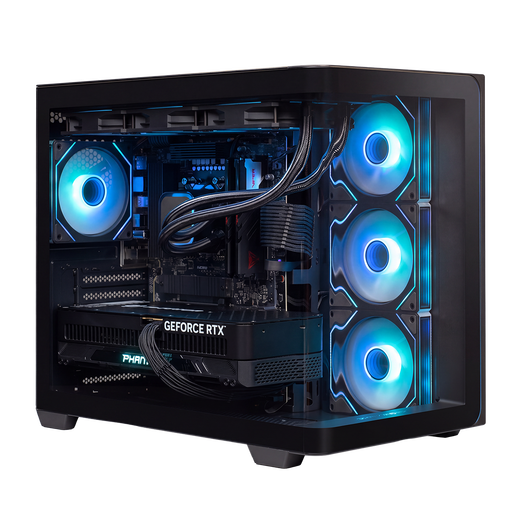 Image unavailable
A gaming desktop to compare with the requirements of your chosen ship simulator.
The product name lists RTX 5090, R9, 32 GB and 2 TB. Check the full specifications for this configuration to confirm the exact setup.
For Seafarer, astragon recommends 64 GB RAM; the product name lists 32 GB.
Choose a PC based on the game’s requirements and your monitor’s connection and resolution. Don’t assume that using one screen means you need a particular GPU or guarantees a specific frame rate.
Not just because you want to captain a cargo ship. astragon lists 64 GB as the recommended amount for Seafarer: The Ship Sim. First decide whether that’s the game and target you have in mind, then check the RAM included and the upgrade options for the exact PC.
Check your monitor’s connection and make sure the exact desktop configuration has a suitable port. Also check whether the necessary peripherals are included; for example, Acer states that a keyboard and mouse aren’t included with the Nitro N50-660 DG.E4FEH.003.
According to ACM ConsuWijzer, the seller is responsible for resolving the issue if a product breaks sooner than you could reasonably expect under normal use. For many distance purchases, the Dutch Government states that you have 14 days to change your mind; the relevant terms and exceptions still apply.