
Vandaag of morgen in huis

Kwaliteit gegarandeerd

Welkomstaanbiedingen ontgrendelen: GRATIS bezorging | Tot 80% korting | Gratis 30 dagen JoyPlus-proefperiode
Download de app
Buying a new gaming PC and gaming accessories may seem straightforward until you start comparing specifications. An eye-catching RGB case, high refresh rate or “mechanical feeling” does not automatically mean that a product is right for the way you use it. Buyers in the Netherlands commonly run into three problems: incompatible connections, limited upgradeability and marketing terms that do not mean the same as genuine hardware specifications.
This guide helps you compare PCs, keyboards, controllers and memory objectively. The product information below is based on the specifications and product descriptions provided. Before buying, always check the current price, stock availability, warranty terms and compatibility on the product page.
A gaming PC RTX 5060 or gaming PC RTX 5070 is often judged on its graphics card alone. However, the processor, amount of RAM, storage and power supply also affect how the PC performs in practice. An RTX 5060 with 16 GB of DDR4 memory and a Ryzen 5 5500 offers a different overall balance from an RTX 5070 with a Ryzen 7 7800X3D and DDR5.
So pay attention to the complete configuration:
A compact gaming keyboard may use a membrane construction with a mechanically inspired key feel. That is different from a mechanical gaming keyboard with replaceable switches. If you want quiet operation, a membrane model may be a good choice. If you want to customise the key feel or replace the switches, look specifically for hot-swappable mechanical models.
Also check the layout. Many models in the range use US QWERTY. This means, among other things, that certain symbols are in different positions from those on a Dutch QWERTY or AZERTY layout. This is usually not a major issue for gaming, but it may take some getting used to for typing and programming.
The MageGee TS91 is described as having an IPX4-certified circuit board. According to the same information, the USB connection is not waterproof. Treat this as protection against limited splashes, not as permission to pour a drink over the keyboard. Disconnect the device before cleaning it and keep the connector dry.
For a gaming PC for 1080p and 1440p, the GPU name is not the only relevant factor. Also look at the graphics memory, processor and cooling solution. According to the product information, an RTX 5060 configuration is designed for smooth Full HD gaming and support for 1440p, while an RTX 5070 system offers more headroom for higher settings and demanding games.
Claims about DLSS, ray tracing or expected frame rates depend on the game, settings and drivers. Treat these features as available technologies, rather than as a guaranteed frame rate.
DDR5 RAM will not fit in a DDR4 slot. Before upgrading, check:
The G.Skill Trident Z5 Neo RGB kit contains 64 GB DDR5-6000, split across two 32 GB modules, with AMD EXPO support. The Kingston Fury Beast RGB kit offers 32 GB DDR5-6000, split across two 16 GB modules, with XMP 3.0 and AMD EXPO. The stated speed will only work when supported by the system and the correct profile has been enabled.
A 60% keyboard saves a great deal of desk space, but does not have a separate function row, arrow keys or a numeric keypad in the usual format. With a 75% model, you get more controls back, often without the keyboard reaching the width of a full-size model.
Controllers involve a similar trade-off:
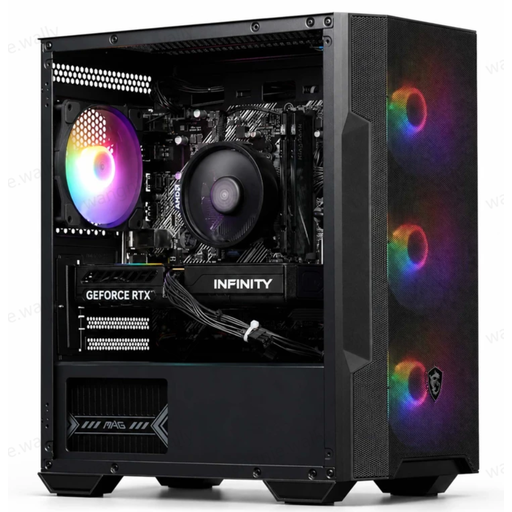
Why it suits this profile: This ready-to-use PC combines a Ryzen 5 5500, RTX 5060, 16 GB DDR4 and Wi-Fi in one system. This reduces the amount of research needed for first-time gaming PC buyers.
The key components are clearly listed, including the 480 GB SSD, 550 W 80 Plus Bronze power supply and included Wi-Fi adapter. Do check that the storage capacity is sufficient for your games.
RTX 5060 with 8 GB GDDR7, 16 GB DDR4, four ARGB fans and Windows.
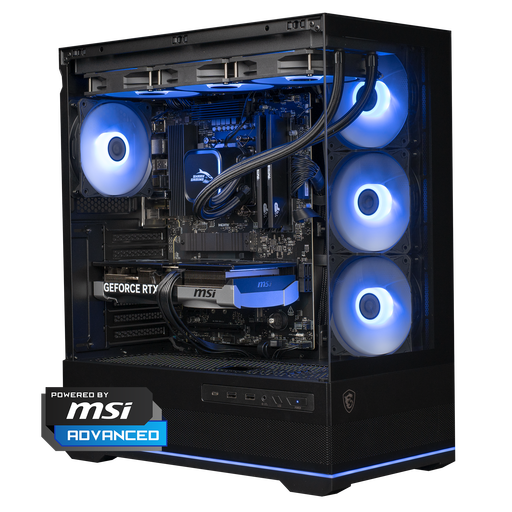
Why it suits this profile: The Ryzen 7 7800X3D, RTX 5070 12 GB, 16 GB DDR5 and 1 TB NVMe SSD are designed for demanding games, high resolutions and multitasking.
The configuration lists the CPU, GPU, memory, storage, cooling and power supply separately. This allows you to assess the overall balance instead of focusing only on the RTX 5070.
12 GB of video memory, 1 TB of NVMe storage, DDR5 and a 360 mm liquid cooler according to the product details.
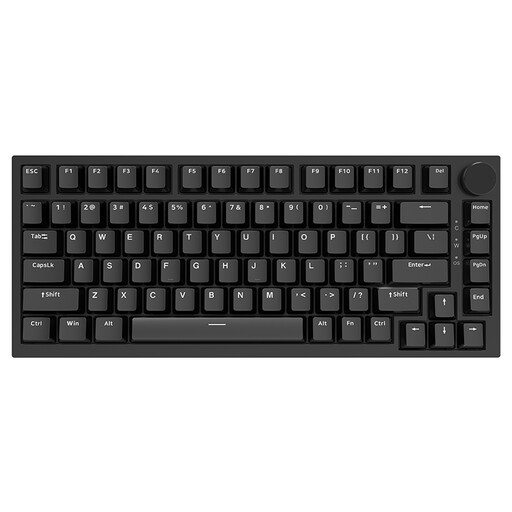
Why it suits this profile: This 75% keyboard is suitable for gamers and typists who want to save desk space while still having arrow keys, a volume knob and mechanical switches.
The product information specifies hot-swappable support, a Type-C cable and a 75% layout. You therefore know in advance what you do and do not get compared with a full-size keyboard.
83 keys, PBT keycaps, volume knob, gasket construction and replaceable linear switches.
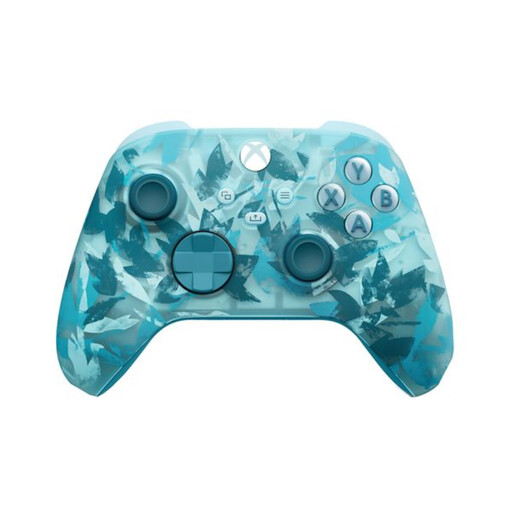
Why it suits this profile: According to the product details, this Xbox controller is suitable for Xbox consoles, Windows PCs, cloud gaming and selected mobile devices.
The connection options are clearly specified: Xbox Wireless, Bluetooth and USB-C. Please note: according to the description, the USB-C cable for wired use is sold separately.
Textured triggers, rubberised grips, 3.5 mm connection and up to 40 hours of battery life according to the product information.
We have put together a complete, up-to-date list of products that fully meet these strict selection criteria and the applicable European safety regulations.
For many games, 16 GB is a useful starting point. Streamers, content creators and users who game, browse and edit at the same time may benefit from 32 GB. Always check whether the PC uses two modules and whether there are free slots for an upgrade.
That depends on the connection and platform. A controller with Bluetooth, 2.4 GHz and USB offers more flexibility than a model with just one connection. Also check whether an adapter is required and whether features such as vibration, button mapping and headset connectivity work on your PC.
Power consumption depends on the power supply, processor, graphics card, settings and how long you play. The wattage shown on the power supply is not the same as its constant power consumption. For a practical estimate, you can measure usage with an energy meter. Also switch the PC off rather than leaving it on standby for long periods when you are not using it.
