
Vandaag of morgen in huis

Kwaliteit gegarandeerd

Welkomstaanbiedingen ontgrendelen: GRATIS bezorging | Tot 80% korting | Gratis 30 dagen JoyPlus-proefperiode
Download de app
Buying a gaming PC seems straightforward until you start comparing the specifications. A striking RGB case, a powerful graphics card and plenty of storage don’t automatically mean the system is right for you. Compatibility, cooling and upgrade options are what determine whether your purchase will remain practical in the long term.
An RTX 5060, RTX 5070 or Radeon RX 9070 XT immediately catches your eye, but the rest of the configuration matters too. A processor that isn’t a good match, limited RAM or an underpowered PSU can affect the overall experience. Always consider the processor, graphics card, RAM, storage and cooling as a whole.
An RGB gaming PC can look great, but lighting won’t improve your frame rate. Instead, check how many fans are installed, which radiators will fit and whether the PC case has enough room for your graphics card and CPU cooler.
An NVMe SSD gets Windows and games up and running quickly, but 480 GB or 512 GB can fill up fast if you store several large games, video files and programmes. A 1TB NVMe SSD gives you more practical storage space. Also check whether the motherboard has an extra M.2 slot for a future upgrade.
For many gamers, the graphics card is the most important component. According to the product description, a system with an RTX 5060 is designed for gaming at 1080p and 1440p. The ASUS ROG systems with an RTX 5070 pair that GPU with 12 GB of GDDR7 memory. This may appeal if you want higher settings, play demanding games or use applications such as rendering software.
Don’t just look at the model. Check the following too:
According to ASUS’s product description, the Prime Radeon RX 9070 XT OC Edition supports 16 GB GDDR6, PCIe 5.0, HDMI 2.1b and DisplayPort 2.1a. These are verifiable product specifications; actual performance depends on the game, settings and other hardware.
Both an AMD Ryzen gaming PC and an Intel gaming PC can be suitable. Pay particular attention to the number of cores, generation, socket type and upgrade options.
For a self-built system, the processor and gaming motherboard must use the same platform. The COLORFUL BATTLE-AX B650M models use the AMD AM5 socket and, according to the product information, support Ryzen 7000, 8000 and 9000 processors. They work with DDR5 RAM, but not DDR4 or DDR3.
The practical difference between the two motherboards mentioned is:
Check the manufacturer’s memory compatibility list before you buy. A DDR5 kit such as 32 GB DDR5-6000 will only run at the stated speed if the motherboard, processor and memory profile support it. XMP and EXPO are settings you can enable in the UEFI/BIOS if needed.
Measure the available space before ordering a PC case or complete gaming PC. The MSI MAG PANO M100R PZ supports micro-ATX and mini-ITX and accommodates graphics cards up to 350 mm long. The Corsair 3500X ARGB supports cards up to 410 mm and larger motherboard formats.
Also check:
A larger case isn’t always necessary, but it can make installation and future upgrades easier. Keep the vents clear and place the PC somewhere stable and dry.
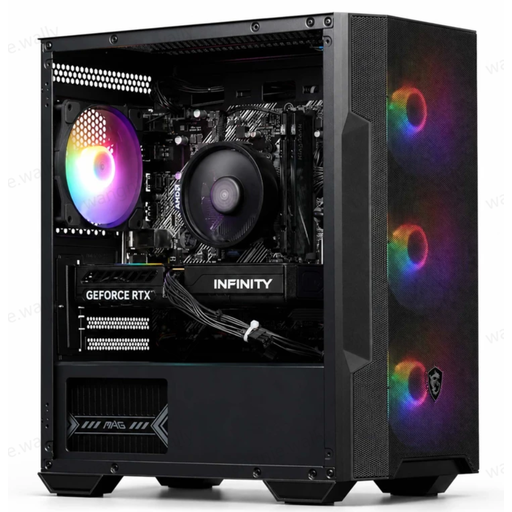
Why it suits this profile: A ready-to-use configuration for anyone who wants to start gaming at 1080p or 1440p without buying individual PC components.
The description lists the processor, GPU, RAM, SSD, PSU and cooling, so you don’t have to judge it by the RGB case alone. Wi-Fi is provided via a USB adapter.
Ryzen 5 5500, RTX 5060 with 8 GB GDDR7, 16 GB DDR4 and a 480 GB M.2 PCIe 4.0 SSD.
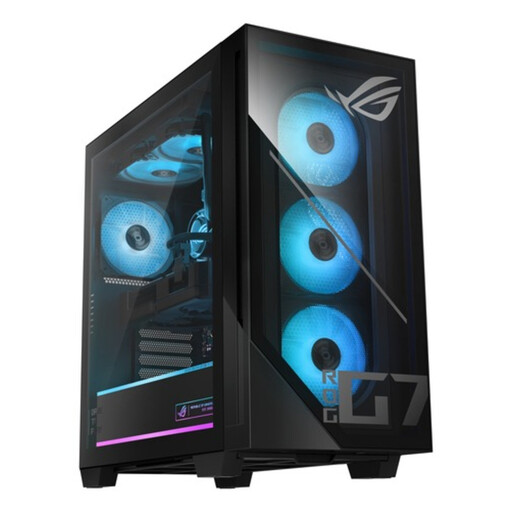
Why it suits this profile: Designed for gamers and creators looking for a powerful all-round configuration with plenty of storage and wireless connectivity.
The configuration lists more than just the RTX 5070: it also includes 32 GB DDR5, a 1TB PCIe 4.0 NVMe SSD, an 850W PSU and liquid cooling.
Intel Core Ultra 7 265F, RTX 5070 with 12 GB GDDR7, 32 GB DDR5 and Wi-Fi alongside Gigabit Ethernet.
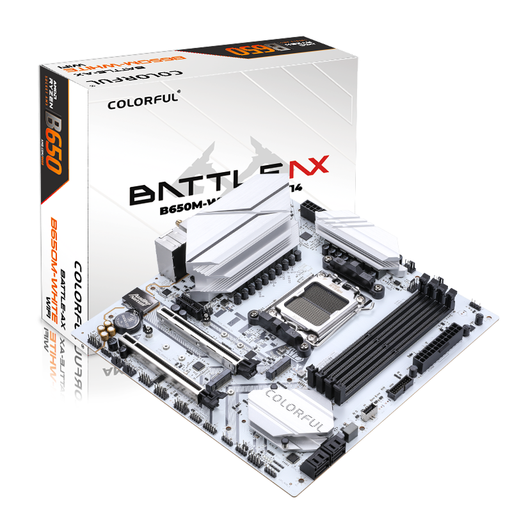
Why it suits this profile: For PC builders putting together a compact AMD Ryzen gaming PC who want room for memory and storage upgrades.
The specifications clearly state the socket, DDR5 support, M.2 connections and Wi-Fi 6. Be sure to check CPU and memory compatibility before buying.
Four DDR5 slots, two M.2 slots, 2.5G LAN, Wi-Fi 6 and Bluetooth 5.2 in an M-ATX form factor.
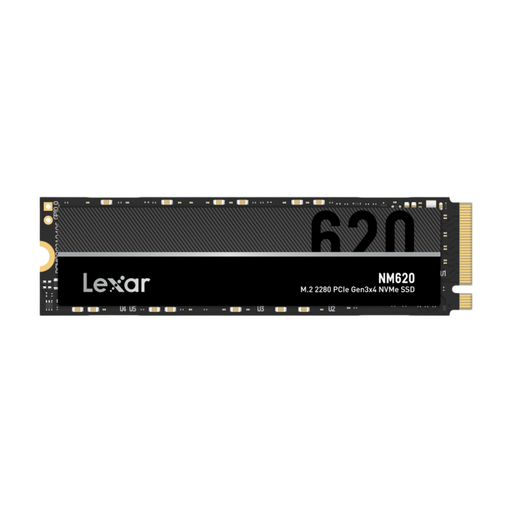
Why it suits this profile: A practical standalone upgrade for gamers and creators who want to add more storage to their existing gaming desktop PC.
It offers 1TB of storage and its interface is clearly specified as PCIe Gen 3x4 NVMe. Check beforehand that your motherboard has a compatible M.2 slot.
Read speeds of up to 3,300 MB/s and write speeds of up to 3,000 MB/s, according to the product specifications, in an M.2 2280 form factor.
We’ve put together a full, up-to-date list of products that meet these strict selection criteria and comply with current European safety regulations.
For most new games, 16 GB of RAM is a practical starting point. If you stream, edit video or keep lots of programmes open at the same time, consider 32 GB of DDR5 or DDR4. Always check which type of memory your motherboard supports.
Yes, especially if it’s difficult to run an Ethernet cable to your desk. A built-in Wi-Fi 6 card, as found on certain B650M motherboards, is generally neater than a separate adapter. For a pre-built system, check whether Wi-Fi is built in or supplied via USB.
Power consumption depends on the graphics card, processor, monitor, settings and how many hours you play. A more powerful system with an RTX 5070 will generally use more electricity than a configuration with an RTX 5060. Check the PSU’s rated output and use sleep mode when the PC isn’t in use.
