
Vandaag of morgen in huis

Kwaliteit gegarandeerd

Welkomstaanbiedingen ontgrendelen: GRATIS bezorging | Tot 80% korting | Gratis 30 dagen JoyPlus-proefperiode
Download de app
Buying a gaming PC might seem straightforward until you have to choose between a complete gaming desktop, individual gaming PC components, or just an upgrade. Manufacturers often emphasise RGB lighting, high clock speeds and big model names. Yet it’s compatibility, graphics card, memory and storage that really determine whether your system performs well.
Watch out for these common pitfalls before you check out:
For competitive games like Counter-Strike 2, VALORANT, Fortnite and Rocket League, a high frame rate is often more important than maximum graphical detail. For 1080p gaming, a gaming PC with a GeForce RTX 5060, 8 GB of video memory and a suitable processor can be a sensible configuration.
If you play more often at 1440p or use demanding single-player titles, you might consider a gaming PC with an RTX 5060 Ti. Actual performance depends on settings, drivers, processor, cooling and the specific game. Claims about DLSS, ray tracing or expected frame rates come from the brand’s or seller’s product information; treat them as a configuration guide rather than a guaranteed result.
An AMD Ryzen gaming PC can be a good choice for gaming, multitasking and streaming. Always check which Ryzen model is used in a pre-built system. A Ryzen 5 5500 and Ryzen 7 5700X, for example, have different numbers of cores and threads.
With individual gaming PC components, the socket is decisive. A gaming motherboard with an AM5 socket supports different processors than a board with an AM4 socket. The COLORFUL Battle-AX B650M Frost WIFI V15 motherboard uses the AMD B650 chipset, an M-ATX form factor of 245 × 245 mm and an AM5 socket. According to the product specifications, it supports AMD Ryzen 7000, 8000 and 9000 series processors, depending on the manufacturer’s current compatibility list.
Furthermore, it has four DDR5 memory slots, two M.2 slots, four SATA ports, 2.5G networking and Wi-Fi 6. That makes the layout relevant if you want to expand storage or memory later.
Don’t just check the amount of memory – check the type too:
When installing, follow the motherboard manual. Switch the PC off completely, unplug it from the mains and avoid touching the gold contacts on the RAM modules. Only enable XMP or EXPO if your system and memory profile support it.
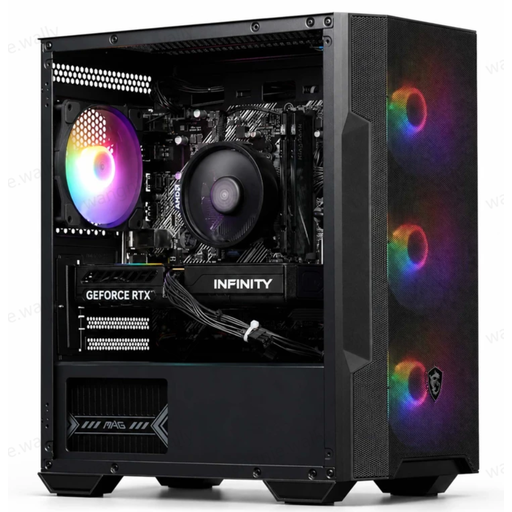
Why this fits the profile: A complete gaming computer is practical if you don’t want to select components yourself. This configuration includes an AMD Ryzen 5 5500, RTX 5060, 16 GB DDR4 and a 480 GB M.2 PCIe 4.0 SSD.
The key components are clearly listed, including processor, graphics card, memory, storage and power supply. Do check beforehand whether 480 GB is enough for your game library.
RTX 5060 with 8 GB GDDR7, 16 GB DDR4, four ARGB fans and Windows. A USB Wi-Fi adapter is included.
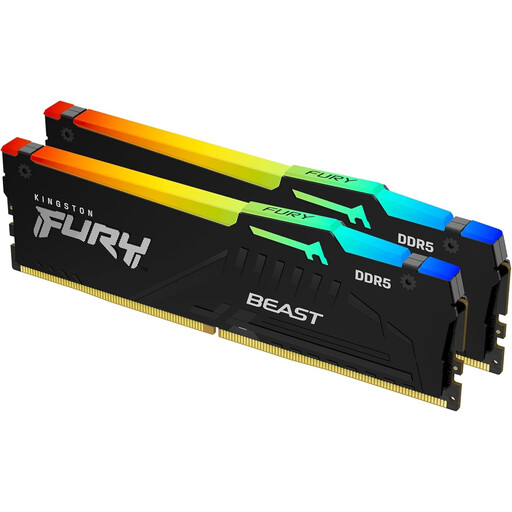
Why this fits the profile: This 32 GB kit is designed for a DDR5 desktop and suits users who combine gaming with streaming, video editing or running many programmes at once.
The set consists of two 16 GB modules and explicitly states DDR5. Check before buying whether your motherboard supports DDR5; DDR4 slots are not compatible.
32 GB DDR5-6000, CL36, RGB lighting and support for XMP 3.0 and AMD EXPO.
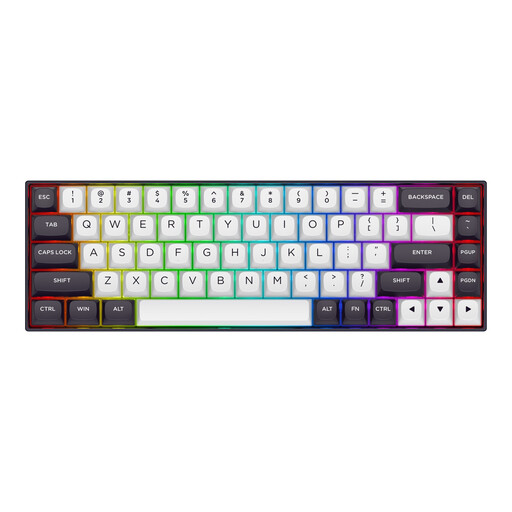
Why this fits the profile: For competitive players, a compact Hall Effect gaming keyboard with adjustable actuation can be appealing, especially in titles where rapid key presses matter.
The product specifications list adjustable actuation from 0.2 to 4.0 mm and Rapid Trigger. Check that the software works on your system and that the US layout suits you.
68 keys, magnetic linear switches, 8000Hz polling rate, RGB lighting and a detachable USB-C cable.
We’ve put together a full, up-to-date list of products that fully meet these strict selection criteria and comply with current European safety regulations.
For many games, 16 GB of RAM is a workable starting configuration. If you stream at the same time, use large programmes or keep many browser tabs open, you could benefit from 32 GB. Always check whether your motherboard uses DDR4 or DDR5.
A 480 or 500 GB SSD can be enough for Windows and a few games. For a larger library, 1 TB is more practical. Also look at the number of available M.2 and SATA slots, so you can add an extra SSD later.
Power consumption depends on the graphics card, processor, power supply, settings and how long you use it. A system uses less energy during light tasks than when gaming. So check the wattage of the power supply and use sleep mode or shut it down when the PC isn’t needed.
