
Vandaag of morgen in huis

Kwaliteit gegarandeerd

Welkomstaanbiedingen ontgrendelen: GRATIS bezorging | Tot 80% korting | Gratis 30 dagen JoyPlus-proefperiode
Download de app
Buying a gaming PC seems straightforward: choose a graphics card, check the amount of RAM and compare the price. But the biggest differences often lie in details that only become apparent after purchase. These include too little storage, a weak power supply or a compact case that makes upgrading difficult.
This buying guide helps gamers, esports fans, content creators and demanding home users compare a gaming desktop or gaming computer objectively.
A gaming PC with an RTX 5060 or RTX 5070 sounds appealing, but the graphics card works alongside the processor, RAM and power supply. An older or less well-matched CPU can become a bottleneck at high frame rates. So always check the complete configuration.
Also look out for the difference between a desktop graphics card and a laptop graphics card. An RTX 5070 Laptop GPU is not automatically equivalent to an RTX 5070 in a desktop.
A gaming PC with 16GB RAM is a practical starting configuration for many games and everyday use. However, if you stream at the same time, use lots of browser tabs or edit video, you may benefit from having room to upgrade. Check how many memory slots are free and what the maximum capacity is.
With a gaming PC with a 1TB SSD, the usable space is lower than the stated capacity. Windows, recovery files and installed software already take up some of it. A system with a 480GB or 512GB SSD can therefore fill up more quickly if you install several large games.
A desktop needs to fit on or under your desk and have enough connections for your monitors, headset, keyboard and external storage. Also check the power supply’s wattage, the available video ports and the ventilation openings.
A compact mini gaming PC saves space, but often offers fewer options for adding a dedicated graphics card or extra storage. A tower usually has more room for upgrades, but also takes up more space and can be heavier.
A Ryzen gaming PC can be a good choice for gaming, multitasking and content creation, depending on the model you choose. Don’t just look at the processor name. Check:
An Intel gaming PC can also offer a range of performance levels. The Intel Core 5 210H in the Acer Nitro 20, for example, is in a different class from the Intel Core i7-14700F in a larger desktop. So compare the full product specifications rather than using only “Intel” or “Ryzen” as your deciding factor.
For 1080p and 1440p gaming, the graphics card is usually a key consideration. Look at:
An RTX 5060, RTX 5060 Ti or RTX 5070 may be part of a suitable configuration, but your gaming experience also depends on the game, settings, resolution, cooling and screen you use. Manufacturer claims about frame rates are therefore no guarantee for every user.
A Windows 11 gaming PC is ready to use once set up, but check that Windows is listed as an installed operating system. Some systems may come with an evaluation version.
Also check whether the SSD is an NVMe model and whether there is a free M.2 slot or an additional drive bay. The MSI MAG Infinite S3 models, for example, list space for additional 2.5-inch and 3.5-inch drives, while the M.2 slot is already occupied.
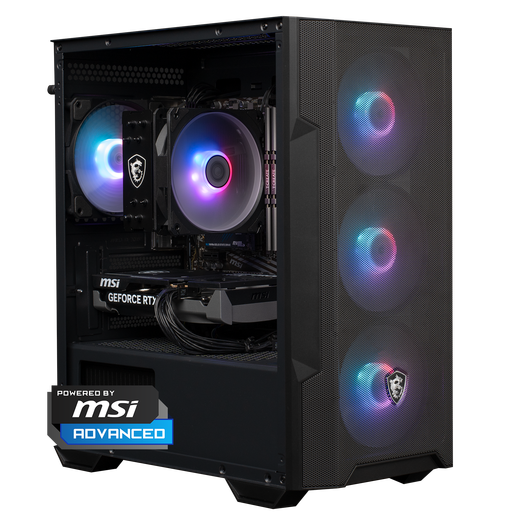
Why it suits this user: This ready-made gaming PC combines an AMD Ryzen 5 5500, RTX 5060, 16GB DDR4 and 1TB of NVMe storage in a relatively compact case.
The configuration lists more than just the GPU: it also specifies the CPU, RAM, storage, power supply and Windows 11 Home. That lets you check the complete setup.
RTX 5060 with 8GB, 16GB DDR4, 1TB NVMe and a case measuring 388 × 200 × 423 mm.
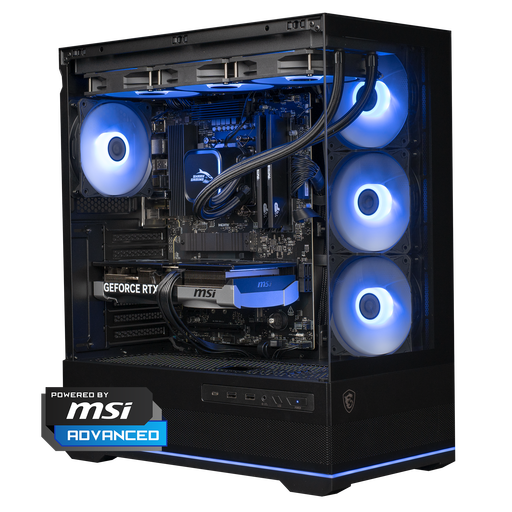
Why it suits this user: The combination of Ryzen 7 7800X3D, RTX 5070 with 12GB and DDR5 memory is designed for demanding gaming and multitasking setups.
The power supply is rated at 750W and the desktop uses a 360mm liquid cooler. However, check beforehand that the case will fit on your desk.
Ryzen 7 7800X3D, RTX 5070 12GB, 16GB DDR5, 1TB NVMe and Windows 11 Home.
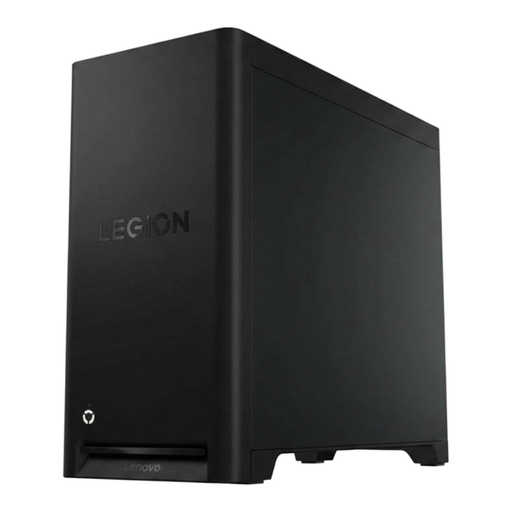
Why it suits this user: This tower combines a Ryzen 5 7600 with an RTX 5060 and offers four memory slots, an 850W power supply and several USB connections.
The upgrade information is specific: up to 32GB RAM, four DIMM slots and a 1TB PCIe 4.0 M.2 SSD.
Wi-Fi 7, Bluetooth 5.4, 2.5Gb Ethernet, 1TB SSD and a 30-litre tower case.
We’ve put together a complete, up-to-date list of products that meet these strict selection criteria and the applicable European safety regulations.
The price depends mainly on the graphics card, processor, storage and upgrade options. A system for 1080p gaming may cost less than a desktop designed for high settings at 1440p. So compare the full specifications, not just the GPU label.
16GB RAM is suitable for many games. For streaming, video editing and demanding multitasking, upgrade options matter more. Before you buy, check the number of free memory slots and the maximum RAM capacity.
Its lifespan depends on the games you play, settings, cooling and future software requirements. A desktop with standard components, plenty of ventilation and free expansion slots can be easier to upgrade than a mini gaming PC with soldered memory. Keep the computer clear of dust and don’t block the ventilation openings.
