
Vandaag of morgen in huis

Kwaliteit gegarandeerd

Welkomstaanbiedingen ontgrendelen: GRATIS bezorging | Tot 80% korting | Gratis 30 dagen JoyPlus-proefperiode
Download de app
Buying a new gaming PC is a significant investment. Whether you're looking for a pre-built gaming desktop or want to build a system yourself, the market can be overwhelming. Manufacturers throw around technical terms and promises that aren't always relevant to your needs. As a Joybuy Product Recommendation Officer, I'm here to help you cut through the marketing jargon. We'll look at the facts so you can make a smart choice without wasting money.
Before we look at products, let's first discuss the most common pitfalls. By recognising them, you can avoid a purchase you'll later regret.
To avoid the pitfalls mentioned above, it's crucial to understand a few core specifications. These aren't complex technical details, but practical points that make the difference between a good and a bad purchase.
The case is more than just a metal box; it's the foundation of your gaming PC. A good case ensures efficient cooling, simplifies installation, and provides room for future upgrades.
Building a gaming PC is all about synergy. The processor (CPU) and graphics card (GPU) must be balanced for the resolution you plan to game on.
A pre-built gaming PC from a reputable brand often gets this balance right, which simplifies the choice if you don't want to build it yourself.
Below is a selection of products that suit different user profiles. We've analysed the specifications and how they help avoid the pitfalls mentioned earlier.
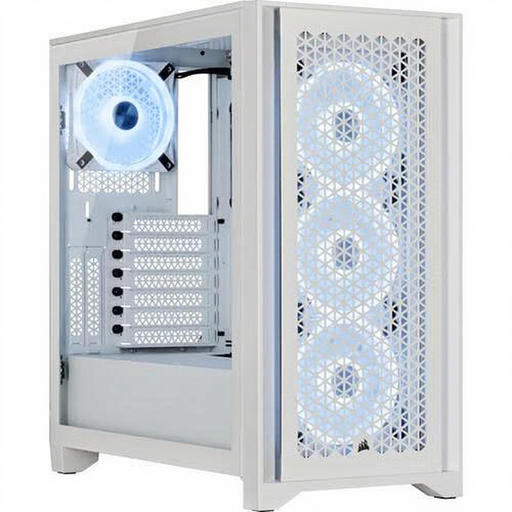
Why This Fits Their Persona: This case is a popular starting point for DIY builders. It offers an excellent balance of price, ease of building, and performance, without the complexity of a high-end case. Perfect for someone building their first gaming PC.
Directly tackles the pitfall of poor cooling. The case is designed for high airflow and comes with three RGB fans, giving you a solid cooling foundation right out of the box.
Excellent cable management and ample clearance (GPU up to 360mm) make the building process forgiving and straightforward.
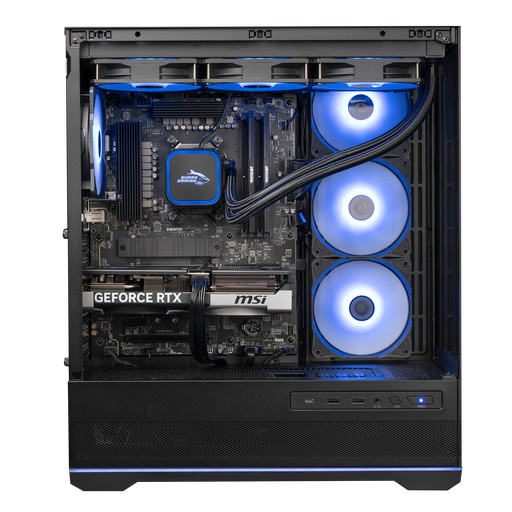
Why This Fits Their Persona: For the gamer who wants to get started immediately with a powerful and reliable system. No fussing with picking components or assembly; just power on and play at high settings.
This system avoids the "imbalance" pitfall. The AMD Ryzen 7 7800X3D and the MSI GeForce RTX 5070 are specifically chosen to complement each other perfectly for excellent 1440p and even 4K gaming performance.
Professionally assembled with quality components from MSI, including water cooling. This guarantees stability and optimal performance right out of the box.
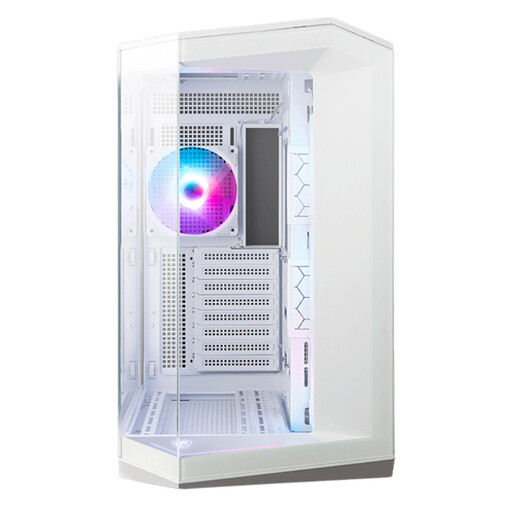
Why This Fits Their Persona: For the builder who wants to showcase their components. The panoramic glass design makes the PC the centrepiece of the room. Ideal for a sleek, modern setup with plenty of RGB lighting.
This MSI case proves that aesthetics and function can go hand in hand. Despite the extensive glass, the case supports up to 10 fans, avoiding the pitfall of poor cooling in a "beautiful" case.
The 270-degree panoramic design offers an unparalleled view of your components. It comes with four pre-installed ARGB fans.
We have compiled a complete, up-to-date list of products that fully meet these strict selection criteria and local regulations.
The price of a gaming PC can vary widely. For a solid system capable of comfortably running modern games at 1080p or 1440p, you should expect to pay between €1,200 and €2,000. For high-end 4K gaming and streaming, prices can quickly rise above €2,500. The price is primarily determined by the graphics card and processor.
A pre-built gaming PC is an excellent choice for those who value convenience and warranty. You get a system built and tested by professionals, and you have a single point of contact for support. Building a gaming PC yourself can be cheaper and gives you complete control over every component, but it does require technical knowledge and time.
For most gaming PCs, good air cooling is sufficient. PC water cooling (especially AIO coolers) becomes appealing for high-end processors, particularly if you plan to overclock. It can provide lower temperatures and quieter operation under heavy load, but it is generally not strictly necessary for a great gaming experience.
