
Vandaag of morgen in huis

Kwaliteit gegarandeerd

Welkomstaanbiedingen ontgrendelen: GRATIS bezorging | Tot 80% korting | Gratis 30 dagen JoyPlus-proefperiode
Download de app
A gaming PC with 32GB RAM may seem like a safe choice on paper. But memory capacity alone doesn’t tell you enough. The processor, graphics card, storage, cooling and upgrade options all play a part in whether a desktop suits the games you play and how you plan to use it.
This is particularly important if you’re looking for a powerful gaming PC for 1440p or 4K gaming, streaming and video editing. Below, you’ll find the key points to check and some popular options based on verifiable product specifications.
32GB of memory is suitable for many modern games, multitasking and streaming. But a PC with 32GB DDR5 and an entry-level graphics card won’t automatically be faster than a system with 32GB DDR4 and a more powerful GPU. For graphics performance, the graphics card is particularly important.
So, check:
A 32GB DDR5 gaming desktop uses a different type of memory from a DDR4 system. You can’t install DDR5 in a DDR4 motherboard later on. Always check that the motherboard, processor and RAM are compatible.
The G.SKILL Aegis kit in the product details consists of 2 x 16GB DDR4-3200. The Kingston FURY Beast kit uses 2 x 16GB DDR5-6000 with CL30 and AMD EXPO. These are different platforms, not interchangeable upgrades.
A 1TB NVMe SSD boots quickly and generally reduces loading times for software and games compared with older hard drives. However, 1TB can fill up quickly if you have a large library. Check whether there are additional M.2 slots or room for a second drive.
A Windows installation, creative software and a few large games can already take up a significant proportion of the available capacity.
A 2 x 16GB configuration is often preferable to a single 32GB module, as it lets the system use dual-channel memory. Check your motherboard manual for the correct slots and settings.
With 32GB, you’ll have more headroom for streaming, browser windows and chat apps alongside a game than you would with a 16GB system. Content creators working with large video projects, 3D software or virtual machines may benefit from 64GB. The G.SKILL Trident Z5 Neo RGB kit, for example, offers 64GB DDR5-6000, but it isn’t a complete PC and requires a compatible DDR5 platform.
A Ryzen gaming PC could be a good option if you’re looking for gaming performance on a modern AMD platform. An Intel gaming PC may suit users who value specific Intel features, connectivity or software compatibility.
Don’t just look at the processor name. Check:
A gaming PC with an RTX 5070 could suit users who want to play modern games at high settings. For higher resolutions and demanding ray tracing, systems with an RTX 5080 or a gaming PC with RTX 5090 are aimed at more demanding use.
According to the product descriptions, the RTX 5080 and RTX 5090 systems are designed for uses including 4K gaming, streaming and creative work. Treat this as the manufacturer’s positioning: your actual performance will also depend on the game, settings, drivers, cooling and monitor.
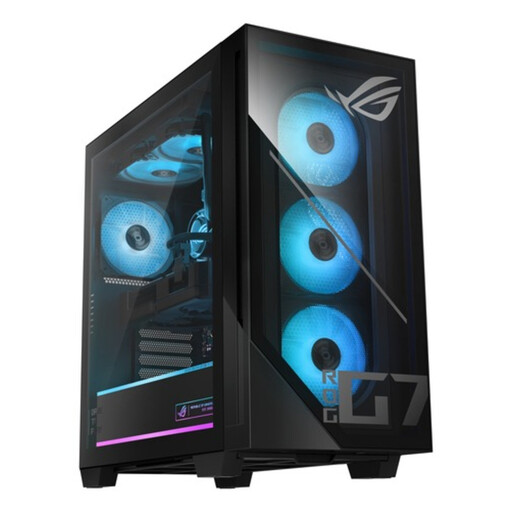
Why it suits this user: This desktop combines 32GB DDR5, a 1TB PCIe 4.0 NVMe SSD and an RTX 5070 12GB with an Intel Core Ultra 5 225F. It’s a straightforward setup for gaming, studying and everyday multitasking.
The product information lists the RAM type, SSD, GPU and power supply, so you don’t have to rely on the 32GB figure alone.
32GB DDR5, RTX 5070 12GB, 1TB PCIe 4.0 NVMe SSD, 240mm liquid cooling and an 850W 80+ Gold power supply.
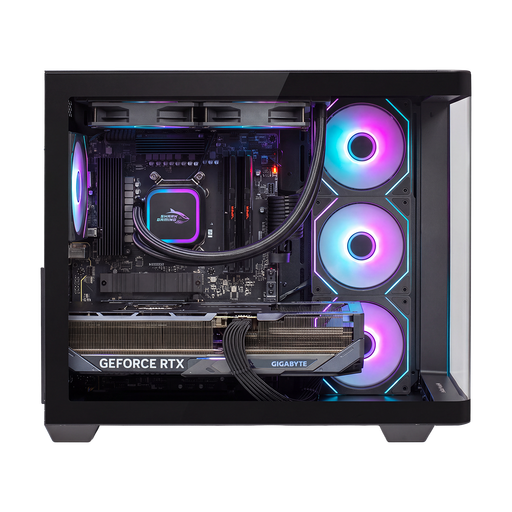
Why it suits this user: For users looking for a high-end gaming PC with plenty of storage and powerful hardware for gaming, streaming and creative projects.
As well as 32GB DDR5, the configuration lists an RTX 5090 with 24GB of video memory, 2TB of NVMe storage and a 1200W 80+ Gold power supply.
AMD Ryzen 7 9800X3D, RTX 5090 24GB, 2TB NVMe SSD, 240mm all-in-one cooling and Windows 11 Home.
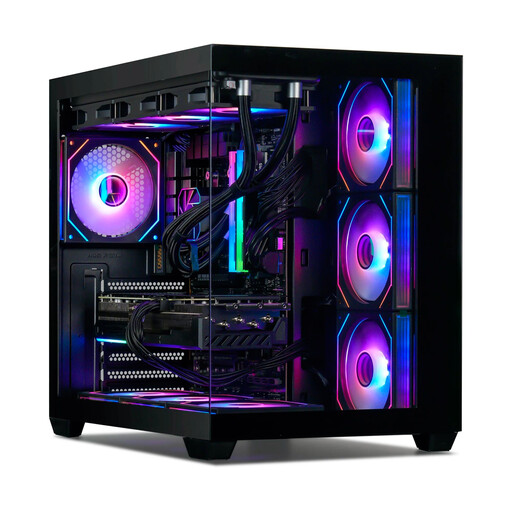
Why it suits this user: This Ryzen gaming PC is designed for intensive gaming, streaming and multitasking, with 32GB DDR5-6000, an RTX 5080 16GB and a 1TB NVMe SSD.
The specifications list not just the GPU, but also DDR5-6000, a 360mm cooler, motherboard, power supply and Windows evaluation version. Check this last limitation before buying.
Ryzen 7 7800X3D, RTX 5080 16GB, 32GB DDR5-6000 and 1TB NVMe SSD. The listed Windows installation is an evaluation version.
We’ve put together a complete, up-to-date list of products that meet these strict selection criteria and the applicable European safety regulations.
For most games, 32GB RAM is a generous and practical starting point. It also leaves room for streaming software, browsers and voice chat. For demanding video editing, 3D rendering or running lots of virtual machines, 64GB may be more suitable.
Its lifespan depends on the games you play, the image quality you want and future software requirements. A PC with a recent graphics card, DDR5 memory, NVMe storage and spare expansion slots may remain useful for longer. Keeping it dust-free and ensuring good ventilation also help you use the hardware within its specified operating conditions.
Power consumption varies depending on the graphics card, processor and workload. An RTX 5090 system with a 1200W power supply is designed for more demanding hardware than an RTX 5070 desktop with an 850W power supply. The power supply’s wattage isn’t the same as its constant power consumption. So, check actual usage while gaming and make sure the power supply is suitable and certified.
