
Vandaag of morgen in huis

Kwaliteit gegarandeerd

Welkomstaanbiedingen ontgrendelen: GRATIS bezorging | Tot 80% korting | Gratis 30 dagen JoyPlus-proefperiode
Download de app
A gaming mouse needs to do more than look good on your desk. An awkward shape, an unreliable wireless connection or a flat battery can quickly cause frustration during an FPS match. You’ll also soon notice during everyday use whether the mouse feels comfortable in your hand and responds accurately.
Marketing doesn’t always make choosing one easier. High DPI, RGB lighting and claims of ultra-low latency sound appealing, but they don’t automatically mean a mouse will suit your PC, hand size or games. That’s why Joybuy Product Recommendation Officer helps you separate the most important features from the rest.
A high-DPI gaming mouse can move the cursor across the screen faster. For most players, though, the maximum DPI matters less than sensor consistency, the adjustment range and how you use the sensitivity settings. Many FPS gamers play at a lower sensitivity so they can make larger arm movements.
So don’t just check the maximum DPI figure. Also look at:
A wireless gaming mouse can connect via 2.4 GHz, Bluetooth or both. Bluetooth is handy for a laptop and everyday use, while a 2.4 GHz USB receiver is generally designed for a direct gaming connection. Check where the receiver plugs in and whether you can keep playing while the mouse is charging.
A long battery life sounds practical, but “up to” a certain number of hours depends on the connection type, lighting and how you use the mouse. Treat the stated battery life as a product specification based on certain conditions, rather than a guaranteed length of use.
An RGB gaming mouse can complement a lit-up setup, but lighting doesn’t directly improve tracking or response times. The same goes for programmable buttons: six buttons can be handy for MOBA or RTS games, while an FPS player may prefer a simpler design.
An optical gaming mouse uses an optical sensor to track movement across a surface. Check the sensor range and adjustment options, but consider them alongside the polling rate. A polling rate of 1000 Hz means that, according to the product specifications, the mouse reports its position up to a thousand times per second.
Models with 4000 or 8000 Hz can send more data per second, which may place extra demands on your computer. According to the product information for the RAPOO VT9Pro, 4000 Hz can increase CPU usage; if you experience dropped frames, you may need to switch back to 1000 Hz.
A lightweight gaming mouse weighing around 60 to 75 grams can feel comfortable for quick movements. A heavier model may feel more stable. There’s no universally ideal weight, so also consider the dimensions, shape and way you hold the mouse:
An ergonomic gaming mouse won’t automatically suit every hand. Compare its length, width and height with your current mouse.
For competitive games, 2.4 GHz with a USB receiver is often the most practical wireless option. Bluetooth is especially useful for office work, laptops and lower power consumption. A model with USB-C usually offers a straightforward way to charge, and sometimes lets you keep playing while connected by cable.
If your mouse has a built-in lithium-ion battery, check the safety instructions. Don’t try to replace the battery yourself, and charge the device using the supplied or a suitable cable.
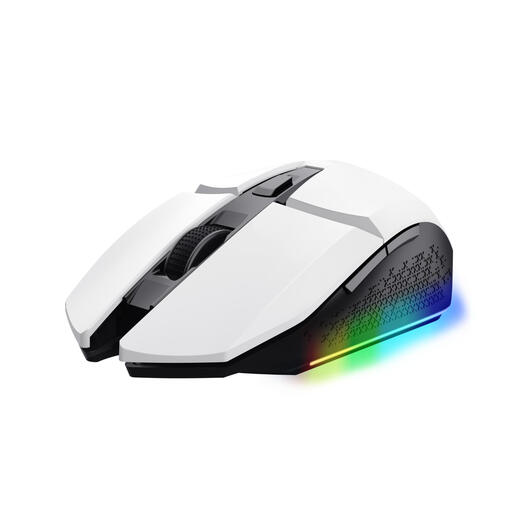
Why it suits this type of user: This wireless gaming mouse combines a 2.4 GHz receiver, six buttons, RGB lighting and an adjustable range of 800 to 4800 DPI. According to the product description, battery life is up to 80 hours, and you can keep playing while it charges.
The key features are clearly specified: an optical sensor, DPI button, rechargeable battery and the ability to play while charging. The maximum DPI is a sensible range for casual gaming.
Wireless 2.4 GHz connection, six buttons and RGB lighting with four lighting options; the specifications state that it’s suitable for left- and right-handed users.

Why it suits this type of user: The specifications list a weight of 63 to 64 grams, an ergonomic right-handed shape, 30,000 DPI and a 1000 Hz polling rate. The mouse is designed for both wireless and wired use.
The product information lists the sensor, polling rate, weight and connection separately, so you don’t have to rely on a vague claim about speed.
Lightweight design, optical Focus Pro 30K sensor and, according to the manufacturer, up to 90 hours of battery life.
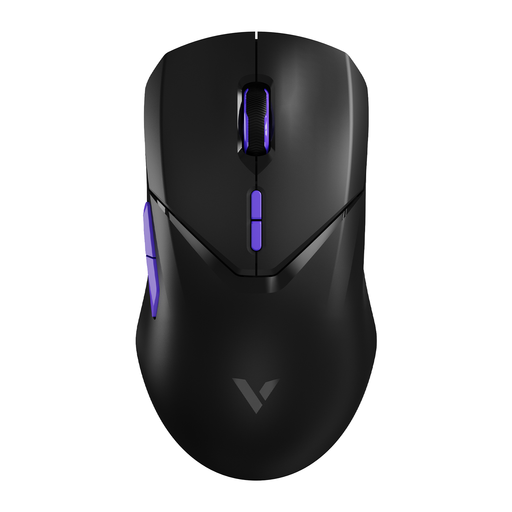
Why it suits this type of user: According to the product information, this model is aimed at users looking for a lightweight mouse, plenty of programmable buttons and long battery life. The stated specifications are 68 grams, 26,000 DPI, ten programmable buttons and up to 180 hours of battery life.
The higher 4000 Hz polling rate needs to be considered alongside your hardware: according to the safety information, it can increase CPU usage. You can switch back to 1000 Hz if your system needs it.
4000 Hz polling rate, PAW 3398 optical sensor and stated battery life of up to 180 hours.
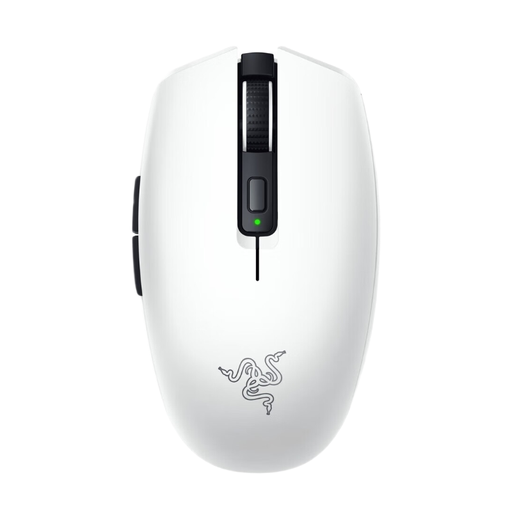
Why it suits this type of user: Its compact shape and stated weight of 60 grams without a battery make this model suitable for laptop use, travel and smaller workspaces. According to the product specifications, the mouse supports both 2.4 GHz and Bluetooth.
You’re not paying for lots of extra buttons or heavy lighting. The focus is on a compact size, two wireless connections and long stated battery life.
Bluetooth and 2.4 GHz connectivity; listed as suitable for left- and right-handed users, with up to 950 hours of battery life via Bluetooth according to the manufacturer.
We’ve put together a complete, up-to-date list of products that meet these strict selection criteria and current European safety regulations.
For FPS games, many players look for a lightweight design, a consistent optical sensor, a direct 2.4 GHz connection and a shape that supports quick movements. A low or medium DPI setting can be more practical than using the sensor’s maximum range. Also check that the mouse suits your grip and hand size.
It can be, provided the mouse uses a suitable wireless connection and USB receiver. Check the stated polling rate, connection mode and whether you can keep playing while it’s connected by cable. Bluetooth is especially handy for everyday use, but it isn’t always the first choice for fast-paced games.
Lifespan depends on the switches, cable or battery, how intensively you use it and how well you maintain it. According to the product information, some models have click ratings of tens of millions; this is a product specification, not a guarantee of a particular lifespan. Keep the sensor and mouse mat clean, avoid moisture and don’t pull on the cable. With a wireless model, battery capacity and charging habits also affect how practical the mouse remains over time.
