
Vandaag of morgen in huis

Kwaliteit gegarandeerd

Welkomstaanbiedingen ontgrendelen: GRATIS bezorging | Tot 80% korting | Gratis 30 dagen JoyPlus-proefperiode
Download de app
A gaming mouse should feel good in the shop, but that is not the whole story. You only find out whether the size is right, the cable stays out of the way and the buttons are logically positioned during a long gaming session. When searching for the “best gaming mouse”, many people mainly compare DPI and RGB lighting. These are visible features, but they do not tell you everything.
A gaming mouse with a high DPI rating can be set to a high sensitivity, but that does not automatically mean you will play more accurately. Many gamers actually use a lower setting for greater control. It is therefore also worth checking whether you can adjust the DPI in small increments and save multiple profiles.
RGB makes your setup more personal, but it does not change the sensor, weight or fit. Check whether the lighting can be switched off and whether the accompanying software works with your PC. On some models, RGB effects and macros can only be adjusted through the manufacturer’s software.
A compact, symmetrical mouse may suit a claw or fingertip grip, while a larger ergonomic gaming mouse offers more support for the right hand. A vertical mouse creates a completely different hand position. Check the length, width, height and hand orientation before ordering.
DPI indicates how far the cursor moves in response to a particular physical mouse movement. A range of 6,400 to 8,500 DPI is more than enough adjustment for everyday use and gaming. Models offering 25,600, 26,000 or 30,000 DPI mainly provide extra flexibility for different sensitivity profiles.
An optical sensor is standard on modern gaming mice. When comparing models, look at the maximum resolution, the available DPI increments and the software used to adjust the settings. The sensor rating alone is no guarantee of a better gaming experience.
A lightweight gaming mouse weighing around 50 to 70 grams can be comfortable for fast movements and large mouse mats. A heavier model may feel more stable. There is no universally suitable weight: your grip, hand size and playing style determine what feels comfortable.
Also check the dimensions. The HyperX Pulsefire Haste 2, for example, is approximately 124.3 mm long, 66.8 mm wide and 38.2 mm high. At around 130 mm long and 112 grams, the Razer Basilisk V3 Pro is clearly larger and heavier.
A wired gaming mouse draws power via USB and does not need to be recharged. This is practical for a fixed desktop setup. Check the cable length and flexibility, especially if your computer is positioned under or beside the desk.
A wireless gaming mouse gives you greater freedom of movement. Pay attention to the connection type, battery type, stated usage time and charging method. Bluetooth is useful for multiple devices, while a wireless dongle is often intended for a direct connection to a PC. Also check whether your console and operating system are supported.
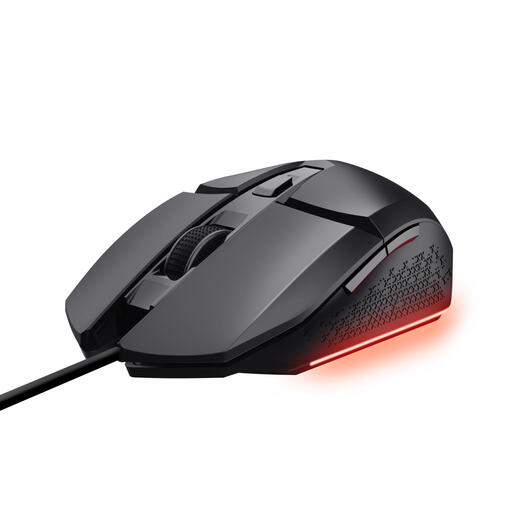
Why it suits this profile: This wired gaming mouse offers adjustable DPI, six buttons and RGB lighting, without you having to worry about a battery. The cable is 1.5 metres long and the mouse is aimed at PC gamers on a limited budget.
The product information specifies DPI levels from 200 to 6,400 and three RGB settings, so you do not have to judge it on appearance alone.
Optical sensor, six programmable buttons, DPI switch and software for macros and lighting.
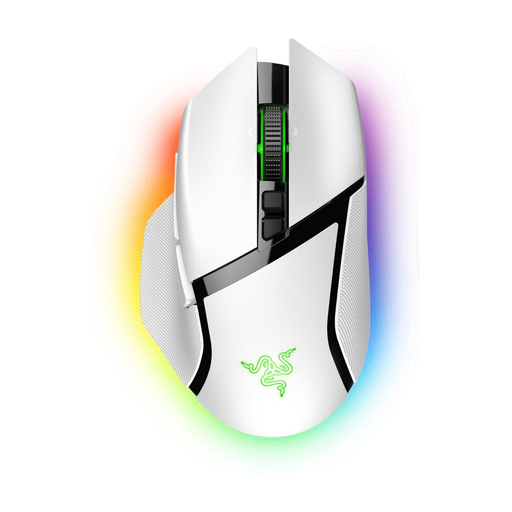
Why it suits this profile: Ideal if you are looking for a wireless, ergonomic gaming mouse with plenty of customisation options. This right-handed model has 11 buttons, RGB lighting, and both HyperSpeed and Bluetooth connectivity.
The choice between USB, Bluetooth and wireless radio makes the connection options clearer than on a model with just one connection type.
Sensor up to 30,000 DPI, 11 programmable buttons and a stated battery life of up to 90 hours via HyperSpeed.
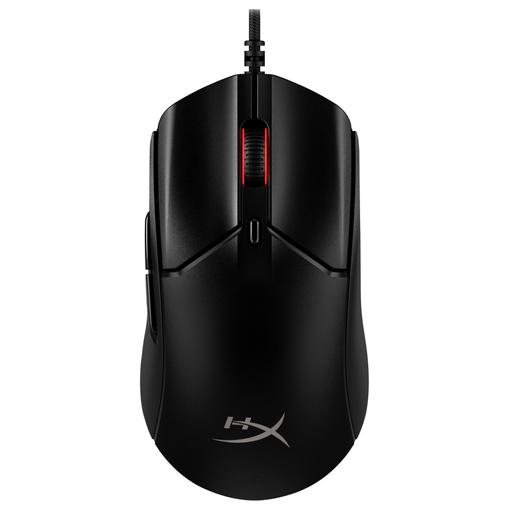
Why it suits this profile: This model is designed for players who value low weight, a high polling rate and compatibility with PCs and multiple consoles.
The product details clearly state the weight of approximately 52 grams without the cable, the 1.8-metre cable and the included grip tape.
HyperX 26K sensor, adjustable up to 26,000 DPI, polling rate of up to 8,000 Hz and six programmable buttons.
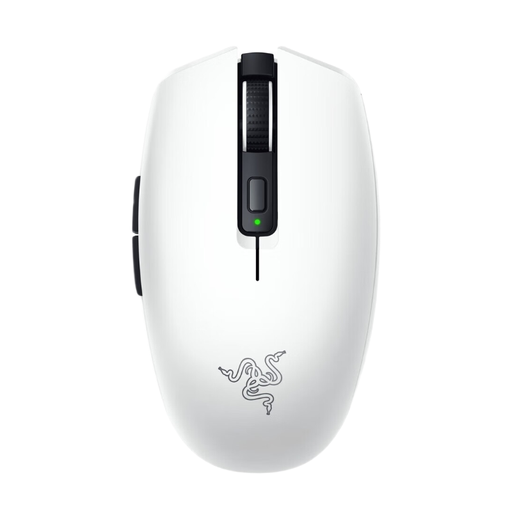
Why it suits this profile: Its compact, lightweight design and two wireless options make it suitable for laptop use, a flexible workspace or gaming on the go.
The mouse weighs approximately 60 grams without a battery and supports both Bluetooth and a wireless receiver; do check which battery type you want to use beforehand.
Up to 18,000 DPI, six programmable buttons and, according to the product information, up to 950 hours of battery life via Bluetooth.
We have put together a complete, up-to-date list of products that fully meet these strict selection criteria and the applicable European safety regulations.
That depends on the connection and your preferences. A model with a wireless radio connection can give you greater freedom of movement, while Bluetooth is particularly useful when you want to use the mouse with different devices. If you would rather not recharge a battery, a wired gaming mouse may be the better choice.
For most users, an adjustable range of up to 6,400 or 8,500 DPI is sufficient. A higher maximum, such as 26,000 or 30,000 DPI, gives you more adjustment options but is not necessary for every game. Focus particularly on fine DPI increments and the ability to save profiles.
Its lifespan depends on usage, cable care, cleaning and the quality of the switches. Manufacturers sometimes state a click rating, such as 10 million or 100 million clicks. According to the brands’ own specifications, these figures apply under certain conditions; they are not a guarantee of a fixed service life.
