
Vandaag of morgen in huis

Kwaliteit gegarandeerd

Welkomstaanbiedingen ontgrendelen: GRATIS bezorging | Tot 80% korting | Gratis 30 dagen JoyPlus-proefperiode
Download de app
A gaming mouse should suit your game, hand and connection. Yet the choice is often driven by high DPI figures, RGB lighting or terms such as “ultralow latency”. These figures do not tell the whole story. For example, a lightweight mouse may feel comfortable for fast FPS movements, but less suitable if you are used to a heavier model with plenty of thumb support.
As a Joybuy Product Recommendation Officer, I mainly filter products based on verifiable specifications. Before buying, look out for these three common pitfalls:
A wired gaming mouse draws power via USB and does not need charging. This is practical for a fixed PC setup and avoids problems caused by a flat battery. A smooth cable of sufficient length is important, though; a stiff cable can restrict your movement.
A wireless gaming mouse with a 2.4GHz receiver is suitable for competitive games when you want a tidy desk. Look at the battery life, charging method and whether you can continue playing while charging. A Bluetooth gaming mouse is useful for a laptop, tablet or second device, but check whether the gaming features remain available in Bluetooth mode.
A lightweight gaming mouse weighing approximately 53 to 75 grams may suit players who make large arm movements. A low weight is often practical for a claw grip or fingertip grip. A heavier model with more buttons may be better suited to MOBA and RTS games.
Also check the hand orientation. Many models are designed for right-handed use only. An ergonomic gaming mouse does not automatically have the right shape for every hand. Pay attention to the length, width, height and position of the thumb buttons.
DPI indicates how sensitive the cursor can be set. A high-DPI gaming mouse offers plenty of adjustment options, but a high maximum value is mainly useful if you actually use it. For FPS games, many players choose lower sensitivity for controlled aiming; for everyday use, a higher setting may feel more comfortable.
The polling rate indicates how often the mouse position is transmitted per second. 1,000 Hz is a common setting. Higher values such as 4,000 or 8,000 Hz may use additional system resources. According to Rapoo’s product information, the VT9Pro may cause higher CPU usage at 4,000 Hz. So check whether your PC can handle it.
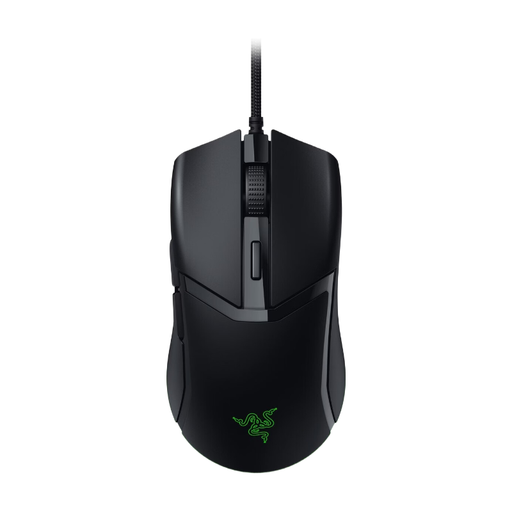
Why it suits this profile: This wired gaming mouse connects easily via USB and offers adjustable sensitivity for PC and Mac use.
You are not paying for a battery or wireless receiver. The essential gaming features are straightforward: DPI adjustment, programmable buttons and configuration software.
58 grams according to the product specifications, optical sensor up to 8,500 DPI, six buttons and a 1.8-metre cable.
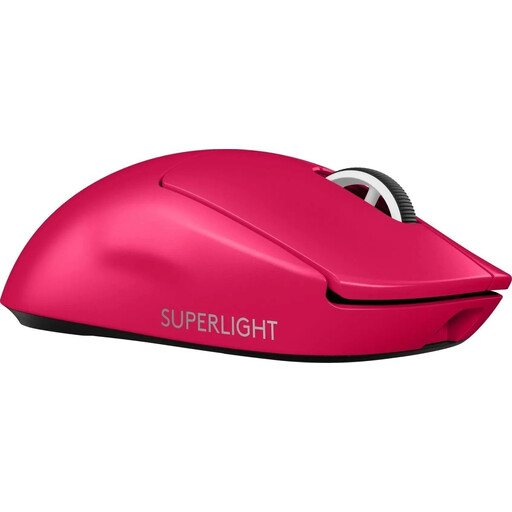
Why it suits this profile: An esports mouse for players who value low weight, wireless LIGHTSPEED connectivity and USB-C charging.
The product information states a weight of 60 grams and a wireless radio connection. Check your preferred DPI setting before buying, as the listed product details give different maximum values.
HERO sensor, polling rate of up to 4,000 Hz according to the specification table, five buttons and a rechargeable battery via USB-C.
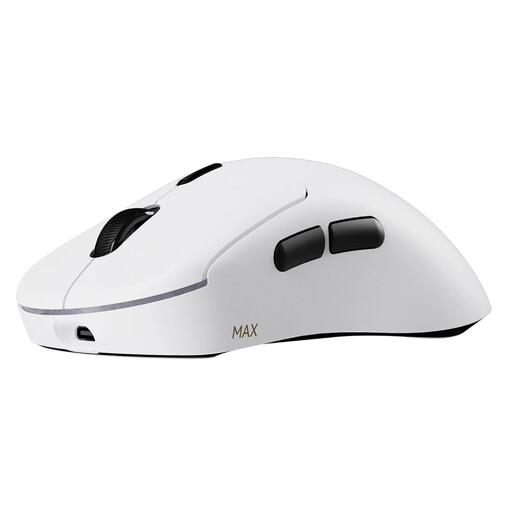
Why it suits this profile: Designed for players who want plenty of buttons, a high polling rate and long battery life for FPS, MOBA or RTS games.
Battery life is linked to a specific polling rate: according to Rapoo, it lasts up to 750 hours at 1,000 Hz. Higher settings may therefore affect power consumption.
53 grams, up to 8,000 Hz wirelessly, 30,000 DPI according to the product information, ten programmable buttons and optical switches.
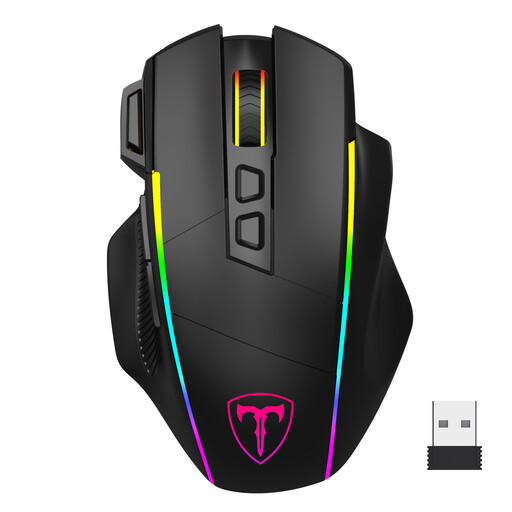
Why it suits this profile: Ideal for anyone who wants to use a gaming mouse with both a laptop and PC, with a choice of 2.4GHz, Bluetooth and USB-C.
The three connection options make it more flexible to use. However, note that according to the product information, the programming software works only in wired mode and on Windows.
Adjustable from 1,200 to 10,000 DPI, eight programmable buttons, RGB lighting and four polling-rate settings up to 1,000 Hz.
We have put together a complete, up-to-date list of products that fully meet these strict selection criteria and the applicable European safety regulations.
It can be, especially with a 2.4GHz connection and an included USB receiver. Check the polling rate, battery status and whether you can play while charging. Bluetooth is mainly practical for mobile devices and office work.
That depends on your screen, game and personal settings. A range of approximately 800 to a few thousand DPI is sufficient for many situations. A high-DPI gaming mouse gives you more adjustment room, but a high maximum value does not necessarily result in better performance.
Its lifespan depends on the switches, cable, battery, intensity of use and maintenance. Manufacturers sometimes state a click rating or battery life; these are product specifications or brand claims, not a guarantee of a particular service life. Keep the sensor dry, do not pull on the cable and charge a built-in battery according to the instructions.
