
Vandaag of morgen in huis

Kwaliteit gegarandeerd

Welkomstaanbiedingen ontgrendelen: GRATIS bezorging | Tot 80% korting | Gratis 30 dagen JoyPlus-proefperiode
Download de app
Buying a gaming mouse seems simple, until you have to choose between DPI, weight, lighting, buttons and wireless connectivity. Marketing copy often focuses on impressive numbers, even though other features can be just as important for everyday use.
A high DPI rating, for example, doesn’t automatically make a mouse more accurate for every player. RGB lighting won’t change its tracking, either. And while a wireless gaming mouse can be convenient, you’ll need to consider battery life, charging options and compatibility.
In this buying guide, we’ll compare the key differences at a glance, so you don’t end up paying for features you won’t use.
DPI determines how quickly the cursor moves across the screen in response to the same physical hand movement. A high-DPI gaming mouse can be useful for certain play styles, but many players use a lower range in practice. So don’t just check the maximum value: see whether the DPI is adjustable and what increments are available.
An optical gaming mouse with a stable sensor, suitable polling rate and comfortable grip may feel better to use than a model that simply boasts a higher number on the box.
A lightweight gaming mouse weighing around 50 to 70 grams takes less effort to move over longer distances. A heavier model may feel more stable. There’s no one weight that works for everyone.
Hand orientation matters, too. Some models are specifically designed for right-handed use, while a symmetrical mouse may suit both left- and right-handed users. An ergonomic gaming mouse with a thumb rest won’t necessarily be suitable if you use a claw or fingertip grip.
A programmable gaming mouse can be useful for MMO, MOBA or RTS games. For simpler FPS games, two thumb buttons may be enough. More buttons also mean a larger body and potentially more weight.
RGB lighting is mainly a visual feature. According to information provided by the brands concerned, you can adjust the lighting using software, but it has no direct effect on sensor precision. Check whether the required software supports your operating system, too.
A wired gaming mouse draws power directly through USB, so you don’t need to charge it. This is handy for a fixed PC setup. Check the cable length and flexibility: a stiff cable can get in the way when using low sensitivity settings.
A wireless gaming mouse usually connects via a 2.4GHz receiver or Bluetooth. Many gaming models use 2.4GHz for a fast connection, while Bluetooth is handy for laptops and multiple devices. A model with three connection options, such as 2.4GHz, USB-C and Bluetooth, offers more flexibility, but check whether software features are available in every connection mode.
DPI is the mouse’s sensitivity. The polling rate indicates how often the mouse sends data to your computer. A rate of 1,000 Hz means this happens up to 1,000 times per second, according to the product specifications. Higher rates may matter to competitive players, but can sometimes use more system resources.
Also look for:
Check how many buttons the mouse has and whether they’re genuinely programmable. Pay attention to the position of the side buttons; if they’re too close together, you may press the wrong one while gaming.
Brands can make their own durability claims, but don’t treat these as a guarantee for every usage scenario. For example, Razer states that switches or buttons on certain models have been tested for a specific number of clicks. This is a product specification from the brand, not a guarantee of how long the mouse will last for every user.
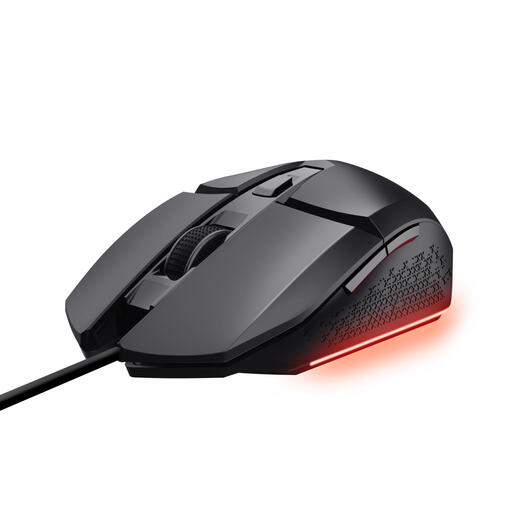
Why it suits this user: This wired gaming mouse offers a straightforward set of features for PC gamers who don’t need a fully featured model straight away.
The DPI is adjustable from 200 to 6,400, and the mouse uses an optical sensor. That means you don’t have to rely on a single high maximum value.
Six buttons, software for customising settings and RGB lighting with three modes. The cable is 1.5 metres long.

Why it suits this user: This wireless model is aimed at users who value a low weight, USB-C charging and an advanced sensor.
With a stated weight of 60 grams and a wireless LIGHTSPEED connection, this model is designed to offer freedom of movement without a heavy body.
Optical sensor, USB-C charging and a product specification of up to 32,000 DPI. The shape is designed for right-handed use.
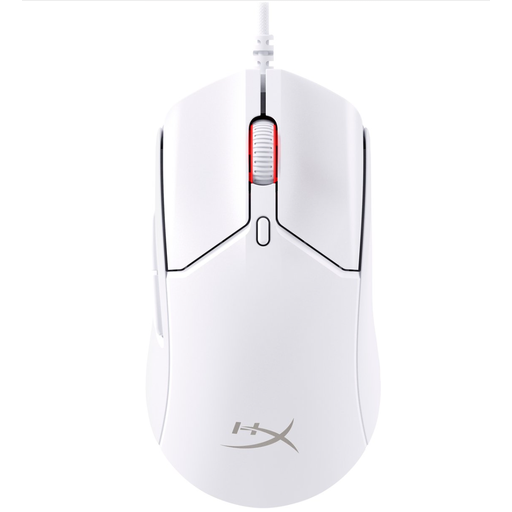
Why it suits this user: This lightweight model is designed for users who want to combine fast movements and programmable buttons with compatibility across PC and consoles.
The stated weight is approximately 52 to 53 grams without the cable. Its symmetrical shape and included grip tape give you more options for adjusting your grip.
According to the product specifications: HyperX 26K sensor, up to 26,000 DPI, six programmable buttons and compatibility with PC, PS5, PS4 and Xbox consoles.
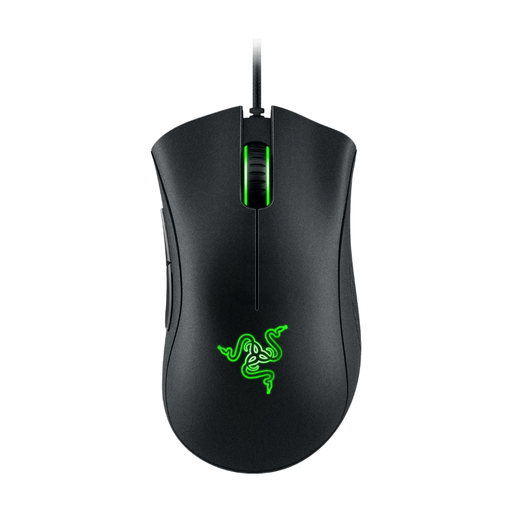
Why it suits this user: Its ergonomic, right-handed shape is designed for gamers who prefer a fixed USB setup and a classic design.
The product specifications combine an optical sensor with 6,400 DPI, five buttons and a polling rate of up to 1,000 Hz. So your choice isn’t based on lighting alone.
Ergonomic body, programmable buttons and a 2.1-metre cable. Razer states that the buttons have been tested for up to 10 million clicks.
We’ve put together a complete, up-to-date list of products that meet these strict selection criteria and the applicable European safety regulations.
It depends on your screen, game and play style. Start with a moderate setting and adjust it until you can move the cursor or aim with control. Adjustable DPI is more practical than a fixed setting.
You don’t need to charge a wired model, and it works directly via USB. A wireless gaming mouse gives you more freedom of movement, but check the battery life, connection type and whether you can keep playing while it charges. If you’re using a console, you should also check whether the specific model is officially compatible.
Its lifespan depends on how you use and maintain it, strain on the cable, and the quality of its switches and sensor. Clean the sensor and mouse feet regularly with a dry cloth, avoid pulling on the cable and keep a wireless model charged. These products are generally covered by a minimum two-year legal guarantee in the EU; additional manufacturer terms may vary by brand and model.
