
Vandaag of morgen in huis

Kwaliteit gegarandeerd

Welkomstaanbiedingen ontgrendelen: GRATIS bezorging | Tot 80% korting | Gratis 30 dagen JoyPlus-proefperiode
Download de app
Buying a gaming mouse sounds simple until you have to choose between a wired gaming mouse, wireless mouse, RGB lighting, high DPI and dozens of button layouts. Marketing often focuses on extreme figures, while shape, weight and software are just as important.
The three most common pitfalls:
So start by looking at the specifications you notice every day. You can then consider extra features such as programmable buttons and RGB gaming mouse lighting.
An optical gaming mouse uses an optical sensor to register movement. DPI indicates how far the cursor moves in response to a particular hand movement. A mouse with adjustable DPI is useful if you want to use a different speed for each game or application.
A range of 800 to 6,400 DPI is sufficient for many PC users. Models such as the Razer DeathAdder V3 and Logitech G502 X offer higher values, but that does not automatically mean you need them. Also check whether the DPI setting can be adjusted in increments.
The polling rate indicates how often the mouse sends data to the computer. 1,000 Hz is standard; some gaming models specify up to 8,000 Hz. A higher setting may use more system resources and is mainly relevant to users who have configured their computer and games accordingly.
A lightweight gaming mouse is comfortable for fast, sweeping movements. Also consider how you hold the mouse:
Check the dimensions and weight before ordering. An ergonomic mouse designed for right-handed use is not automatically suitable for left-handed users. A vertical mouse also creates a very different hand position from a traditional model. That is a personal preference, not a universal solution.
A wired gaming mouse connects directly via USB and does not need to be charged. The trade-off is having a cable on your desk. A wireless mouse gives you more freedom of movement, but check the battery life, connection type and whether a USB receiver is included.
Programmable buttons are useful for MMOs, strategy games, productivity and shortcuts. For straightforward FPS games, a model with five or six buttons may be easier to manage. Also check software compatibility: some functions, macros and RGB settings only work with the accompanying app.
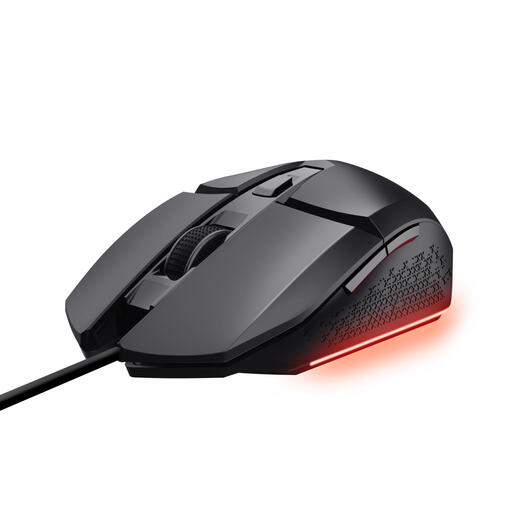
Why it suits this profile: This wired gaming mouse offers a USB connection, six buttons and adjustable DPI, without the need to manage a battery.
The DPI can be adjusted from 200 to 6,400. This means you are not just looking at a marketing figure; you can set the speed to suit your needs.
Optical sensor, six buttons, software for macros and three RGB settings.

Why it suits this profile: Right-handed users who want plenty of functions directly beneath their fingers get an extensive button layout with this wired model.
The choice is not just about DPI: the mouse has an ergonomic right-handed shape, 13 controls and a fixed USB connection.
Optical sensor up to 25,600 DPI, 1,000 Hz polling rate and adjustable scroll resistance.
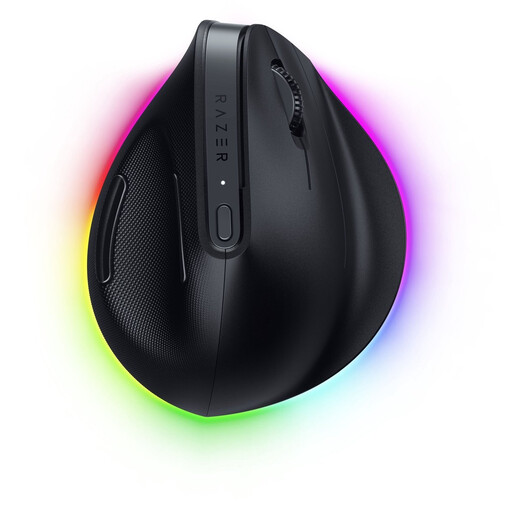
Why it suits this profile: For people who combine work and gaming and deliberately want a vertical mouse with wireless connectivity and support for multiple devices.
The product shape and hand orientation are clearly stated: this is a vertical mouse for right-handed use. That makes the choice more targeted than simply going by RGB or DPI.
Up to 30,000 DPI, six programmable buttons, Bluetooth and Razer HyperSpeed, plus 18 RGB zones.
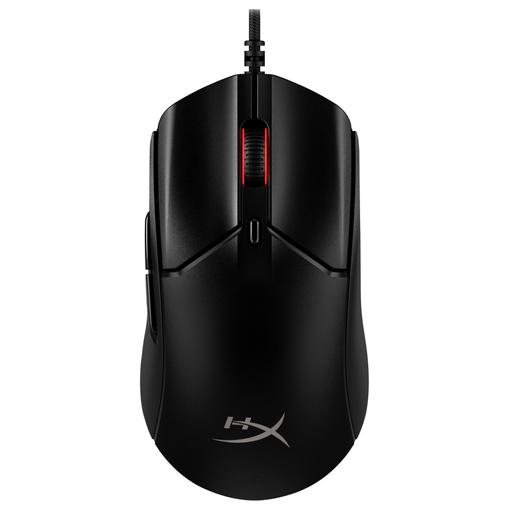
Why it suits this profile: This lightweight gaming mouse is aimed at players who value a symmetrical shape, flexible cable and high polling rate.
Alongside the high sensor resolution, the weight of approximately 52 grams and the symmetrical shape are also stated. This lets you assess speed, grip and size together.
HyperX 26K optical sensor, up to 8,000 Hz, six buttons and PTFE feet.
Check these points before completing your purchase:
We have put together a complete, up-to-date list of products that fully meet these strict selection criteria and the applicable European safety regulations.
A USB connection means you do not have to charge a battery and provides a stable connection. Modern wireless mice can also be suitable for gaming, but check the connection used, receiver and battery life. The right choice depends on your desk setup and personal preference.
It varies depending on the game, screen resolution and playing style. Start with a moderate setting and adjust it gradually. A mouse with adjustable DPI is more practical than simply looking at the maximum value on the packaging.
Its lifespan depends on the switches, cable, scroll wheel, intensity of use and maintenance. Manufacturers sometimes state a rated click lifespan, but this is a product specification rather than a guarantee of a fixed period of use. Keep the sensor and mouse feet clean, avoid liquids and do not pull on the USB cable.
