Who is this guide for?

Players who click and navigate frequently

When building rooms and managing menus, easy access to the scroll wheel and buttons is well worth considering. Two Point Studios describes Two Point Hospital as a game centred on hospital layout and staff management.

Students with a small desk

If you use the same space for studying and gaming, or take your mouse with you, it’s worth deciding in advance between a cable, a USB receiver and Bluetooth. Logitech describes the G305 as a mouse with a 2.4 GHz USB receiver; check the connection type of the exact mouse you’re considering.

Players who share a room

If someone else in the room is studying or sleeping, click noise may be a factor. Check this separately: buttons, lighting and a wireless connection don’t tell you how quietly a mouse clicks.

What should you look for when choosing?

Wired gaming mouse

A good fit if: you usually play at the same desk and can position the cable without it getting in the way.

The trade-off: you don’t need to manage a battery or wireless receiver, but the cable’s length and route need to suit your desk.

Wireless with a USB receiver

A good fit if: you want to keep your desk clear or take your mouse with you, and have a suitable USB port.

The trade-off: you’ll need to keep track of the receiver and allow for battery replacement. Logitech specifies a 2.4 GHz receiver for the G305; its official specifications don’t confirm Bluetooth.

Wireless with Bluetooth and a USB receiver

A good fit if: you want to switch between Bluetooth and a receiver connection; Razer lists both options for the Basilisk V3 Pro.

The trade-off: Razer lists the Basilisk V3 Pro at 112 g without a cable, and compatible charging accessories are sold separately. The Basilisk V3 Pro 35K is a different version.

What to consider What should you check? Who is this important to?
Controls Check the position of the scroll wheel and buttons. Make sure your preferred settings are available on your computer. If I often build rooms and navigate management menus, I want the wheel and buttons to be easy to reach. Around 25% of consumers prioritise accessible controls.
Hand comfort Compare the shape, dimensions and weight of the exact version with your hand and grip. A specification can’t prove that a mouse will be comfortable for everyone. For longer sessions, I want a mouse that feels comfortable in my hand, with buttons within easy reach. Around 20% of consumers prioritise hand comfort.
Desk and connection Check that your computer has the required connection and that the cable, Bluetooth connection or USB receiver suits the way you use the mouse. At a small desk, I want to save space or take my mouse with me easily without finding I’m missing the right connection. Around 20% of consumers choose mainly based on desk layout and connection.
Total cost Compare the current price of the exact version and check whether you’ll need any batteries or charging accessories. If I won’t use the extra features, I don’t want to pay unnecessarily for accessories or functions. Around 20% of consumers prioritise total cost.
Click noise Look for an explicit specification for quiet switches and, if possible, check the sound of the exact mouse for yourself. If I share a room, I want to avoid disturbing others with repeated clicking. Around 15% of consumers prioritise quiet clicks.

Things to watch out for when buying

  • Don’t assume every wireless mouse has Bluetooth

    Logitech’s official specifications for the G305 list a dedicated 2.4 GHz USB receiver. Check the connection type of the exact version with the manufacturer, especially if a product description says something different.

    If the mouse uses a receiver, make sure your computer has a suitable, available USB port.

  • Don’t confuse different model versions

    Razer distinguishes between the Basilisk V3 Pro and the Basilisk V3 Pro 35K. Specifications or product details for one version don’t automatically confirm the features of the other.

    Compare the full model name and relevant specifications before choosing a version.

  • Don’t assume gaming features mean quiet clicks

    Lots of buttons, lighting and a wireless connection don’t indicate that a mouse clicks quietly. If you share a room, check this feature separately.

    Look for an explicit mention of quiet switches for the exact version, and try the mouse’s click sound for yourself if possible.

  • With wireless mice, check the battery and accessories too

    Logitech says the G305 uses a replaceable AA battery. Razer lists compatible charging accessories for the Basilisk V3 Pro, sold separately.

    Check what’s included in the box, and only factor in accessories you actually plan to use.

Brands to consider

Logitech G

The G203 LIGHTSYNC is a wired option, while the G305 LIGHTSPEED uses a 2.4 GHz USB receiver. This information applies to these models, not the brand’s entire range.

  • Logitech lists six buttons for the G203 and six programmable buttons for the G305. For advanced G203 features, Logitech mentions G HUB.
  • For the G305, Logitech lists up to 250 hours in the specified performance mode; actual battery life may vary. The official specifications don’t confirm Bluetooth.

Trust

The wired GXT 109 Felox is a model to consider if you use a fixed desk setup.

  • Trust lists six buttons, adjustable settings and a 1.5-metre cable for the Felox.
  • With a cable of this length, it’s important to check that it will reach comfortably and can be routed neatly around your desk.

SteelSeries

The wired Aerox 3 is worth comparing if a low stated weight is important to you.

  • SteelSeries specifies a weight of 59 g and a USB-C connection on the mouse for the wired Aerox 3 version.
  • Weight alone won’t tell you whether the shape suits your hand; also compare the dimensions and button positions of the version you’re considering.

Razer

The Basilisk V3 Pro is designed for those who want to use multiple programmable buttons and different connection options.

  • For the original Basilisk V3 Pro, Razer specifies eleven programmable buttons, Bluetooth and a 2.4 GHz connection.
  • Razer lists a weight of 112 g without a cable; compatible charging accessories are sold separately. The Basilisk V3 Pro 35K is a different version.

Gaming mice at Joybuy

This selection includes wired and wireless gaming mice to compare for a desk you use for both studying and gaming. For each model, check that the connection, shape and extra features suit the way you’ll use it.

AJAZZ AJ159 PRO wireless gaming mouse, white

AJAZZ AJ159 PRO, white

A wireless option to compare if you want a choice of connections for a small desk.

The product name lists Bluetooth, 2.4G and USB-C, a 56 g design, a PAW3395 sensor, 26K DPI and a 400 mAh battery. Check which connection and settings suit your computer and how you use the mouse.

View at Joybuy

HyperX Pulsefire Saga wired gaming mouse, black

HyperX Pulsefire Saga, wired

A wired option if you usually play in one place and want to adjust the shape to suit your grip.

The product description lists a weight of 69 g, a flexible USB cable and 16 combinations of interchangeable parts. The product name lists RGB lighting and 26,000 DPI.

View at Joybuy
Logitech G G502 X, wired right-handed gaming mouse

Logitech G G502 X, right-handed

A wired option to consider if you want to use extra buttons for custom settings.

The product information lists 13 programmable buttons and a scroll wheel. The product name lists a USB Type-A connection, an optical sensor and 25,600 DPI.

View at Joybuy

Razer Orochi V2 wireless gaming mouse, black

Razer Orochi V2, black

A wireless option to compare if you want to use Bluetooth or a dedicated wireless connection.

The product description lists Bluetooth, Razer HyperSpeed Wireless, a symmetrical shape and six independently programmable buttons. The product name lists 18,000 DPI.

View at Joybuy
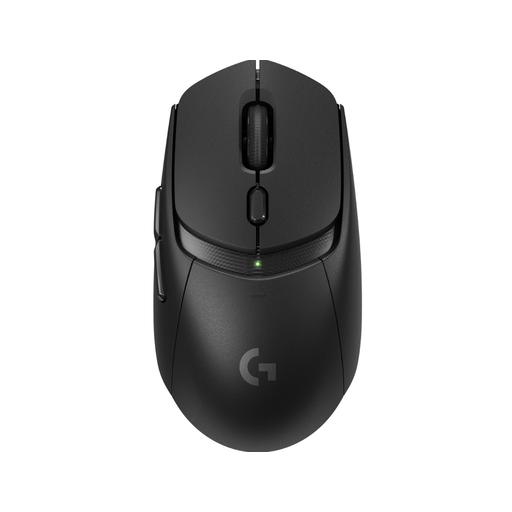
Logitech G309 LIGHTSPEED wireless gaming mouse, black

Logitech G309 LIGHTSPEED, black

A wireless option to consider if you want several programmable buttons without a fixed mouse cable on your desk.

The product description lists LIGHTSPEED, Bluetooth and six programmable buttons. The product information states that this is not a quiet mouse, so don’t choose it if quiet clicks are essential.

View at Joybuy

Frequently asked questions

Do I need lots of side buttons or an extremely high DPI setting for a hospital management game?

Not to start with. Two Point Studios describes Two Point Hospital as a game that involves hospital layout and management, among other things. So start with a mouse whose basic controls, wheel and shape suit you. Extra programmable buttons are most useful if you want to assign your own commands to them. A high maximum DPI setting doesn’t, by itself, guarantee a better gaming experience.

Can I connect the Logitech G305 directly to my laptop using Bluetooth?

Don’t assume you can: Logitech’s official specifications list a dedicated 2.4 GHz connection for the G305, using a USB receiver and USB port. Check the connection type of the exact version before you buy.

What should I do with used batteries or my old mouse?

Take used household batteries to a collection point; according to the Dutch government, they must not go in the bin. For discarded electrical appliances, the Dutch government lists options including local authority collection and, when a private individual buys a similar new appliance, the take-back scheme for old appliances.

What are my rights if I’m unhappy with a mouse bought online or it breaks too soon?

Online purchases generally come with a statutory cooling-off period of up to 14 days after delivery; ACM ConsuWijzer explains the exceptions. If a product doesn’t perform as you could reasonably expect under normal use, you also have statutory guarantee rights, and the seller is responsible for offering an appropriate solution. A manufacturer’s guarantee doesn’t replace those statutory rights.

What should I look out for when buying electronics with a CE mark?

According to Your Europe, the European Union’s information portal, electrical and electronic equipment must comply with the applicable product rules. The manufacturer is responsible for meeting the requirements and applying the mark; the CE mark is not an EU certification issued centrally. Check the product and manufacturer details, and don’t assume a product complies based only on a shop description.
