A wired gaming mouse can be a practical choice when power sockets are scarce: you won’t need a separate mouse charger, but you will need a free computer port and have to be happy with a cable. If you’d rather play wirelessly, choose between a replaceable battery and a rechargeable battery, and check whether Bluetooth is available if you don’t want to use a USB receiver. Also consider the grip, button layout and scrolling behaviour that suit your game.
Who is this buying guide for?
Player without a charging spot
You don’t want to charge your mouse from a wall socket during long tactics sessions. Compare a wired connection with a replaceable battery: Logitech G lists one AA battery for the G305, while a wired mouse doesn’t need separate charging.
Laptop player with USB ports in use
You want to keep your ports free and can use Bluetooth. Check that both your computer and the mouse you choose support this connection; a 2.4GHz receiver requires a USB port.
Player who uses maps and menus frequently
You want buttons that are easy to reach and smooth scrolling. Logitech G lists a dual-mode scroll wheel for the G502 X. More buttons or a higher DPI rating alone don’t prove that a mouse is better suited to your game.
What should you look for when choosing?
The percentages refer to the same group of shoppers: people looking for a gaming mouse for turn-based tactics when power sockets are scarce, grouped by their main purchasing concern.
| What to consider |
What to look for |
Who is this important to? |
| No separate charging |
Check whether the mouse is wired or uses a replaceable battery; a wired mouse needs a free computer port. |
If I don’t want to charge a separate mouse during long sessions, I compare a cable with a replaceable battery. Around 33% of shoppers prioritise avoiding a charging session. |
| Keeping USB ports free |
Check whether the exact model has Bluetooth and whether your computer supports Bluetooth; 2.4GHz uses a receiver. |
When my USB ports are already in use, I want to know whether Bluetooth works without a receiver. Keeping ports free is the top priority for around 27% of shoppers. |
| Map navigation and commands |
Check the button layout, scroll modes and whether the controls you want work with the relevant software and game. |
For map and menu actions, I want to tailor the buttons and scrolling to the way I play. Around 20% of shoppers prioritise these controls. |
| Comfort during long sessions |
Compare the shape, dimensions, grip and weight, including any battery. |
During longer gaming sessions, I look for a shape that suits my hand, not just a particular DPI. Around 20% of shoppers put comfort first. |
Common pitfalls
-
Assuming ‘wireless’ means ‘no USB port needed’
Bluetooth and 2.4GHz via a receiver are different connection options. According to Razer, the Orochi V2 offers both modes, but the receiver is needed for 2.4GHz.
Check the product page and manual for the exact model to confirm that it has Bluetooth and that your computer supports it.
-
Ruling out a wired mouse because you have few wall sockets
A wired mouse uses a computer port and doesn’t need a separate mouse charger. The practical trade-off is the cable and the occupied port.
Count your computer ports and wall sockets separately before choosing between wired and wireless.
-
Comparing battery life across different connection modes directly
Razer lists different maximum usage times for each mode of the Orochi V2, based on an AA lithium battery. These figures won’t necessarily apply to other batteries or conditions.
Only compare stated battery life when the connection mode, battery type and usage conditions match.
-
Assuming similar model names mean the same version
The wired Aerox 3 and Aerox 3 Wireless are different versions. Likewise, don’t assume the Basilisk V3 Pro is the same as the Basilisk V3 Pro 35K without checking.
Before buying, compare the full model name, version and connection type.
Brands to consider
Logitech G
The G305 and G502 X illustrate two different options: a wireless model with an AA battery and a wired mouse with a dual-mode scroll wheel.
- Logitech G lists up to 250 hours from one AA battery for the G305; this is the manufacturer’s stated figure.
- You’ll eventually need to replace the G305’s battery; the wired G502 X has a cable and uses a computer port.
Razer
The Orochi V2 and Basilisk V3 X offer different shapes and controls; according to Razer, the Orochi V2 supports Bluetooth and 2.4GHz.
- The Orochi V2’s Bluetooth mode can do away with the need for a USB receiver if your computer supports Bluetooth.
- Razer’s stated battery life varies by connection mode and is based on an AA lithium battery; don’t treat the maximum figures as a guarantee of how long it will last for you.
Trust
Trust describes the GXT 926 Redex II as a wireless mouse with a 2.4GHz receiver and a cable included for charging while you play.
- The manufacturer lists up to 65 hours of wireless use.
- The receiver uses a USB port; charging temporarily requires a cable and a suitable power source.
SteelSeries
According to SteelSeries, the Aerox 3 Wireless supports Bluetooth and 2.4GHz. Check the generation and version before comparing specifications.
- SteelSeries Support lists up to 200 hours via Bluetooth and 80 hours via 2.4GHz for the Aerox 3 Wireless.
- This battery life applies to the Aerox 3 Wireless mentioned and doesn’t automatically apply to another generation or the wired Aerox 3.
Corsair
The European quick-start guide for the KATAR PRO Wireless describes an AA battery and a choice between Bluetooth and a USB receiver.
- Bluetooth can remove the need for a USB receiver when your computer and mouse are used in that mode.
- The guide says that 2.4GHz mode requires a free USB port; check the exact version.
Gaming mice at Joybuy
This selection includes wired mice and wireless models that support replaceable batteries, for anyone with few wall sockets.
 No image available
Razer Basilisk V3 35K wired gaming mouse, black
A wired option if you don’t want to charge your mouse separately; bear in mind the cable and the computer port it will use.
The product name lists USB Type-A and 35,000 DPI. The description mentions a scroll wheel and customisable controls.
View at Joybuy
 No image available
HyperX Pulsefire Saga wired gaming mouse, RGB, 26,000 DPI, black
A wired option if you don’t want a separate mouse charger and have a USB port available.
The product name lists RGB lighting and 26,000 DPI. The description mentions a weight of 69 g and a flexible USB cable.
View at Joybuy
 No image available
AJAZZ AJ159 V2 MC tri-mode gaming mouse, 24,000 DPI
A good fit if you want to play wirelessly without relying solely on recharging; check which battery and connection options suit the way you use it.
The product name mentions support for battery replacement and 24,000 DPI. The description lists wired, Bluetooth and 2.4GHz connection modes.
View at Joybuy
 No image available
Logitech G G502 X wired right-handed gaming mouse
A wired option if you want to avoid charging a mouse separately and don’t mind having a cable on your desk.
The product name lists USB Type-A and 25,600 DPI. The description mentions a scroll wheel and programmable buttons; Logitech G lists a dual-mode scroll wheel for the G502 X.
View at Joybuy
 No image available
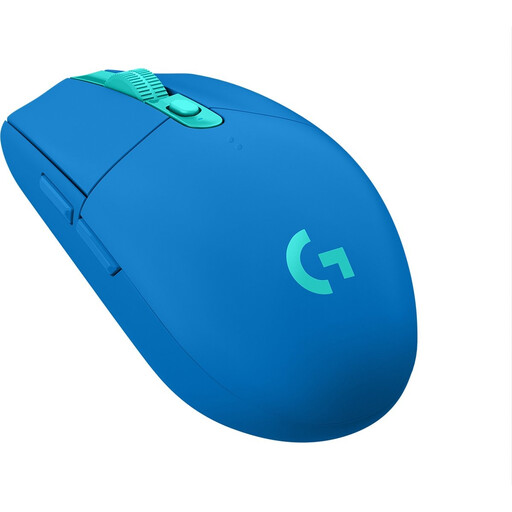
Logitech G305 LIGHTSPEED wireless gaming mouse, blue
A good fit if you want to play wirelessly without charging a mouse separately; bear in mind that you’ll need to replace the battery and use the USB receiver.
Logitech G lists one AA battery for the G305. The described set-up uses a USB receiver.
View at Joybuy
Frequently asked questions
Do I need an extra power socket for a wired gaming mouse?
No, the mouse uses your computer’s USB port and doesn’t need a separate mouse charger. Just check that the port is free and suitable.
Can I play without a USB receiver?
Yes, if both your computer and the exact mouse model support Bluetooth. According to Razer, the Orochi V2 has Bluetooth and 2.4GHz as separate modes; you’ll need the receiver for 2.4GHz.
How do I set up a mouse with Bluetooth and a receiver?
Follow the instructions for your model. The European Corsair guide for the KATAR PRO Wireless explains how to pair via Bluetooth or connect the receiver to a free USB port for 2.4GHz.
What should I do with flat batteries or a mouse I no longer need?
Milieu Centraal advises taking flat batteries to a collection point for separate recycling. You can take a small mouse you no longer need to a collection point for electrical appliances; if possible, remove any removable battery first.
What are my rights when buying online in the Netherlands?
According to ACM ConsuWijzer, online purchases generally come with a statutory cooling-off period of up to 14 days after delivery. The product must also meet what you could reasonably expect of it; if it develops a fault earlier, the seller is responsible for providing an appropriate solution. A manufacturer’s guarantee does not replace these statutory rights.


