
Map navigators
You often zoom and rotate a large map, so you want a scroll wheel and middle click that are easy to use. In Transport Fever 2, the default controls use the wheel to zoom and a held middle click to rotate or tilt the camera.


Start with a mouse whose scroll wheel, middle click and shape feel comfortable for navigating the map. Extra buttons and wireless connectivity only matter if you’ll actually use them. If you play at a glossy or transparent desk, also consider the surface the mouse will be moving across.
You often zoom and rotate a large map, so you want a scroll wheel and middle click that are easy to use. In Transport Fever 2, the default controls use the wheel to zoom and a held middle click to rotate or tilt the camera.
You spend a long time building or managing your game, and care more about shape, grip and button access than having the highest possible DPI specification.
You play in a bright room and want to check that the mouse tracks well on your desk surface. If it’s smooth or transparent, you could also try using a suitable mouse mat.
| What to consider | What should you check? | Who is this important for? |
|---|---|---|
| Scroll wheel and middle click | Test the middle click and compare a notched wheel with a free-spinning mode. In Transport Fever 2, you use the wheel to zoom and hold the middle click to control the camera. | If I navigate the map often, I want to zoom smoothly and control the camera easily. Around 31% of consumers prioritise map navigation. |
| Fit for long sessions | Compare the shape, weight, handedness and reach of the middle click and thumb buttons. Specifications alone don’t tell you whether a mouse will feel comfortable in your hand. | For long gaming sessions, I want a shape and button layout that suit my hand and grip. Around 25% of consumers give fit and button accessibility top priority. |
| Tracking on your gaming surface | Consider the surface you actually play on. Logitech warns that optical mice may not work well on many glossy or transparent surfaces; a higher maximum DPI doesn’t prove that tracking will be better on them. | If the mouse stutters on my desk, I want to know whether the surface is the cause. Around 19% of consumers prioritise tracking on their gaming surface. |
| Easy-to-reach shortcuts | Check whether you can assign the commands you want to mouse buttons, and whether those buttons are within easy reach. Extra buttons are only useful if you can distinguish them easily. | I want to control frequently used commands with the mouse, without choosing buttons I won’t use. Around 13% of consumers put assignable, accessible commands first. |
| Wired or wireless | Check which connection the exact model uses and whether it works with your computer. If it’s wireless, remember to consider power; a cable needs space on your desk. | If a cable gets in the way of my movement or desk setup, I want a suitable wireless connection. Around 12% of consumers prioritise playing without a cable. |
The amount of ambient light alone doesn’t determine whether the sensor tracks well. Logitech highlights limitations with many glossy and transparent surfaces; decorative lighting won’t change the surface of your desk.
First, test the mouse on a suitable non-glossy surface, then compare its features.
In Transport Fever 2, you use the wheel to zoom. A free-spinning mode can feel different from one with notched steps, especially when you want to adjust the zoom in smaller increments.
Try both the middle click and the wheel mode you prefer for zooming in and out.
The wired Razer Basilisk V3, wired Basilisk V3 35K and wireless Basilisk V3 Pro are different versions.
Compare the full model name and the specifications for that version before making your choice.
The wired G502 X is worth considering if you want to compare a switchable scroll wheel with an adjustable thumb button position.
The wired Basilisk V3 is an option to compare if you’re weighing up different wheel modes and programmable controls.
The Aerox 9 Wireless is worth considering if you specifically want a wireless mouse with lots of side buttons.
The Scimitar Elite Wireless is an alternative worth comparing if you want an adjustable thumb button grid and several connection modes.
Compare wired and wireless gaming mice with different controls and connection options here. Choose based on the features and connectivity of the specific version.
 No image available
Wired gaming mouse with 35,000 DPI and 11 buttons.
Bear in mind that the USB cable needs space on your desk.
 No image available
Wired, right-handed gaming mouse with 25,600 DPI.
Remember to allow space for the cable on your desk.
 No image available
Wireless gaming mouse with PAW3335 sensor, 16,000 DPI and eight programmable buttons.
 No image available
Wired version; allow space for the cable.
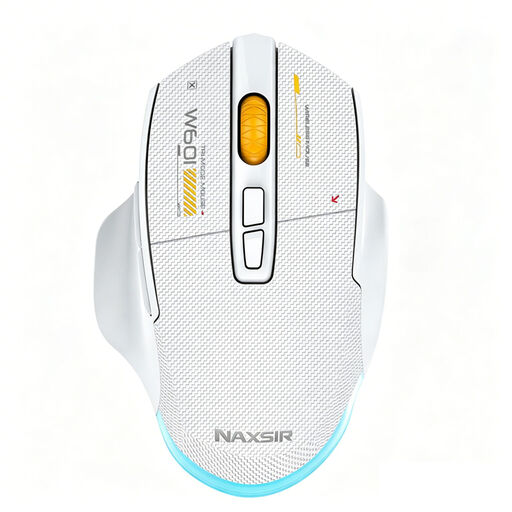 No image available
Supports wired, 2.4 GHz wireless and Bluetooth connections; the title lists 12,800 DPI and seven programmable macro keys.
Not just because of the ambient light. Logitech warns that optical mice may not work well on many transparent or glossy surfaces. If tracking stutters, try a suitable surface before looking to lighting as a solution.
With the default mouse settings, you use the wheel to zoom and hold the middle click to rotate and tilt the camera. You can change the mouse and keyboard settings, so check your own setup before assigning commands to extra mouse buttons.
According to the product information, the Logitech G502 X connects via USB Type-A. To customise the buttons or set up features, check separately which software and support your operating system requires; a USB connection doesn’t confirm that support.
First, check that the surface and sensor are clean, and that the scroll wheel and middle click work independently. Joybuy product information for the G502 X recommends using a suitable surface and keeping the sensor clean; this maintenance advice isn’t a proven fix for every fault.
For online purchases by consumers, a 14-day cooling-off period applies in many cases, subject to legal exceptions. According to the Dutch government, there is no fixed statutory guarantee period; you are entitled to a product that works as it should and can contact the seller if there is a fault. Any manufacturer’s guarantee is in addition to this.