What should you look for?
When building railways in Transport Fever 2, scrolling, middle-clicking and dragging are all part of the mouse controls, according to the Transport Fever 2 Wiki. So start with the scroll wheel and grip, then consider shortcuts and connectivity.
| What to consider |
What to look for |
Who will find this important? |
| Railway and camera controls |
Check that the scroll wheel and middle click feel comfortable to use, and that the scroll increments suit the way you play. |
If you often lay railway tracks and switch between the map and close-up details, you’ll want precise zoom and camera controls; around 28% of consumers give these controls top priority. |
| Buttons for your own shortcuts |
Check that the buttons are easy to reach and that the mouse software supports the assignments you want. |
For commands you use regularly, you’ll want to reach the buttons with your thumb without pressing them by accident; around 22% of consumers prioritise shortcuts. |
| Fit for longer sessions |
Consider the grip, button position and thumb reach in relation to your hand. |
For longer gaming sessions, you’ll want a shape that suits your hand; around 22% of consumers prioritise fit. |
| Connectivity alongside a headset |
Check the connections, connection mode and power supply. Don’t assume the devices share a receiver unless this is explicitly supported. |
If a cable gets in the way of your setup, you’ll want a wireless connection that works with your PC and headset; around 17% of consumers prioritise a cable-free setup. |
| Basic controls or extra features |
Compare the buttons and software you need with the extra features you actually want to use. |
If you mainly use basic commands, you won’t want to choose features you won’t use; around 11% of consumers prioritise simple controls. |
Joybuy products
These mice offer wired and wireless options for railway building, camera control and customising buttons.
 No image available
HyperX Pulsefire Saga wired gaming mouse
A wired option if you want to customise the grip and button assignments.
The product description lists sixteen combinations of interchangeable grip components and customisable button assignments via HyperX NGENUITY.
Joybuy
 No image available
Logitech G G502 X
A wired choice if you want a scroll wheel and extra programmable controls.
The product information lists USB Type-A, thirteen programmable controls and a scroll wheel with switchable resistance. The stated weight is 89 g.
Joybuy
 No image available
RAPOO VT9Pro 4K wireless gaming mouse
A wireless option if you want programmable buttons and would rather avoid a mouse cable.
The product information lists ten programmable buttons and macro support. At 4K polling, the description notes higher CPU usage and says you can switch back to 1000 Hz if you experience frame drops.
Joybuy
 No image available
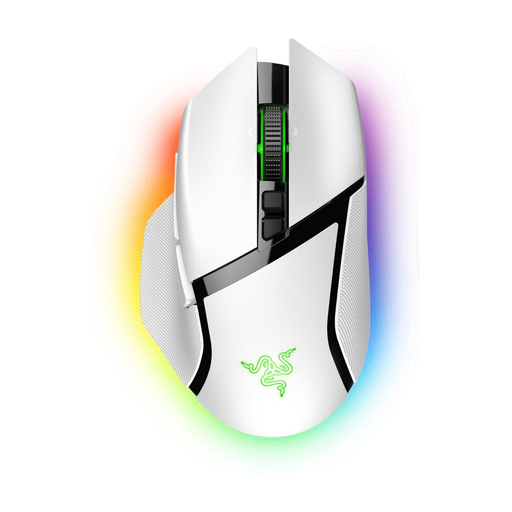
Razer Basilisk V3 Pro White
A wireless option if you want a tactile scroll wheel and extra programmable controls.
The product information lists eleven programmable buttons and wireless connectivity via HyperSpeed or Bluetooth.
Joybuy
 No image available
Razer Viper V3 Pro Black
A wireless option if you want a right-handed shape and customisable buttons.
The product description lists a scroll wheel, eight configurable buttons and a weight of 54 g.
Joybuy
Frequently asked questions
Can I control the camera in Transport Fever 2 with my mouse?
Yes. The official Transport Fever 2 Wiki describes dragging with the right mouse button, rotating or tilting by holding down the mouse wheel, and zooming with the scroll wheel. You can adjust the mouse and keyboard settings; also check which buttons you can assign in your mouse software.
Will a wireless headset affect my choice of mouse?
Not necessarily. If you also use a wireless mouse and notice stuttering, check the position of the receiver and other wireless devices. Logitech lists nearby 2.4GHz devices as a possible cause of inconsistent tracking with wireless gaming mice. Don’t assume the devices share a receiver unless the product information confirms this.
How can I keep my setup comfortable during longer gaming sessions?
Choose a grip that suits your hand, and vary your posture and activity. The Dutch Arboportaal recommends taking short breaks regularly and adjusting your workstation to suit the user, among other things; this doesn’t prove that a particular mouse model prevents aches and pains.
What are my rights when buying a mouse online?
According to the Dutch Government, when you buy at a distance, you’ll usually have 14 days to change your mind. You’re also entitled to a product that works properly; in the Netherlands, there’s no fixed statutory guarantee period of exactly two years. If there’s a fault, contact the retailer to arrange a solution.
What should I check for product safety when buying a mouse?
Check the product information for the applicable conformity details. According to Your Europe, CE marking is only required for products covered by harmonised EU rules that include this requirement; wireless equipment is also subject to the European framework for radio equipment.


