Start with a mouse that has an easy-to-reach button you can assign to push-to-talk or ping, then test the setting in the game or desktop chat app you use. Next, check whether you can adjust the lighting, whether the shape suits your hand, and whether you’d prefer a cable or wireless receiver. Extra buttons and RGB lighting aren’t useful for everyone.
Who is this mouse suitable for?
Players practising push-to-talk
If you want to speak or ping quickly while playing without taking your hand off the mouse, look for an easy-to-reach button and check that the game or chat app you use supports the assignment. Razer and SteelSeries describe programmable buttons for actions like these.
Players who want to control the lighting
If you practise in a dark room, check whether you can adjust the lighting on the model you’re considering. Razer and SteelSeries Support describe customisation options for supported devices.
Players practising for long sessions
If you use commands repeatedly, choose a mouse shape and button layout that suit your hand and grip. The button layouts described by Razer and SteelSeries make it worth checking for yourself how easy the buttons are to reach.
What should you look for when choosing?
First, decide which actions you want to control with the mouse and whether the game or chat app recognises that input. Then compare button accessibility, lighting settings, fit and the choice between a cable and wireless power.
| What to consider |
What to look for |
Who is this important for? |
| Easy-to-reach talk and ping button |
Check the button position and software assignment, and whether the game or desktop chat app recognises the input you’ve chosen. |
If I want to speak or ping without changing my grip, I’ll look for a button I can easily reach while playing. Around 36% of consumers prioritise talk and ping controls. |
| Adjustable lighting |
Check whether you can adjust the lighting on the exact model, then try your chosen setting in the room where you play. |
In a dark room, I want to decide for myself how brightly the mouse lights up, without mistaking lighting for better communication controls. Around 29% of consumers give lighting control top priority. |
| Grip and button accessibility |
Compare the shape of the model and try pressing the button you need without changing your grip. |
For longer sessions, I want to use commands without the shape or button position becoming uncomfortable. Around 21% of consumers prioritise fit and button accessibility. |
| Connection and power |
Check which connection modes are supported, which USB port is required and what power the mouse needs during a long session. |
If I want to move around without a cable, or prefer a wired connection, I’ll weigh that up against battery use or charging. Around 14% of consumers choose mainly based on connection and power. |
Common buying mistakes
-
Assuming more buttons automatically mean better team communication
A button will only work for your talk or ping action if the game or chat app supports the assignment and you can use it with your grip.
Decide in advance which actions you want to assign to separate buttons. Test the assignment while moving and check that you can use the button without pressing it by accident.
-
Confusing RGB lighting with a mouse that’s better suited to a dark room
Adjustable lighting alone says nothing about how easy it is to reach the talk and ping buttons.
Check the lighting settings for the exact model, and assess the button position and grip separately.
-
Choosing wireless without checking the power requirements and connection mode
A wireless mouse requires you to consider the battery, charging or receiver. For the M75 Wireless, Corsair recommends a wired or 2.4 GHz connection for gaming; this advice applies to this model.
Check which battery type, connection and connection mode you’ll need for your sessions. If the model uses an AA battery, remember that you’ll need to replace it.
Brands to consider
Razer
The wired Basilisk V3 is worth considering if you want to assign talk and ping actions to separate buttons.
- Razer lists 10+1 programmable buttons and gives push-to-talk and pinging as possible uses.
- The lighting and right-handed shape are separate considerations: check whether the lighting settings and grip suit your room and hand.
SteelSeries
The wired Rival 5 is worth a look if you want to compare several thumb commands.
- SteelSeries lists nine programmable buttons, five of which are on the side. SteelSeries Support describes adjustable lighting for supported devices.
- The layout doesn’t guarantee that you’ll be able to distinguish the buttons easily with your grip, so check their accessibility for yourself.
Logitech G
The wireless G305 is a good fit if you’d rather use a receiver and replaceable AA battery than a cable.
- Logitech G states that it lasts for 250 hours on a single AA battery. This is a manufacturer’s figure, not a guarantee for every setting or user.
- Check whether the available buttons suit the commands you want to assign.
Corsair
The M75 Wireless is a model to consider if you’re weighing up wired use against using a wireless receiver.
- The Corsair manual describes wired use and connection via a 2.4 GHz receiver; Corsair recommends wired or 2.4 GHz for gaming.
- This is the manufacturer’s advice for this model, not an independent comparison. Also check whether the interchangeable side buttons suit the layout you want.
Gaming mice at Joybuy
This Joybuy selection includes wired and wireless gaming mice with programmable buttons or adjustable lighting, for players who want to practise team commands.
 Image unavailable
HyperX Pulsefire Saga
A wired option if you want to assign game commands to several buttons.
The product name lists 26,000 DPI and RGB lighting. The description mentions six programmable buttons, adjustable RGB lighting via HyperX NGENUITY, a flexible cable and interchangeable parts for different grip combinations.
View at Joybuy
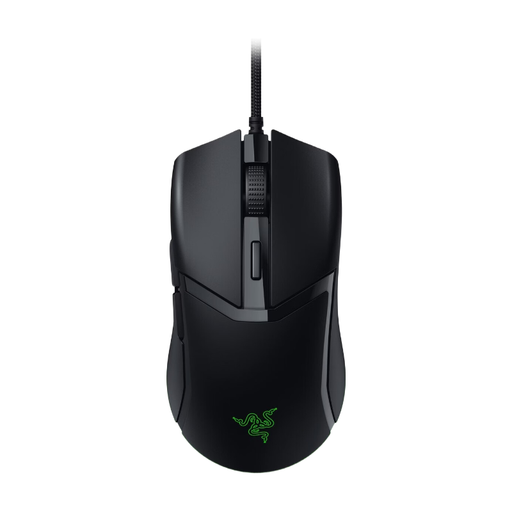 Image unavailable
Razer Cobra Wired Gaming Mouse (Black)
A wired option if you want to use programmable buttons and adjustable lighting for game commands.
The description mentions six buttons, customisable Chroma RGB lighting via Synapse, a symmetrical shape and a Speedflex cable.
View at Joybuy
 Image unavailable
Razer Basilisk V3 X HyperSpeed
A wireless option if you want to use a receiver and assign commands to programmable buttons.
The description mentions HyperSpeed and Bluetooth, a USB dongle and customisable Chroma RGB lighting via Synapse. The mouse runs on an AA battery, so bear in mind that it will need replacing.
View at Joybuy
 Image unavailable
Razer Basilisk V3 Pro 35K (Black)
A wireless option if you want to use several buttons for separate talk or ping actions.
The description lists eleven programmable buttons, a Focus Pro 35K sensor, several connection modes and adjustable RGB lighting.
View at Joybuy
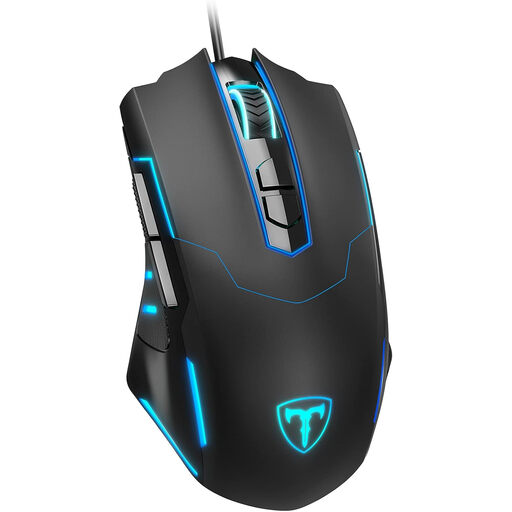 Image unavailable
ET wired gaming mouse, 7,200 DPI
A wired option if you want to configure several buttons and switch off the lighting in a dark room.
The description mentions seven programmable buttons, adjustable DPI and polling rate, switchable RGB lighting, an ergonomic contour and a rubberised surface.
View at Joybuy
Frequently asked questions
How do you set a mouse button for push-to-talk?
Choose a push-to-talk key in your game or desktop chat app, then assign a mouse button to it if your mouse and software support this. Next, test whether you can hold the button down while moving. Discord Support describes hotkeys for the desktop app; this feature isn’t available in the mobile or browser client. Corsair describes assigning mouse buttons as an option in iCUE.
Can you adjust a gaming mouse’s lighting?
It depends on the model. SteelSeries Support describes a lighting tab for devices that support RGB. Check the settings for your specific mouse and see how they look in the room where you play.
Which connection can you use with the Corsair M75 Wireless while gaming?
The Corsair manual lists wired use, a 2.4 GHz receiver and Bluetooth. For this model, Corsair recommends a wired or 2.4 GHz connection for gaming. This is the manufacturer’s advice for the M75 Wireless, not a general comparison of gaming mice.
What rights do you have when buying online in the Netherlands?
For an eligible distance purchase, you’ll usually have a 14-day cooling-off period, according to the Dutch government. You’re also entitled to a product that works properly; if there’s a problem, the seller must provide a solution. Check the information about the cooling-off period and any additional guarantee for your purchase.


