What should you look for?
First decide which controls and lighting you want, then compare the shape, connection and power supply of the exact model.
| What to consider |
What should you check? |
Who is this important for? |
| Adjustable lighting |
Check whether you can adjust the colour and effects on the exact model, and whether the required software works on your system. |
I want to decide how noticeable the lighting is in a dark room, without it distracting me. This is the top priority for around 27% of consumers. |
| Accessible game commands |
Compare the position of the buttons and check whether your game lets you assign the actions you want. |
If I want to use an action of my choice quickly during a fight, the buttons need to be easy to reach. This is the top priority for around 27% of consumers. |
| Shape and feel in use |
Compare the dimensions and weight; check how easy the buttons are to reach with your usual grip. |
I want a mouse that suits my hand and grip, especially during longer sessions. Fit is the top priority for around 20% of consumers. |
| Connection while playing |
Check whether the mouse is wired or wireless, and whether a cable can move freely on your desk. |
If a cable gets in the way of my movements, I want to play wirelessly; with a cable, I need enough room to move. Being able to keep playing without cable interference or unexpected power interruptions is the top priority for around 13% of consumers. |
| Battery or charging |
Check the battery type or charging method, and which accessories you need for your connection. |
I want to know in advance whether I need to replace a battery or charge the mouse, so managing it suits the way I use it. This is the top priority for around 13% of consumers. |
Gaming mice at Joybuy
This selection focuses on gaming mice with extra buttons for game commands and lighting controls. Both wired and wireless versions are available; check the features and limitations of each model.
 Image unavailable
Razer Basilisk V3 35K wired gaming mouse
Suited to players who want to control extra game commands and adjustable lighting without having to manage a mouse battery.
Wired; 11 buttons; 11 RGB zones; 35.000 DPI; stated weight 101 g.
Bear the cable in mind and make sure you have enough room to move.
View at Joybuy
 Image unavailable
Shark Velocity M71 wireless gaming mouse
An option to compare if you want to play wirelessly and have the option to programme extra buttons.
Rechargeable battery; eight programmable buttons; RGB lighting; 2.4 GHz wireless and USB.
Stated battery life is up to 50 hours; bear your chosen settings in mind.
View at Joybuy
 Image unavailable
Shark Gaming Velocity M70 wired gaming mouse
Suited to players who want to combine programmable buttons and adjustable lighting with a wired connection.
Seven programmable buttons; adjustable RGB lighting; PMW3360 sensor; up to 12.000 DPI.
Bear the cable in mind and check that it can move freely on your desk.
View at Joybuy
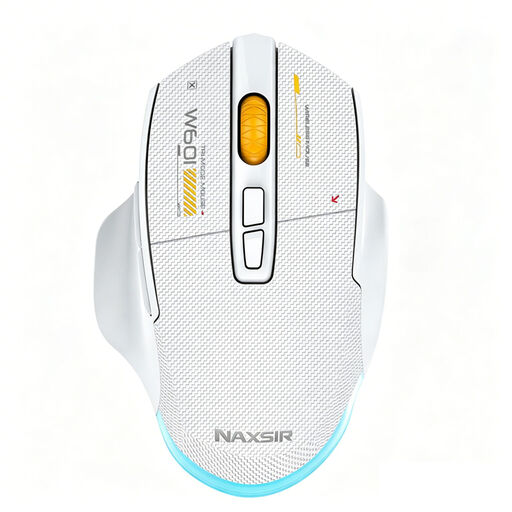 Image unavailable
NAXSIR 3-in-1 gaming mouse, white
An option to compare if you want multiple connection options and programmable macro buttons.
Wired, 2.4G wireless or Bluetooth; seven programmable macro buttons; RGB lighting with adjustable brightness and an option to switch it off.
500 mAh battery; charges via USB-C. Check which connection is right for your device.
View at Joybuy
 Image unavailable
AJAZZ AJ159 PRO wireless gaming mouse, white
Suited to players looking to compare a wireless mouse with programmable buttons and several connection options.
2.4 GHz, Bluetooth and USB-C; 400 mAh rechargeable battery; 26K DPI; stated weight 56 g; designed for small to medium-sized hands.
The product description warns that magnets in the charging base may affect medical implants and advises keeping it at least 15 cm away from pacemakers.
View at Joybuy
Frequently asked questions
Do you need RGB lighting for survival games in the dark?
No, not as a personal buying requirement. Logitech G describes adjustable lighting for the G203, and Razer does the same for the Basilisk V3; these specifications do not demonstrate a performance benefit in a dark room.
How can you tell whether extra mouse buttons will work in your game?
Check whether the game lets you assign the action you want, and whether you can reach the button with your usual grip. Features and setup steps may vary by model, software and game.
What should you look for in a wireless gaming mouse?
Check the connection and power supply for the exact version. A mouse that uses an AA battery needs different management from one with a rechargeable battery; battery life may also depend on your settings.
Where can you check a wireless mouse's compliance?
Check the EU compliance information and CE marking for the exact model. The European Commission explains the rules for radio equipment made available on the EU market; the Dutch government lists CE marking for electronic devices. General product rules do not automatically confirm that a specific listing is compliant.
Is the manufacturer's warranty your only right if the mouse breaks too soon?
No. ACM ConsuWijzer explains that, in the Netherlands, you have a statutory guarantee in addition to any seller's warranty if a product does not perform as you could reasonably expect under normal use. There is no single fixed statutory guarantee period that applies to every gaming mouse.


