Choose a button layout that lets you reliably access your in-game actions; a thumb grid is especially useful if you use lots of separate actions. Then consider whether the buttons suit your hand and grip, and weigh up a cable against the freedom of movement and battery management of a wireless mouse.
Who is this guide for?
Support player with lots of abilities
You’re practising a role with lots of separate actions and want to see whether a thumb grid is easier to use than a few side buttons. Razer, SteelSeries and Corsair describe different button counts and layouts for their models.
Player who spends a long time at their desk
You switch between gaming and other desk-based tasks, and want to assess the shape, grip and button reach for your own hand, rather than focusing only on the number of buttons.
Someone who works from home and games too
You’re weighing up freedom of movement, connectivity and battery management against a wired connection. According to Razer, the Naga V2 HyperSpeed has two wireless modes; the Logitech G502 X is a wired model.
What should you look for?
Start with the actions you actually want to assign, then check whether the buttons suit your hand and desk setup.
| What to consider |
What should you check? |
Who is this important for? |
| In-game buttons within reach |
Compare the number and position of the side buttons, and see whether you can reach them with your usual grip. |
If I want to control several abilities or communication actions, I look for buttons I can reach without getting confused. Around 36% of consumers say easily accessible in-game buttons are their top priority. |
| Shape and hand position |
Consider the shape, weight and button positions, and assess them using your own hand and grip. |
For longer sessions, I want the mouse to feel comfortable in my hand and the buttons to remain easy to reach. For around 29% of consumers, hand comfort comes first. |
| Connectivity for work and gaming |
Check which connections the exact model offers and whether they suit your computer and desk setup. |
If I switch between work and gaming, I weigh up freedom of movement against the available connections. Around 21% of consumers prioritise flexible use in their home workspace. |
| No battery management |
Check whether a cable suits your desk and whether you can connect the mouse where you want it. |
At a fixed desk, I don’t want to have to charge or replace a battery. For around 14% of consumers, the simplicity of a wired mouse is their first choice. |
Which buying mistakes can you avoid?
-
Choosing based only on the number of buttons
A higher number of programmable buttons doesn’t mean they’ll be easy to use with your grip. An awkward layout can actually make practising harder.
Make a note of the in-game actions you really use, then assess the position of the corresponding buttons with your own hand.
-
Confusing similarly named variants
Joybuy product listings for the Razer Basilisk V3 Pro mention different sensor specifications, including 35K and 30K. So don’t assume that versions with almost identical names are the same.
Before buying, check the full model name and the specifications of the version you’ve chosen.
-
Choosing wireless based on a single maximum battery life figure
Razer gives different maximum usage times for each wireless mode of the Naga V2 HyperSpeed. The stated duration isn’t a guarantee of how long it will last in your situation.
Check which connection mode you’ll use and how to replace or recharge the battery.
Which brands are worth considering?
Razer
The Naga V2 HyperSpeed is a wireless option with lots of programmable controls; the Basilisk V3 has a different layout, with less emphasis on a thumb grid.
- Razer lists 21 programmable controls and two wireless modes for the Naga V2 HyperSpeed.
- More buttons don’t automatically make a mouse easier to use; check their reach with your own grip. The stated usage time is the manufacturer’s estimate.
SteelSeries
The wired Rival 5 has a layout with fewer programmable buttons, making it a good option if you want a few actions close to hand.
- SteelSeries lists nine programmable buttons and a quick-action switch for the Rival 5.
- Check for yourself whether the switch is easy to reach with your grip.
Logitech G
The wired G502 X is an option for a fixed desk setup if you’d rather not manage a battery.
- Logitech lists an adjustable DPI shift button, a two-mode scroll wheel and a weight of 89 g for the G502 X.
- The cable and shape need to suit your desk and hand; these features don’t necessarily apply to other G502 versions.
Corsair
The wired Scimitar RGB Elite is worth considering if you want to compare mice with lots of individual thumb buttons.
- Corsair lists 17 programmable buttons, 12 of which are on a repositionable side panel.
- The stated weight is 122 g without the cable and accessories. Assess the weight and dense button layout with your own grip.
HyperX
The Pulsefire Raid has a different side-button and scroll control layout to compare.
- The official HyperX manual lists separate side buttons and a tilting scroll wheel.
- According to the manual, programmable functions require HyperX NGENUITY; check that the software is compatible with your system.
Joybuy product picks
These product picks focus on wireless gaming and use in a home workspace. Check the button layout, connections and power supply for each version to make sure they suit the way you play.
 No image available
AJAZZ AJ200 AI MC wireless gaming mouse with charging dock
An option if you’re looking for a wireless mouse with different connectivity options for gaming and desk use.
The product name lists a PAW3311 sensor, 24,000 DPI, three connection modes (BT/2.4G/USB-C), a weight of 63 g and a charging dock.
View at Joybuy
 No image available
AULA SC620 wireless gaming mouse, white
The product name mentions programmable buttons and several connection modes; compare the layout with the actions you want to control.
The product name lists BT5.0/2.4G/USB-C, a PixArt PAW3311 sensor, 12,000 DPI, 8KHz, seven programmable buttons, a weight of 67 g and a 400 mAh battery.
View at Joybuy
 No image available
Logitech G G309 LIGHTSPEED wireless gaming mouse
A wireless option to compare if freedom of movement at your desk matters to you.
The product information mentions battery power and an included AA battery; bear this in mind when choosing and using the mouse.
View at Joybuy
 No image available
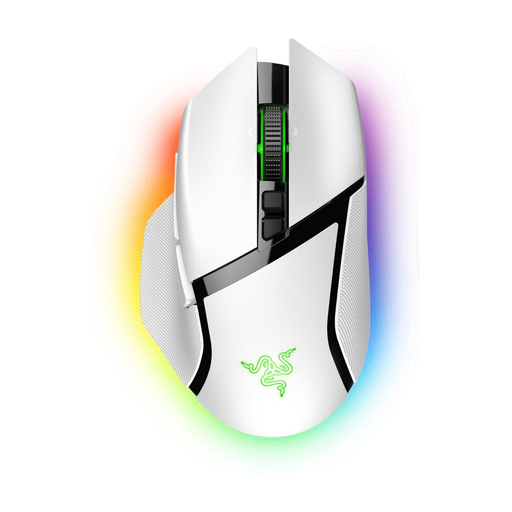
Razer Basilisk V3 Pro White
A version to compare if you’re looking for a wireless mouse for gaming and desk use. Check the button layout and connectivity options of this specific variant.
View at Joybuy
 No image available
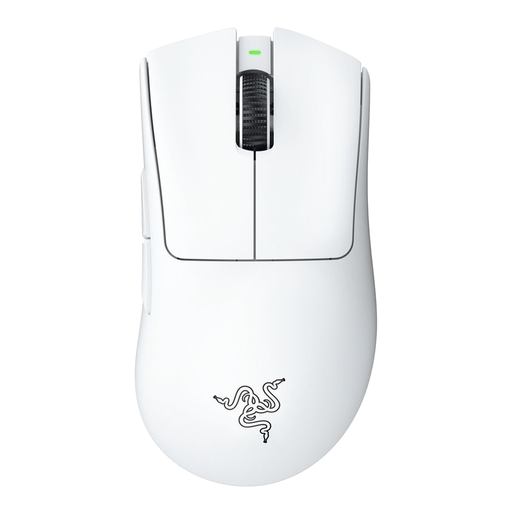
Razer DeathAdder V3 Pro White
A wireless option to consider alongside mice with a thumb grid. Check whether the button layout suits the in-game actions you want to practise.
View at Joybuy
Frequently asked questions
How should I start setting up buttons for a support role?
First, make a note of the actions you use frequently in your game, and assign them only to buttons you can reach reliably with your grip. Before buying, check whether the functions you want to set up require software; according to the official HyperX manual, programmable functions on the Pulsefire Raid require HyperX NGENUITY.
Does a higher maximum DPI automatically make a mouse better for practice?
No. A higher maximum DPI on its own doesn’t determine whether a mouse is right for your game. Check whether you can choose a sensitivity setting that suits the way you play, and also consider the shape and button layout.
What should I check when buying a wireless mouse?
Check the connection mode and how the mouse is powered. Razer lists different maximum usage times for Bluetooth and 2.4 GHz on the Naga V2 HyperSpeed; these manufacturer figures don’t guarantee the same usage time in your situation.
If I buy a gaming mouse online from a business in the Netherlands, do I have a cooling-off period?
For distance purchases, a 14-day cooling-off period applies in many cases, according to the Dutch government. Check the seller’s information for your order; the Dutch government explains that an online purchase from a private individual doesn’t count as a distance purchase.
Does a manufacturer’s warranty replace my statutory rights?
No. According to the Dutch government, when you buy a product you’re entitled to one that works properly under the statutory warranty. Any manufacturer’s or seller’s warranty is a separate guarantee.


