
Players with limited connections
You don’t want to use an extra power socket during long strategy sessions. You’re weighing up a spare USB port, Bluetooth, and whether you’d rather recharge the mouse or replace its batteries.


Start by checking which connections your computer still has available and how you want to power the mouse. A wired mouse uses a USB port, while Bluetooth can save you a USB receiver if your computer supports it. Then decide how many commands you actually want to control with mouse buttons. A larger thumb panel gives you more options to assign, but the layout still needs to feel comfortable in your hand.
You don’t want to use an extra power socket during long strategy sessions. You’re weighing up a spare USB port, Bluetooth, and whether you’d rather recharge the mouse or replace its batteries.
You want frequently used commands under your thumb, so you’re comparing a simple button layout with a mouse that has more programmable buttons.
You’re mainly looking for a shape and button layout that suit your hand and grip. Specifications alone can’t tell you whether a mouse will feel comfortable.
A good fit if: you have a spare USB port and don’t want to recharge or replace batteries.
Trade-off: the cable uses a USB port and may limit your movement; you won’t need a separate power socket for the mouse.
A good fit if: your computer supports Bluetooth and you want to avoid using a USB receiver. Trust lists Bluetooth alongside a 2.4GHz connection for the Ybar; Razer and Corsair list both connection types for the models mentioned.
Trade-off: check how each model is powered, and bear in mind that you may need to recharge it or replace its batteries.
A good fit if: you don’t want a mouse cable across your desk and have a spare USB port for the receiver.
Trade-off: the receiver takes up a USB port. A model that runs on AA batteries will need replacements, while a rechargeable mouse needs a way to charge it.
| What to consider | What to look for | Who is this important for? |
|---|---|---|
| Connection and power | Count power sockets and USB ports separately. Check for Bluetooth, the type of receiver, and whether the mouse uses batteries or a charging cable. | I want a connection that works with the ports still free on my desk, without needing an extra power socket. Around 36% of consumers put connection and power supply first. |
| Buttons for commands | Make a list of the commands you want to assign, then check the number and placement of the buttons and whether you need specific software. | If I use the same commands often while playing, I want them within easy reach without choosing an overly cluttered layout. Around 29% of consumers prioritise programmable buttons. |
| Comfort during long sessions | Compare the shape and dimensions of the exact version; also check whether the thumb buttons are adjustable. | I want to hold the mouse comfortably during a long session and reach the buttons easily. Around 21% of consumers put personal fit first. |
| What you’ll need and aftercare | Check how the mouse is powered, which accessories are included and who to contact if something goes wrong. | I want to know in advance whether I’ll need to replace batteries or recharge the mouse, and where to report a problem. Around 14% of consumers prioritise ongoing requirements and aftercare. |
A wired mouse or USB receiver uses a computer port, not a separate power socket. Bluetooth can save you the receiver if your computer supports it.
Before choosing a connection type, check how many USB ports you have free and whether your computer supports Bluetooth.
The models reviewed range from a classic 6-button layout to mice with lots of programmable buttons. How useful they are depends on which commands you want to assign and how easily you can use the buttons.
First decide which commands you want on the mouse, then compare the number and placement of its buttons.
Wired and wireless versions can differ in their connection and power requirements. The charging options listed may also vary from one product page to another.
Compare the full model name, connection, power source and included accessories for the version you’re buying.
The models reviewed show the differences between a wired mouse with a classic button layout and the wired G502 X with an adjustable thumb button, according to Logitech G’s official model specifications.
The Naga V2 HyperSpeed and Viper V3 HyperSpeed differ in their button layout and power source. Razer describes the Naga V2 HyperSpeed as having plenty of programmable buttons, with Bluetooth as well as 2.4GHz connectivity.
The GXT 931 Ybar and GXT 929 Helox are different wireless models. Trust lists Bluetooth and a 2.4GHz receiver for the Ybar; the Helox product description mentions USB-C charging.
Corsair describes the Scimitar Elite Wireless as a model with 16 programmable buttons, a sliding side panel, Bluetooth and 2.4GHz wireless connectivity.
SteelSeries positions the Aerox 9 Wireless for MMO and MOBA gaming. Its layout may be worth comparing if you want to assign lots of strategy commands yourself.
This Joybuy selection focuses on gaming mice that offer Bluetooth connectivity. Depending on the model, wired USB or 2.4GHz connections and different button layouts may also be available. Check the exact version and power source.
 Image unavailable
An option if you want to use Bluetooth or prefer to choose between several connection types.
Wired, 2.4 GHz and Bluetooth; 7 programmable macro keys; 12,800 DPI.
 Image unavailable
An option if you want Bluetooth and a charging dock would suit your set-up.
Bluetooth, 2.4 GHz and USB-C; 400 mAh battery; 56 g; PAW3395 sensor and 26K DPI.
According to the product warning, keep the magnetic charging dock at least 15 cm away from pacemakers and other medical implants, and away from payment cards and identity cards.
 Image unavailable
An option if you want Bluetooth and the ability to customise commands on the mouse.
Bluetooth, 2.4 GHz and USB-C; charging dock; PAW3311 sensor and 24,000 DPI. The product description mentions software for reassigning buttons and setting up macros.
 Image unavailable
An option if you want to combine Bluetooth with programmable buttons.
Bluetooth 5.0, 2.4 GHz and USB-C; 7 programmable buttons; 400 mAh battery; 67 g.
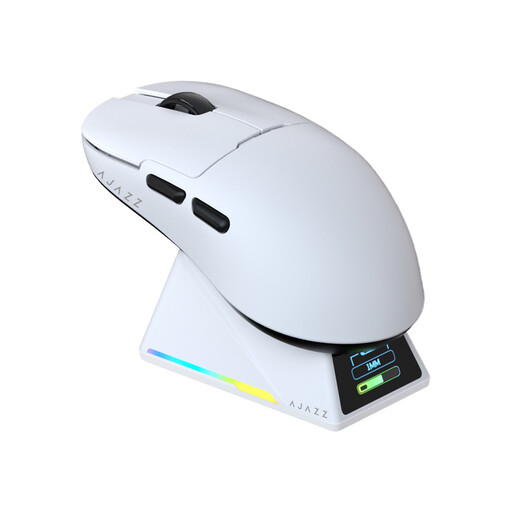 Image unavailable
An option if you want Bluetooth, customisable buttons and a symmetrical shape.
Bluetooth, 2.4 GHz and wired USB-C; magnetic charging dock; PAW3950 sensor and 42,000 DPI. The product description mentions software for reassigning buttons and setting up macros.
No. The wired models reviewed connect to your computer and don’t need a separate power socket. You will need a suitable USB port free, though; a wireless USB receiver also uses a computer port.
First choose which commands you want to assign, then check the software instructions for the exact model. Logitech describes G HUB for device profiles, while Corsair names iCUE for the Scimitar Elite Wireless reviewed here. Check which features are available without the software installed.
Take flat batteries to a suitable collection point; according to the Dutch government, they shouldn’t go in the rubbish bin. An old mouse can be handed in as electrical equipment, for example at the shop or online retailer where you buy a similar new device, or at a municipal recycling centre.
If a product develops a fault, the Dutch government says you should contact the seller. There’s no fixed duration for the statutory guarantee in the Netherlands: what you could reasonably expect from the product also matters.
A wireless mouse that uses radio waves falls within the scope of EU rules for radio equipment. For products that must carry CE marking under EU rules, the manufacturer uses it to declare that the product meets the applicable requirements; it isn’t an independent performance test. Check the product and conformity information for the specific version.