What should you look for?
First assess the sensitivity and grip. Then decide how many commands you really want to assign to mouse buttons, and choose the connection that suits your setup.
| What to consider |
What to look for |
Who is this important to? |
| Cursor control |
Check whether you can adjust the sensitivity, then try both quick map movements and precise selections with your screen and game settings. |
If I want to navigate the map quickly and select small units accurately, I want to be able to tailor cursor movement to both tasks. Around 33% of consumers put cursor control first. |
| Hotkeys |
Count the commands you actually want to assign, then check game support, mouse software and how easy the buttons are to reach. |
If you prefer to use the mouse for recurring commands, it helps to have buttons that the game can assign and that are easy for your thumb to find. Around 25% of consumers prioritise easy-to-reach hotkeys. |
| Grip and comfort |
Compare hand orientation, shape, weight and button position; try the grip for yourself if possible. |
During long sessions, I want to hold and use the mouse without its shape or buttons getting in the way of my grip. Around 25% of consumers focus on grip and comfort. |
| Connection and maintenance |
Check the connection for the exact version and, for wireless models, the power requirements, receiver and any software needed. |
If I want to avoid cables on my desk, or would rather not manage batteries, the connection needs to suit my setup. Around 17% of consumers prioritise connectivity and maintenance. |
Gaming mice at Joybuy
This selection includes wired and wireless gaming mice with adjustable sensitivity and, depending on the model, programmable buttons.
 No image available
Shark Velocity M71 Wireless Gaming Mouse
A wireless option if you’re looking for adjustable cursor sensitivity and programmable buttons.
2.4 GHz and wired USB connection; 16,000 DPI; 8 programmable buttons.
The built-in battery needs recharging; the product description states up to 50 hours of use per full charge.
View at Joybuy
 No image available
AJAZZ AJ159 PRO Wireless Gaming Mouse
A wireless option with adjustable DPI and programmable macro buttons for anyone who wants to assign multiple commands to their mouse.
26K DPI; 7 programmable macro buttons; 2.4G, USB-C and Bluetooth; 400 mAh battery; 56 g design.
The description warns that the magnets in the charging base should be kept away from pacemakers, medical implants, and payment or ID cards.
View at Joybuy
 No image available
HyperX Pulsefire Haste 2 Wired Gaming Mouse
A wired option if you’re looking for adjustable sensitivity and a handful of programmable buttons.
HyperX 26K sensor; 6 programmable buttons; 53 g; symmetrical shape.
This is the wired version.
View at Joybuy
 No image available
Logitech G G502 X
A wired option if you want extra programmable buttons and a switchable scroll wheel.
25,600 DPI; 13 programmable buttons; USB Type-A connection; right-handed design.
Logitech describes the G502 X as having a scroll wheel with both free-spinning and notched modes. The mouse is wired.
View at Joybuy
 No image available
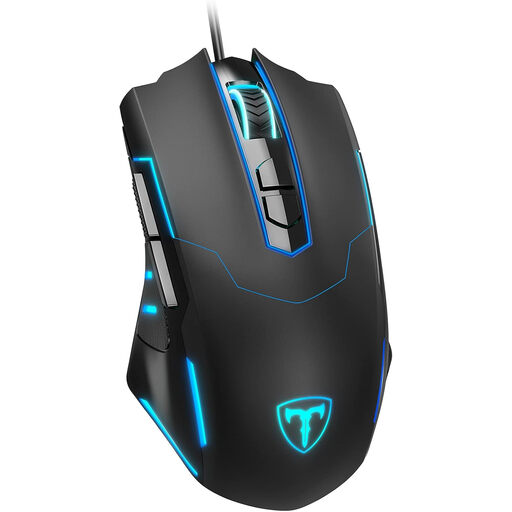
ET Wired Gaming Mouse
A wired option if you’re looking for adjustable DPI and a selection of programmable buttons.
Up to 7,200 DPI; 7 programmable buttons.
According to the product description, software is needed to set up the buttons for the first time.
View at Joybuy
Frequently asked questions
Do I automatically need a mouse with an extremely high DPI for a large screen?
No. A large screen does not automatically require an extremely high DPI. DPI affects how far the cursor moves with the same hand movement; adjust the sensitivity to suit your screen settings and the size of the items you’re selecting.
Can I assign game commands to all the extra mouse buttons?
That depends on the game and the mouse software. Age of Empires Support describes a fully remappable hotkey layout for Age of Empires IV and warns that conflicting assignments can make a command unusable. Don’t assume other games offer the same options.
What should I check about the connection and maintenance?
Check the connection and any required software for the exact version. According to the Dutch product description, the wired Logitech G502 X connects via USB Type-A. For a wireless mouse, you should also check the power requirements and the connection needed.
Do you lose your right to help if the manufacturer’s warranty expires?
No. According to ACM ConsuWijzer, statutory rights in the Netherlands apply alongside a seller’s or manufacturer’s warranty. The seller remains your point of contact if the product is faulty; there is no single fixed statutory warranty period that automatically applies to a mouse.
What rules apply to a wireless mouse?
Wireless versions placed on the market in the Netherlands as radio equipment must meet the applicable requirements. The Dutch Authority for Digital Infrastructure states that the manufacturer applies the CE marking when the radio equipment meets all the requirements; this does not confirm that a specific item has been checked individually.


